

SpringBoot中spring.profiles.active配置实现多环境区分
更新时间:2025年07月23日 09:23:43 作者:L-960
本文介绍了在SpringBoot项目中通过命名约定、启动参数和@Profile注解实现不同环境配置文件的切换,以及如何根据环境动态执行代码,具有一定的参加的参考价值,感兴趣的可以了解一下
spring boot允许通过命名约定按照一定的格式application-{profile}.properties来定义多个配置文件,然后通过在application.properties的spring.profiles.active来具体激活一个或者多个配置文件,如果没有没有指定任何profile的配置文件的话,spring boot默认会启动application-default.properties。
在项目开发中有多个配置文件
application-dev.yml //开发环境
application-test.yml //测试环境
application-pro.yml //生产环境
1、只需要在源配置文件application.yaml上面增加下面的一个配置,就代表指定使用哪一个配置文件:
spring:
  profiles:
    active: dev #当前使用application-dev.yml配置
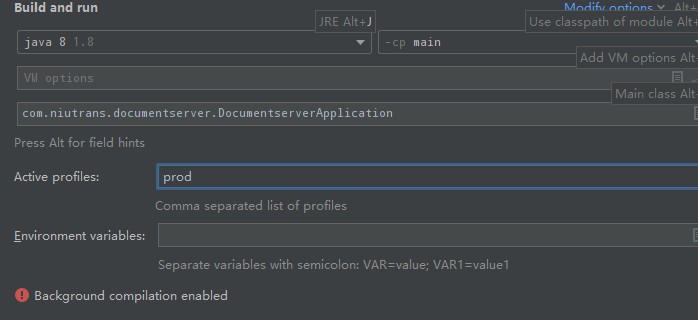
2、也可以在java启动参数中指定,动态选择运行环境
执行java -jar xxx.jar --spring.profiles.active=test,运行测试环境的配置
执行java -jar xxx.jar --spring.profiles.active=prod,运行生产环境的配置
3、也可以动态选择运行环境, 当没有指定环境的时候, 默认选择dev环境
spring:
  profiles:
    active: ${profile:dev} #当前使用application-dev.yml配置
4、在项目代码中使用@Profile区分环境,使某些代码在指定环境下执行
下面类只在dev环境下执行,其他环境不会生效
@Component
@Slf4j
@Profile("dev") //生产环境执行.
public class InitOtherService implements ApplicationRunner {

    @Override
    public void run(ApplicationArguments args) throws Exception {
        // todo
    }
}
到此这篇关于SpringBoot中spring.profiles.active配置实现多环境区分的文章就介绍到这了,更多相关SpringBoot 多环境区分内容请搜索脚本之家以前的文章或继续浏览下面的相关文章希望大家以后多多支持脚本之家!
相关文章

spring boot-2.1.16整合swagger-2.9.2 含yml配置文件的代码详解
这篇文章主要介绍了spring boot-2.1.16整合swagger-2.9.2 含yml配置文件,本文通过实例代码给大家介绍的非常详细,对大家的学习或工作具有一定的参考借鉴价值,需要的朋友可以参考下2020-08-08 上一篇文章介绍了Springboot项目如何快速实现过滤器功能,本篇文章接着来盘一盘拦截器,仔细研究后会发现,其实拦截器和过滤器的功能非常类似,可以理解为面向切面编程的一种具体实现。感兴趣的小伙伴可以参考阅读2023-03-03
 这篇文章主要介绍了java使用smslib连接短信猫发关短信代码,需要的朋友可以参考下2014-02-02
 这篇文章主要介绍了Java设计模式之外观模式的实现方式,外观模式隐藏系统的复杂性,并向客户端提供了一个客户端可以访问系统的接口,这种类型的设计模式属于结构型模式,它向现有的系统添加一个接口,来隐藏系统的复杂性,需要的朋友可以参考下2023-11-11
 本文给大家分享Spring使用三级缓存解决循环依赖的问题,本文通过实例代码给大家介绍的非常详细,对大家的学习或工作具有一定的参考借鉴价值,需要的朋友参考下吧2021-06-06
Spark Streaming与Flink进行实时数据处理方案对比
面对海量流式数据,Spark Streaming 和 Flink 成为两大主流开源引擎,本文将基于生产环境需求,从整体架构,编程模型等维度进行深入对比2025-06-06 这篇文章主要介绍了SpringBoot中的@Inherited注解详解,@Inherited是一个标识,用来修饰注解,如果一个类用上了@Inherited修饰的注解,那么其子类也会继承这个注解,需要的朋友可以参考下2023-08-08
 本文详细讲解了Java WebService技术工作原理以及调用方式。对大家的学习或者工作具有一定的参考学习价值,需要的朋友们下面随着小编来一起学习学习吧2021-12-12
详解如何让Spring MVC显示自定义的404 Not Found页面
这篇文章主要介绍了详解如何让Spring MVC显示自定义的404 Not Found页面,小编觉得挺不错的,现在分享给大家,也给大家做个参考。一起跟随小编过来看看吧2018-10-10 ForkJoinPool是一个功能强大的Java类,用于处理计算密集型任务,本文主要介绍了Java中使用ForkJoinPool的实现示例,具有一定的参考价值,感兴趣的可以了解一下2023-09-09
最新评论