

C#中多线程使用CancellationTokenSource进行线程管理
更新时间:2025年09月30日 08:22:02 作者:铃儿~响叮当
本文主要介绍了C#中多线程使用CancellationTokenSource进行线程管理,文中通过示例代码介绍的非常详细,对大家的学习或者工作具有一定的参考学习价值,需要的朋友们下面随着小编来一起学习学习吧
1. Xml 代码
<Grid Margin="15" HorizontalAlignment="Left">
    <Grid.ColumnDefinitions>
        <ColumnDefinition Width="100" />
        <ColumnDefinition Width="100" />
        <ColumnDefinition Width="10" />
        <ColumnDefinition Width="120" />
    </Grid.ColumnDefinitions>
    <Grid.RowDefinitions>
        <RowDefinition Height="40" />
        <RowDefinition Height="40" />
        <RowDefinition Height="40" />
        <RowDefinition Height="40" />
        <RowDefinition Height="40" />
        <RowDefinition Height="1*" />
    </Grid.RowDefinitions>

    <!--  添加任务  -->
    <Label Content="Task Number" Style="{StaticResource LabelStyle}" />
    <TextBox
        x:Name="xTxtTaskNum"
        Grid.Column="1"
        Style="{StaticResource TextBoxStyle}" />
    <Button
        Grid.Column="3"
        Click="BtnClick_CreateTasks"
        Content="创建任务"
        Style="{StaticResource BtnStyle}" />

    <!--  开始任务  -->
    <Label
        Grid.Row="1"
        Content="Task Index"
        Style="{StaticResource LabelStyle}" />
    <TextBox
        x:Name="xTxtStartIdx"
        Grid.Row="1"
        Grid.Column="1"
        Style="{StaticResource TextBoxStyle}" />
    <Button
        Grid.Row="1"
        Grid.Column="3"
        Click="BtnClick_StartTask"
        Content="开始该任务"
        Style="{StaticResource BtnStyle}" />

    <!--  结束任务  -->
    <Label
        Grid.Row="2"
        Content="Task Index"
        Style="{StaticResource LabelStyle}" />
    <TextBox
        x:Name="xTxtStopIdx"
        Grid.Row="2"
        Grid.Column="1"
        Style="{StaticResource TextBoxStyle}" />
    <Button
        Grid.Row="2"
        Grid.Column="3"
        Click="BtnClick_StopTask"
        Content="停止该任务"
        Style="{StaticResource BtnStyle}" />

    <!--  暂停任务  -->
    <Label
        Grid.Row="3"
        Content="Task Index"
        Style="{StaticResource LabelStyle}" />
    <TextBox
        x:Name="xTxtPauseIdx"
        Grid.Row="3"
        Grid.Column="1"
        Style="{StaticResource TextBoxStyle}" />
    <Button
        Grid.Row="3"
        Grid.Column="3"
        Click="BtnClick_PauseTask"
        Content="暂停该任务"
        Style="{StaticResource BtnStyle}" />

    <!--  恢复任务  -->
    <Label
        Grid.Row="4"
        Content="Task Index"
        Style="{StaticResource LabelStyle}" />
    <TextBox
        x:Name="xTxtResumeIdx"
        Grid.Row="4"
        Grid.Column="1"
        Style="{StaticResource TextBoxStyle}" />
    <Button
        Grid.Row="4"
        Grid.Column="3"
        Click="BtnClick_ResumTask"
        Content="恢复该任务"
        Style="{StaticResource BtnStyle}" />
</Grid>
2. 代码实现
public partial class TestCancellationTokenThreads : Window
{
    private ConcurrentDictionary<int, TaskInfo> _dictTaskInfo = new();
    private int _taskNum = 0;

    public TestCancellationTokenThreads()
    {
        InitializeComponent();
    }

    private void BtnClick_CreateTasks(object sender, RoutedEventArgs e)
    {
        _taskNum = Convert.ToInt32(xTxtTaskNum.Text);

        for (int i = 0; i < _taskNum; i++)
        {
            TaskInfo taskInfo = new()
            {
                Name = $"Task{i + 1}",
                Task = null,
                Cts = null,
                IsPause = false,
            };
            _dictTaskInfo.TryAdd(i, taskInfo);
        }
        Debug.WriteLine($"{_taskNum}个任务创建成功!");
    }

    private void BtnClick_StartTask(object sender, RoutedEventArgs e)
    {
        if (string.IsNullOrEmpty(xTxtStartIdx.Text)) return;

        int idx = Convert.ToInt32(xTxtStartIdx.Text);
        if (idx < 0 || idx >= _taskNum)
        {
            Debug.WriteLine($"任务序号超出任务总数{_taskNum}");
            return;
        }
        TaskInfo taskInfo = _dictTaskInfo[idx];

        if ((taskInfo.Cts != null && !taskInfo.Cts.IsCancellationRequested) || (taskInfo.Task != null && !taskInfo.Task.IsCompleted))
        {
            Debug.WriteLine($"任务: {taskInfo.Name}正在运行...");
            return;
        }
        taskInfo.Cts = new();
        taskInfo.IsPause = false;   //启动任务后,自动开始
        Debug.WriteLine("任务开始运行...");

        CancellationToken token = taskInfo.Cts.Token;
        //创建任务
        taskInfo.Task = Task.Run(async () =>
        {
            int numIdx = 0;
            //执行任务的,用 Token 的 IsCancellationRequested
            while (!token.IsCancellationRequested)
            {
                if (!taskInfo.IsPause)
                {
                    Debug.WriteLine(numIdx);
                    numIdx++;
                }
                try
                {
                    await Task.Delay(1000, token);
                }
                catch (OperationCanceledException)
                {
                    break;  //取消则立刻退出
                }
            }
        }, token);
    }

    private async void BtnClick_StopTask(object sender, RoutedEventArgs e)
    {
        if (string.IsNullOrEmpty(xTxtStopIdx.Text)) return;

        int idx = Convert.ToInt32(xTxtStopIdx.Text);
        if (idx < 0 || idx >= _taskNum)
        {
            Debug.WriteLine($"任务序号超出任务总数{_taskNum}");
            return;
        }
        TaskInfo taskInfo = _dictTaskInfo[idx];
        if (taskInfo.Cts == null || taskInfo.Task == null) return;

        //触发取消的操作,用 Cts 的 IsCancellationRequested
        if (!taskInfo.Cts.IsCancellationRequested)
        {
            taskInfo.Cts.Cancel();
        }
        try
        {
            await taskInfo.Task.WaitAsync(TimeSpan.FromMilliseconds(3000));
        }
        catch (TimeoutException)
        {
            Debug.WriteLine($"任务:{taskInfo.Name} 停止超时!");
        }
        finally
        {
            taskInfo.Cts.Dispose();
            taskInfo.Cts = null;
            taskInfo.Task = null;
        }
        Debug.WriteLine($"任务:{taskInfo.Name} 已停止");
    }

    private void BtnClick_PauseTask(object sender, RoutedEventArgs e)
    {
        if (string.IsNullOrEmpty(xTxtPauseIdx.Text)) return;

        int idx = Convert.ToInt32(xTxtPauseIdx.Text);
        if (idx < 0 || idx >= _taskNum)
        {
            Debug.WriteLine($"任务序号超出任务总数{_taskNum}");
            return;
        }
        TaskInfo taskInfo = _dictTaskInfo[idx];
        taskInfo.IsPause = true;
    }

    private void BtnClick_ResumTask(object sender, RoutedEventArgs e)
    {
        if (string.IsNullOrEmpty(xTxtResumeIdx.Text)) return;

        int idx = Convert.ToInt32(xTxtResumeIdx.Text);
        if (idx < 0 || idx >= _taskNum)
        {
            Debug.WriteLine($"任务序号超出任务总数{_taskNum}");
            return;
        }
        TaskInfo taskInfo = _dictTaskInfo[idx];
        taskInfo.IsPause = false;
    }

}

public class TaskInfo
{
    public string? Name { get; set; }
    public Task? Task { get; set; }
    public CancellationTokenSource? Cts { get; set; }
    public bool IsPause { get => _isPause; set => _isPause = value; }
    public object Locker { get; set; } = new();

    //以这样的方式,保留 volatile 的功能性
    //volatile: 适用于一个线程读,一个线程写的情况,并且是简单类型的简单操作 (不能用于 struct等、IsPause = !IsPause 这种 "修改+写入"),并且只能字段
    private volatile bool _isPause;
}
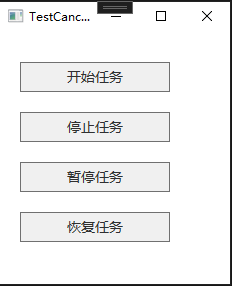
3. 运行
到此这篇关于C#中多线程使用CancellationTokenSource进行线程管理的文章就介绍到这了,更多相关C# 线程管理内容请搜索脚本之家以前的文章或继续浏览下面的相关文章希望大家以后多多支持脚本之家!
相关文章
 这篇文章主要为大家详细介绍了Unity摄使用像机实现望远镜效果,文中示例代码介绍的非常详细,具有一定的参考价值,感兴趣的小伙伴们可以参考一下2019-11-11
 这篇文章主要为大家介绍了WPF Trigger改变属性无效问题排查示例详解,有需要的朋友可以借鉴参考下,希望能够有所帮助,祝大家多多进步,早日升职加薪2023-10-10
 这篇文章详细的介绍了C#中的静态,有需要的朋友可以参考一下2013-09-09
 这篇文章主要介绍了c# rsa注册实现加密文字,需要的朋友可以参考下2014-04-04
 这篇文章主要给大家介绍了关于C#使用EF连接PGSql数据库的相关资料,文中通过示例代码介绍的非常详细,需要的朋友可以参考借鉴,下面随着小编来一起学习学习吧2019-01-01
 这篇文章主要给大家介绍了关于C#管道式编程的介绍与实现方法,文中通过示例代码介绍的非常详细,对大家学习或者使用C#具有一定的参考学习价值,需要的朋友们下面来一起学习学习吧2019-07-07
 这篇文章主要介绍了C#使用ODBC与OLEDB连接数据库的方法,结合实例形式分析了C#基于ODBC与OLEDB实现数据库连接操作简单操作技巧,需要的朋友可以参考下2017-05-05
 这篇文章主要为大家详细介绍了如何利用C#实现屏幕桌面截图以及左上角区域截图功能,文中的示例代码讲解详细,对我们学习C#有一定的帮助,感兴趣的小伙伴可以了解一下2022-12-12
 这篇文章主要介绍了Unity实现苹果手机Taptic震动,文中示例代码介绍的非常详细,具有一定的参考价值,感兴趣的小伙伴们可以参考一下2019-10-10
 这篇文章主要为大家详细介绍了如何使用C# WinForm实现真正的跨平台串口通讯解决方案,包括Windows平台的原生支持,Linux/macOS平台的适配方案,以及第三方库的集成使用,感兴趣的小伙伴可以跟随小编一起学习一下2025-06-06
最新评论