

C#网络协议第三方库Protobuf的使用详解
为什么要使用二进制数据
通常我们写一个简单的网络通讯软件可能使用的最多的是字符串类型,比较简单,例如发送格式为(head)19|Msg:Heart|100,x,y,z…,在接收端会解析收到的socket数据。
这样通常是完全可行的,但是随着数据量变大,网络吞吐量就变大,可能发送的字符串就不合适了,可能会数据量变大。
举例:
假如你要发送你的年收入和你的坐标,例如你的年收入是一亿两千万(123,456,789)(幸福死了)你的坐标是1.234567,如果通过字符串传输,你的收入就是9位,你的坐标可能你发小数因为精度问题还不准确通常使用二进制发送会大大节省。一个int32是4位,float类型也是4位,这样8位就够了。
看下面的例子:
        static void Main(string[] args)
        {
            Console.WriteLine("Hello, World!");

            int money = 123456789;
            float x = 1.234567f;
            byte[] moneybyte = BitConverter.GetBytes(money);
            byte[] xbyte = BitConverter.GetBytes(x);
            Console.WriteLine($"moneybyte: {moneybyte.Length},{money} :xbyte: {xbyte.Length},{x}" );

            int moneyget = BitConverter.ToInt32(moneybyte);
            float xget = BitConverter.ToSingle(xbyte);
            Console.WriteLine($"moneyget: {moneyget} :xget: {xget}");
		}
输出结果
Hello, World!
moneybyte: 4,123456789 :xbyte: 4,1.234567
moneyget: 123456789 :xget: 1.234567
我们看到对于数字32位占4个字节,这样如果是大量的数据就会很节省,甚至你可以使用int16,或者bool占用更小的字节。
对于大量密集的网络程序使用二进制数据进行发送很必要的。
初步思考如何方便的使用二进制或者封装
是不是有这样的疑问,如果要同步一个数据包含很多类型数据,如何拼接和解析呢,好像二进制没有字符串那么直观和好使用。
比如我要同步的数据是如下数据(通常我们把这种格式称作协议),需要发送结构和解析正确的匹配才能解析。
协议头|发送的大小|我的名字|18|123456789|1.234567|我的介绍|结束
对于二进制如果我们有这样的结构
public struct mydata
{
	public string name;
	public int age;
	public int money;
	public float x;
	public string readme;

}
我们可以根据结构体内的属性进行二进制发送就可以了,接收方也有这样的数据结构也进行解析就可以了,这里要注意每个属性的顺序不能是错误的。
网上有一些把结构体或者类打包成二进制的方法,这里就不过多说明了。
使用Protobuf
protobuf就是专门为实现这个而生的,从名字就可以看出来。
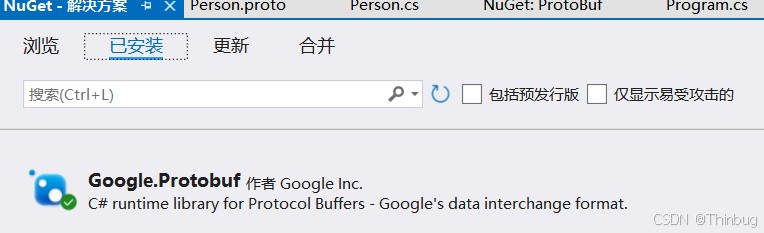
Protobuf 的官方 C# 库是 Google.Protobuf,可以通过 NuGet 包管理器来方便的使用。
我们这里就来简单说一下如何使用:
安装
首先vs里创建一个c#控制台程序。
然后可以通过 NuGet安装
第一个协议
我们创建一个Person.proto文件
syntax = "proto3";

message Person {
  string name = 1;
  int32 age = 2;
  string email = 3;
}
我们需要把这个proto转成c#可以解析的c#程序
我们可以来到Protobuf库下载执行程序,这个程序可以把proto解析成c#文件。
我们下载好之后:输入指令
F:\Downloads\protoc-29.3-win64\bin>protoc --csharp_out=. Person.proto

F:\Downloads\protoc-29.3-win64\bin>
具体指令可以参考库里的文档
–csharp_out输出cs文件 .是当前路径
执行成功后会有一个Person.cs我们可以放入我们的项目,这样就很容易解析协议了。
生成的cs如下:
// <auto-generated>
//     Generated by the protocol buffer compiler.  DO NOT EDIT!
//     source: test.proto
// </auto-generated>
#pragma warning disable 1591, 0612, 3021, 8981
#region Designer generated code

using pb = global::Google.Protobuf;
using pbc = global::Google.Protobuf.Collections;
using pbr = global::Google.Protobuf.Reflection;
using scg = global::System.Collections.Generic;
/// <summary>Holder for reflection information generated from test.proto</summary>
public static partial class TestReflection {

  #region Descriptor
  /// <summary>File descriptor for test.proto</summary>
  public static pbr::FileDescriptor Descriptor {
    get { return descriptor; }
  }
  private static pbr::FileDescriptor descriptor;

  static TestReflection() {
    byte[] descriptorData = global::System.Convert.FromBase64String(
        string.Concat(
          "Cgp0ZXN0LnByb3RvIjIKBlBlcnNvbhIMCgRuYW1lGAEgASgJEgsKA2FnZRgC",
          "IAEoBRINCgVlbWFpbBgDIAEoCWIGcHJvdG8z"));
    descriptor = pbr::FileDescriptor.FromGeneratedCode(descriptorData,
        new pbr::FileDescriptor[] { },
        new pbr::GeneratedClrTypeInfo(null, null, new pbr::GeneratedClrTypeInfo[] {
          new pbr::GeneratedClrTypeInfo(typeof(global::Person), global::Person.Parser, new[]{ "Name", "Age", "Email" }, null, null, null, null)
        }));
  }
  #endregion

}
#region Messages
[global::System.Diagnostics.DebuggerDisplayAttribute("{ToString(),nq}")]
public sealed partial class Person : pb::IMessage<Person>
#if !GOOGLE_PROTOBUF_REFSTRUCT_COMPATIBILITY_MODE
    , pb::IBufferMessage
#endif
{
  private static readonly pb::MessageParser<Person> _parser = new pb::MessageParser<Person>(() => new Person());
  private pb::UnknownFieldSet _unknownFields;
  [global::System.Diagnostics.DebuggerNonUserCodeAttribute]
  [global::System.CodeDom.Compiler.GeneratedCode("protoc", null)]
  public static pb::MessageParser<Person> Parser { get { return _parser; } }

  [global::System.Diagnostics.DebuggerNonUserCodeAttribute]
  [global::System.CodeDom.Compiler.GeneratedCode("protoc", null)]
  public static pbr::MessageDescriptor Descriptor {
    get { return global::TestReflection.Descriptor.MessageTypes[0]; }
  }

  [global::System.Diagnostics.DebuggerNonUserCodeAttribute]
  [global::System.CodeDom.Compiler.GeneratedCode("protoc", null)]
  pbr::MessageDescriptor pb::IMessage.Descriptor {
    get { return Descriptor; }
  }

  [global::System.Diagnostics.DebuggerNonUserCodeAttribute]
  [global::System.CodeDom.Compiler.GeneratedCode("protoc", null)]
  public Person() {
    OnConstruction();
  }

  partial void OnConstruction();

  [global::System.Diagnostics.DebuggerNonUserCodeAttribute]
  [global::System.CodeDom.Compiler.GeneratedCode("protoc", null)]
  public Person(Person other) : this() {
    name_ = other.name_;
    age_ = other.age_;
    email_ = other.email_;
    _unknownFields = pb::UnknownFieldSet.Clone(other._unknownFields);
  }

  [global::System.Diagnostics.DebuggerNonUserCodeAttribute]
  [global::System.CodeDom.Compiler.GeneratedCode("protoc", null)]
  public Person Clone() {
    return new Person(this);
  }

  /// <summary>Field number for the "name" field.</summary>
  public const int NameFieldNumber = 1;
  private string name_ = "";
  [global::System.Diagnostics.DebuggerNonUserCodeAttribute]
  [global::System.CodeDom.Compiler.GeneratedCode("protoc", null)]
  public string Name {
    get { return name_; }
    set {
      name_ = pb::ProtoPreconditions.CheckNotNull(value, "value");
    }
  }

  /// <summary>Field number for the "age" field.</summary>
  public const int AgeFieldNumber = 2;
  private int age_;
  [global::System.Diagnostics.DebuggerNonUserCodeAttribute]
  [global::System.CodeDom.Compiler.GeneratedCode("protoc", null)]
  public int Age {
    get { return age_; }
    set {
      age_ = value;
    }
  }

  /// <summary>Field number for the "email" field.</summary>
  public const int EmailFieldNumber = 3;
  private string email_ = "";
  [global::System.Diagnostics.DebuggerNonUserCodeAttribute]
  [global::System.CodeDom.Compiler.GeneratedCode("protoc", null)]
  public string Email {
    get { return email_; }
    set {
      email_ = pb::ProtoPreconditions.CheckNotNull(value, "value");
    }
  }

  [global::System.Diagnostics.DebuggerNonUserCodeAttribute]
  [global::System.CodeDom.Compiler.GeneratedCode("protoc", null)]
  public override bool Equals(object other) {
    return Equals(other as Person);
  }

  [global::System.Diagnostics.DebuggerNonUserCodeAttribute]
  [global::System.CodeDom.Compiler.GeneratedCode("protoc", null)]
  public bool Equals(Person other) {
    if (ReferenceEquals(other, null)) {
      return false;
    }
    if (ReferenceEquals(other, this)) {
      return true;
    }
    if (Name != other.Name) return false;
    if (Age != other.Age) return false;
    if (Email != other.Email) return false;
    return Equals(_unknownFields, other._unknownFields);
  }

  [global::System.Diagnostics.DebuggerNonUserCodeAttribute]
  [global::System.CodeDom.Compiler.GeneratedCode("protoc", null)]
  public override int GetHashCode() {
    int hash = 1;
    if (Name.Length != 0) hash ^= Name.GetHashCode();
    if (Age != 0) hash ^= Age.GetHashCode();
    if (Email.Length != 0) hash ^= Email.GetHashCode();
    if (_unknownFields != null) {
      hash ^= _unknownFields.GetHashCode();
    }
    return hash;
  }

  [global::System.Diagnostics.DebuggerNonUserCodeAttribute]
  [global::System.CodeDom.Compiler.GeneratedCode("protoc", null)]
  public override string ToString() {
    return pb::JsonFormatter.ToDiagnosticString(this);
  }

  [global::System.Diagnostics.DebuggerNonUserCodeAttribute]
  [global::System.CodeDom.Compiler.GeneratedCode("protoc", null)]
  public void WriteTo(pb::CodedOutputStream output) {
  #if !GOOGLE_PROTOBUF_REFSTRUCT_COMPATIBILITY_MODE
    output.WriteRawMessage(this);
  #else
    if (Name.Length != 0) {
      output.WriteRawTag(10);
      output.WriteString(Name);
    }
    if (Age != 0) {
      output.WriteRawTag(16);
      output.WriteInt32(Age);
    }
    if (Email.Length != 0) {
      output.WriteRawTag(26);
      output.WriteString(Email);
    }
    if (_unknownFields != null) {
      _unknownFields.WriteTo(output);
    }
  #endif
  }

  #if !GOOGLE_PROTOBUF_REFSTRUCT_COMPATIBILITY_MODE
  [global::System.Diagnostics.DebuggerNonUserCodeAttribute]
  [global::System.CodeDom.Compiler.GeneratedCode("protoc", null)]
  void pb::IBufferMessage.InternalWriteTo(ref pb::WriteContext output) {
    if (Name.Length != 0) {
      output.WriteRawTag(10);
      output.WriteString(Name);
    }
    if (Age != 0) {
      output.WriteRawTag(16);
      output.WriteInt32(Age);
    }
    if (Email.Length != 0) {
      output.WriteRawTag(26);
      output.WriteString(Email);
    }
    if (_unknownFields != null) {
      _unknownFields.WriteTo(ref output);
    }
  }
  #endif

  [global::System.Diagnostics.DebuggerNonUserCodeAttribute]
  [global::System.CodeDom.Compiler.GeneratedCode("protoc", null)]
  public int CalculateSize() {
    int size = 0;
    if (Name.Length != 0) {
      size += 1 + pb::CodedOutputStream.ComputeStringSize(Name);
    }
    if (Age != 0) {
      size += 1 + pb::CodedOutputStream.ComputeInt32Size(Age);
    }
    if (Email.Length != 0) {
      size += 1 + pb::CodedOutputStream.ComputeStringSize(Email);
    }
    if (_unknownFields != null) {
      size += _unknownFields.CalculateSize();
    }
    return size;
  }

  [global::System.Diagnostics.DebuggerNonUserCodeAttribute]
  [global::System.CodeDom.Compiler.GeneratedCode("protoc", null)]
  public void MergeFrom(Person other) {
    if (other == null) {
      return;
    }
    if (other.Name.Length != 0) {
      Name = other.Name;
    }
    if (other.Age != 0) {
      Age = other.Age;
    }
    if (other.Email.Length != 0) {
      Email = other.Email;
    }
    _unknownFields = pb::UnknownFieldSet.MergeFrom(_unknownFields, other._unknownFields);
  }

  [global::System.Diagnostics.DebuggerNonUserCodeAttribute]
  [global::System.CodeDom.Compiler.GeneratedCode("protoc", null)]
  public void MergeFrom(pb::CodedInputStream input) {
  #if !GOOGLE_PROTOBUF_REFSTRUCT_COMPATIBILITY_MODE
    input.ReadRawMessage(this);
  #else
    uint tag;
    while ((tag = input.ReadTag()) != 0) {
    if ((tag & 7) == 4) {
      // Abort on any end group tag.
      return;
    }
    switch(tag) {
        default:
          _unknownFields = pb::UnknownFieldSet.MergeFieldFrom(_unknownFields, input);
          break;
        case 10: {
          Name = input.ReadString();
          break;
        }
        case 16: {
          Age = input.ReadInt32();
          break;
        }
        case 26: {
          Email = input.ReadString();
          break;
        }
      }
    }
  #endif
  }

  #if !GOOGLE_PROTOBUF_REFSTRUCT_COMPATIBILITY_MODE
  [global::System.Diagnostics.DebuggerNonUserCodeAttribute]
  [global::System.CodeDom.Compiler.GeneratedCode("protoc", null)]
  void pb::IBufferMessage.InternalMergeFrom(ref pb::ParseContext input) {
    uint tag;
    while ((tag = input.ReadTag()) != 0) {
    if ((tag & 7) == 4) {
      // Abort on any end group tag.
      return;
    }
    switch(tag) {
        default:
          _unknownFields = pb::UnknownFieldSet.MergeFieldFrom(_unknownFields, ref input);
          break;
        case 10: {
          Name = input.ReadString();
          break;
        }
        case 16: {
          Age = input.ReadInt32();
          break;
        }
        case 26: {
          Email = input.ReadString();
          break;
        }
      }
    }
  }
  #endif

}

#endregion


#endregion Designer generated code
使用
我们开始使用
static void Main(string[] args)
{
    Console.WriteLine("Hello, World!");


    var person = new Person
    {
        Age = 18,
        Name = "",
        Email = ""
    };
    byte[] serializedData = person.ToByteArray();

    Console.WriteLine($"serialsize {serializedData.Length} :Serialized Data: "  + BitConverter.ToString(serializedData));

    // 从字节数组反序列化
    var deserializedPerson = Person.Parser.ParseFrom(serializedData);
    Console.WriteLine($"Deserialized Person: Name={deserializedPerson.Name}, Age={deserializedPerson.Age}, Email={deserializedPerson.Email}");

}
代码中我们给person赋值,并通过ToByteArray二进制转化,得到二进制数组后就可以通过网络发送了。
当接收方收到这个二进制数据就可以通过ParseFrom进行解析。
执行结果
Hello, World!
serialsize 2 :Serialized Data: 10-12
Deserialized Person: Name=, Age=18, Email=
我们看到二进制大小是2是因为使用了一种变长编码 (varint) 的优化方案可以看下官方的文档。通常短数据比较多,使用变长编码的方式能够节省一些。
总结
到这里就结束了。以上就是Protobuf的简单使用。
这些仅为个人经验,希望能给大家一个参考,也希望大家多多支持脚本之家。
相关文章
 下面小编就为大家分享一篇C# 添加、修改以及删除Excel迷你图表的实现方法,具有很好的参考价值,希望对大家有所帮助。一起跟随小编过来看看吧2017-12-12
 以下代码实现将一张带透明度的png图片的非透明部分转换成Region输出的方法,有需要的朋友可以参考一下2013-10-10
 项目中少不了读取或设置文件路径的功能,如何才能对输入的路径是否合法进行判断呢?下面这篇文章主要给大家介绍了关于C#利用正则表达式判断是否是有效的文件及文件夹路径的相关资料,需要的朋友可以参考下2022-04-04
 这篇文章主要介绍了C#函数返回多个值的方法详情,文章围绕主题展开详细的内容介绍,具有一定的参考价值,需要的小伙伴可以参考一下2022-09-09
 这篇文章主要介绍了C#设置文件权限的方法,文中讲解非常细致,帮助大家更好的理解和学习c#,感兴趣的朋友可以了解下2020-08-08
 这篇文章主要为大家详细介绍了C#下listview如何插入图片,如何在listview中插入图片的每一个步骤为大家分享,感兴趣的朋友可以参考一下2016-05-05
 webservice的 发布一般都是使用WSDL(web service descriptive language)文件的样式来发布的,在WSDL文件里面,包含这个webservice暴露在外面可供使用的接口。今天我们来详细讨论下如何动态调用以及读取解析返回结果2015-06-06
 这篇文章介绍了用 C#实现示波器功能的方法,包括使用 WinForm 及多种曲线控件,阐述了原理和思路,如定义缓存数据的队列、转化数组刷新显示等,还提到注意事项及扩展特性,最后呼吁点赞支持和交流,需要的朋友可以参考下2024-12-12
 21点又名黑杰克,该游戏由2到6个人玩,使用除大小王之外的52张牌,游戏者的目标是使手中的牌的点数之和不超过21点且尽量大。本文将用C#实现这一经典游戏,需要的可以参考一下2022-08-08
C# 通过NI-VISA操作Tektronix TBS 2000B系列示波器的实现步骤
这篇文章主要介绍了C# 通过NI-VISA操作Tektronix TBS 2000B系列示波器的实现步骤,帮助大家更好的理解和学习使用c#,感兴趣的朋友可以了解下2021-02-02
最新评论