

SpringBoot设置欢迎页的三种方式详解
更新时间:2026年01月31日 09:27:44 作者:好好研究
这篇文章主要为大家详细介绍了SpringBoot实现欢迎页的三种方式,包括静态资源的自动映射,Controller映射和WebMvcConfigurer 配置类,文中的示例代码讲解详细,感兴趣的小伙伴可以了解下
方式一:SpringBoot对静态资源的自动映射(最基础)
SpringBoot框架将欢迎页做了自动配置,不需要任何配置,只需在静态资源目录下添加index.jsp欢迎页即可。
1. 导入jquery‐webjar依赖
<!--引入jquery‐webjar 在访问的时候只需要写webjars下面资源的名称即可-->
<dependency>
    <groupId>org.webjars</groupId>
    <artifactId>jquery</artifactId>
    <version>3.3.1</version>
</dependency>
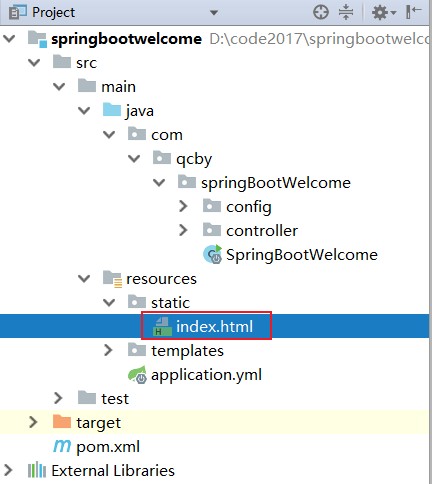
2. 在 src/main/resources/static/ 下新建一个 index.html
<!DOCTYPE html>
<html lang="en">
<head>
    <meta charset="UTF-8">
    <title>Title</title>
</head>
<body>
    <h2>SpringBoot对静态资源的自动映射</h2>
    <p>springboot自动配置,在静态资源下查找index.html文件</p>
</body>
</html>
3. 访问当前项目的任何资源,都去(静态资源的文件夹)找映射
优先级:从高到低
# 任选其一
"classpath:/META‐INF/resources/index.html",
"classpath:/resources/index.html",
"classpath:/static/index.html",
"classpath:/public/index.html"
"/":当前项目的根路径
4. 适用场景:
- 纯静态的 HTML 页面,
- 不需要编写xml,
- 不需要后端传数据,
- 也不使用 Thymeleaf 语法。
方式二:SpringBoot-Controller映射(最常用)
最常用的一种获取动态页面的方式,页面通常放在classpath:/templates/目录下(模板引擎默认目录)。
1. 在 src/main/resources/templates/ 下新建一个 index.html

<!DOCTYPE html>
<html lang="en" xmlns:th="http://www.thymeleaf.org">
<head>
    <meta charset="UTF-8">
    <title>Title</title>
</head>
<body>
    <h2 th:text="${message}"></h2>
    <h2>且使用Thymeleaf 模板引擎</h2>
</body>
</html>
2. 在controller层建一个java文件
package com.qcby.springBootWelcome.controller;

import org.springframework.stereotype.Controller;
import org.springframework.ui.Model;
import org.springframework.web.bind.annotation.RequestMapping;

@Controller
public class WelcomeController {
    @RequestMapping("/")
    public String welcomeHello(Model model){
        model.addAttribute("message","SpringBoot-Controller映射");
        return "index";
    }
}

3. 访问路径:classpath:/templates/index.html
4. 适用场景:
- 使用 Thymeleaf 模板引擎的动态页面
- 需要后端数据交互
方式三:WebMvcConfigurer 配置类
1. 在 src/main/resources/templates/ 下新建一个 login.html

<!DOCTYPE html>
<html lang="en">
<head>
    <meta charset="UTF-8">
    <title>Title</title>
</head>
<body>
    <h2>登录页面</h2>
    <h3>适用 WebMvcConfigurer 配置类</h3>
</body>
</html>
2. 创建WebConfig配置类
package com.qcby.springBootWelcome.config;

import org.springframework.context.annotation.Configuration;
import org.springframework.web.servlet.config.annotation.ViewControllerRegistry;
import org.springframework.web.servlet.config.annotation.WebMvcConfigurer;

@Configuration
public class WebConfig implements WebMvcConfigurer{
    @Override
    public void addViewControllers(ViewControllerRegistry registry) {
        // 直接映射到静态页面
//        registry.addViewController("/").setViewName("login.html");

        // 或者映射到模板引擎页面
         registry.addViewController("/").setViewName("login");
    }
}

3. 访问路径:classpath:/templates/login.html
4. 适用场景:
- 使用 Thymeleaf 模板引擎的动态页面
- 不需要后端传特定数据,仅仅是做路由跳
总结
这三种方式的优先级:SpringBoot-Controller映射 > WebMvcConfigurer 配置类 > SpringBoot对静态资源的自动映射
| 方法 | 适用场景 | 优点 | 缺点 |
|---|---|---|---|
| 静态资源默认 | 简单静态页面 | 无需配置 | 功能单一 |
| WebMvcConfigurer | 需要URL映射 | 灵活 | 需要代码配置 |
| Controller方式 | 动态内容 | 功能强大 | 代码量多 |
| 模板引擎 | 动态页面 | 前后端结合 | 需要学习模板语法 |
到此这篇关于SpringBoot设置欢迎页的三种方式详解的文章就介绍到这了,更多相关SpringBoot设置欢迎页内容请搜索脚本之家以前的文章或继续浏览下面的相关文章希望大家以后多多支持脚本之家!
相关文章
 这篇文章主要介绍了java实现文件重命名的方法,涉及java针对文件的重命名操作技巧,具有一定参考借鉴价值,需要的朋友可以参考下2015-07-07
 本文介绍了MyBatis-Plus中逻辑删除和乐观锁的实现概念、方法和示例,逻辑删除通过更改记录状态模拟删除,而乐观锁通过版本号或时间戳确保并发操作的正确性2025-03-03
 在如今数字化时代,越来越多的人使用PDF文档进行信息传递和共享,而使用Java生成PDF文档也成为了一个非常重要的技能,所以本文我们将为您介绍如何使用Java快速生成PDF文档,需要的朋友可以参考下2023-09-09
关于SpringSecurity配置403权限访问页面的完整代码
本文给大家分享SpringSecurity配置403权限访问页面的完整代码,配置之前和配置之后的详细介绍,代码简单易懂,对大家的学习或工作具有一定的参考借鉴价值,需要的朋友参考下吧2021-06-06 本文详细介绍了在开发中获取当前操作用户信息的三种方式:使用ThreadLocal存储用户信息、通过拦截器和注解结合Shiro框架获取用户信息、以及使用Redis存储用户信息,每种方式都有具体的实现步骤和注意事项,可根据实际需求选择合适的方法2024-10-10
 这篇文章主要给大家介绍了关于JAVA基础之注解与反射的使用方法和场景的相关资料,文中通过示例代码介绍的非常详细,对大家的学习或者工作具有一定的参考学习价值,需要的朋友们下面随着小编来一起学习学习吧2021-03-03
 这篇文章主要介绍了Java 日期转换详解及实例代码的相关资料,需要的朋友可以参考下2016-11-11
Java实现读取Excel文件功能(EasyExcel初使用)
EasyExcel是一款基于Java语言的开源Excel解析工具,可以帮助我们快速、高效地读取和写入Excel文件,这篇文章主要给大家介绍了关于Java实现读取Excel文件功能的相关资料,使用的是EasyExcel,需要的朋友可以参考下2024-07-07 Spring AOP实现复杂的日志记录操作(自定义注解),具有很好的参考价值,希望对大家有所帮助。如有错误或未考虑完全的地方,望不吝赐教2021-09-09
idea本地jar使用maven打包本地依赖实现自动编译到项目里的操作
这篇文章主要介绍了idea本地jar使用maven打包本地依赖实现自动编译到项目里的操作,本文通过示例代码给大家介绍的非常详细,感兴趣的朋友跟随小编一起看看吧2024-05-05
最新评论