

使用JavaFX创建一个实时更新的时钟程序
更新时间:2026年06月15日 08:34:37 作者:WL_Aurora
这篇文章主要介绍了如何使用JavaFX的的Timeline类实现每秒自动更新的时间显示,并融合了Timeline、SimpleDateFormat两个核心关键词;展示了如何定义关键帧、设置无限循环以及使用时间格式化工具类进行时间格式化,需要的朋友可以参考下
一、最终效果预览
运行程序后,窗口右下角显示实时更新的时间,每秒刷新一次:
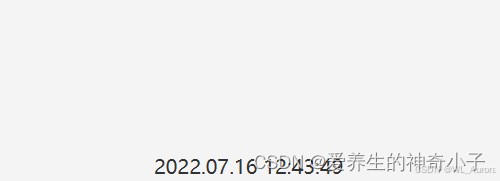
时间格式为 yyyy.MM.dd hh:mm:ss,每秒自动更新,精确到秒。
二、核心知识点
2.1 Timeline:JavaFX 的时间轴动画
Timeline 是 JavaFX 动画系统的核心类,用于按时间线执行一系列动作:
| 属性/方法 | 说明 |
|---|---|
new KeyFrame(Duration, EventHandler) | 定义关键帧:到达指定时间后执行事件 |
setCycleCount(int) | 设置循环次数,INDEFINITE 表示无限循环 |
play() | 启动动画 |
pause() | 暂停动画 |
stop() | 停止动画 |
2.2 SimpleDateFormat 时间格式化
DateFormat currentTime = new SimpleDateFormat("yyyy.MM.dd hh:mm:ss");
常用格式符号:
| 符号 | 含义 | 示例 |
|---|---|---|
yyyy | 四位年份 | 2026 |
MM | 两位月份 | 06 |
dd | 两位日期 | 13 |
HH | 24小时制 | 21 |
hh | 12小时制 | 09 |
mm | 分钟 | 49 |
ss | 秒 | 30 |
注意:HH 是24小时制,hh 是12小时制。建议使用 HH 避免上午下午混淆。
三、完整代码实现
import javafx.application.Application;
import javafx.event.ActionEvent;
import javafx.event.EventHandler;
import javafx.geometry.Insets;
import javafx.geometry.Pos;
import javafx.scene.Scene;
import javafx.scene.control.Label;
import javafx.scene.layout.BorderPane;
import javafx.scene.text.Font;
import javafx.stage.Stage;
import javafx.animation.KeyFrame;
import javafx.animation.Timeline;
import javafx.util.Duration;

import java.text.DateFormat;
import java.text.SimpleDateFormat;
import java.util.Date;

public class RealTimeClock extends Application {

    @Override
    public void start(Stage primaryStage) {
        // 1. 创建时间标签
        Label timeLabel = new Label();
        timeLabel.setFont(new Font(20));  // 设置字体大小为20

        // 2. 设置时间格式
        DateFormat dateFormat = new SimpleDateFormat("yyyy.MM.dd HH:mm:ss");

        // 3. 创建事件处理器:每秒更新时间
        EventHandler<ActionEvent> eventHandler = e -> {
            String currentTime = dateFormat.format(new Date());
            timeLabel.setText(currentTime);
            System.out.println(currentTime);  // 控制台同步输出
        };

        // 4. 创建 Timeline 动画
        Timeline animation = new Timeline(
            new KeyFrame(Duration.millis(1000), eventHandler)
        );
        animation.setCycleCount(Timeline.INDEFINITE);  // 无限循环
        animation.play();  // 启动动画

        // 5. 布局设置:将时间标签放在右下角
        BorderPane root = new BorderPane();
        root.setPadding(new Insets(20));
        BorderPane.setAlignment(timeLabel, Pos.BOTTOM_RIGHT);
        root.setBottom(timeLabel);

        // 6. 创建场景
        Scene scene = new Scene(root, 400, 300);
        primaryStage.setTitle("JavaFX 实时时钟");
        primaryStage.setScene(scene);
        primaryStage.show();
    }

    public static void main(String[] args) {
        launch(args);
    }
}
四、运行效果展示
4.1 界面效果
窗口右下角显示当前时间,每秒自动刷新。同时控制台也会每秒打印一次时间日志。
4.2 控制台输出
2026.06.13 21:49:00
2026.06.13 21:49:01
2026.06.13 21:49:02
2026.06.13 21:49:03
...
五、关键代码解析
5.1 Timeline 的工作原理
Timeline animation = new Timeline(
    new KeyFrame(Duration.millis(1000), eventHandler)
);
Duration.millis(1000):每隔 1000 毫秒(1秒)触发一次eventHandler:每次触发时执行的事件setCycleCount(Timeline.INDEFINITE):无限重复,不会自动停止
Timeline 执行流程:
启动 (play)
    ├── 等待 1000ms
    ├── 执行 eventHandler(更新时间)
    ├── 等待 1000ms
    ├── 执行 eventHandler(更新时间)
    └── ...无限循环
5.2 为什么用 Timeline 而不是 Thread?
| 方式 | 优点 | 缺点 |
|---|---|---|
Timeline | JavaFX 原生支持,自动在 UI 线程更新,线程安全 | 精度受限于 JavaFX 帧率 |
Thread + sleep | 简单直观 | 需要手动调用 Platform.runLater() 更新 UI,容易出错 |
AnimationTimer | 适合高帧率动画(如游戏) | 每秒60次回调,不适合低频更新 |
对于每秒更新一次的需求,Timeline 是最简洁、最安全的选择。
六、进阶:多功能时钟面板
将实时时间与其他功能结合,打造一个更实用的状态栏:
import javafx.application.Application;
import javafx.geometry.Insets;
import javafx.geometry.Pos;
import javafx.scene.Scene;
import javafx.scene.control.Label;
import javafx.scene.layout.HBox;
import javafx.scene.text.Font;
import javafx.scene.text.FontWeight;
import javafx.stage.Stage;
import javafx.animation.KeyFrame;
import javafx.animation.Timeline;
import javafx.util.Duration;

import java.text.SimpleDateFormat;
import java.util.Date;

public class StatusBarClock extends Application {

    private Label timeLabel;
    private Label statusLabel;
    private int seconds = 0;

    @Override
    public void start(Stage primaryStage) {
        // 状态标签
        statusLabel = new Label("系统运行中");
        statusLabel.setFont(Font.font(14));

        // 时间标签
        timeLabel = new Label();
        timeLabel.setFont(Font.font("Consolas", FontWeight.BOLD, 16));

        // 布局
        HBox statusBar = new HBox(20);
        statusBar.setAlignment(Pos.CENTER_RIGHT);
        statusBar.setPadding(new Insets(10, 20, 10, 20));
        statusBar.getChildren().addAll(statusLabel, timeLabel);

        // Timeline:每秒更新
        Timeline timeline = new Timeline(
            new KeyFrame(Duration.seconds(1), e -> update())
        );
        timeline.setCycleCount(Timeline.INDEFINITE);
        timeline.play();

        Scene scene = new Scene(statusBar, 500, 50);
        primaryStage.setTitle("状态栏时钟");
        primaryStage.setScene(scene);
        primaryStage.show();
    }

    private void update() {
        // 更新时间
        SimpleDateFormat sdf = new SimpleDateFormat("yyyy-MM-dd HH:mm:ss");
        timeLabel.setText(sdf.format(new Date()));

        // 更新运行时长
        seconds++;
        if (seconds % 5 == 0) {
            statusLabel.setText("已运行 " + seconds + " 秒");
        }
    }

    public static void main(String[] args) {
        launch(args);
    }
}
七、总结
| 知识点 | 要点 |
|---|---|
| Timeline | 使用 KeyFrame 定义定时任务,INDEFINITE 无限循环 |
| SimpleDateFormat | "yyyy.MM.dd HH:mm:ss" 格式化当前时间 |
| 线程安全 | Timeline 自动在 JavaFX UI 线程执行,无需手动切换 |
| 字体设置 | new Font(20) 或 Font.font("Consolas", FontWeight.BOLD, 16) |
以上就是使用JavaFX创建一个实时更新的时钟程序的详细内容,更多关于JavaFX实时更新时钟的资料请关注脚本之家其它相关文章!
相关文章
 这篇文章主要介绍了关于springmvc-servlet中的配置小知识详解,本文给大家介绍的非常详细,对大家的学习或工作具有一定的参考借鉴价值,需要的朋友可以参考下2020-12-12
 这篇文章主要介绍了使用MyBatis Generator自动创建代码,小编觉得挺不错的,现在分享给大家,也给大家做个参考。一起跟随小编过来看看吧2017-12-12
 这篇文章主要介绍了安卓系统中实现摇一摇画面振动效果的方法,调用Android SDK中的SensorEventListener接口,需要的朋友可以参考下2015-07-07
Java Redis Template批量查询指定键值对的实现
本文主要介绍了Java Redis Template批量查询指定键值对的实现,文中通过示例代码介绍的非常详细,对大家的学习或者工作具有一定的参考学习价值,需要的朋友们下面随着小编来一起学习学习吧2022-07-07 这篇文章主要介绍了springboot上传文件过大的500异常解决,文中通过示例代码介绍的非常详细,对大家的学习或者工作具有一定的参考学习价值,需要的朋友可以参考下2019-09-09
 这篇文章主要介绍了详解Javaee Dao层的抽取,小编觉得挺不错的,现在分享给大家,也给大家做个参考。一起跟随小编过来看看吧2018-07-07
 这篇文章主要为大家详细介绍了servlet实现用户登录的小程序,具有一定的参考价值,感兴趣的小伙伴们可以参考一下2017-05-05
 这篇文章主要为大家介绍了Spring整合Mybatis框架方法剖析,有需要的朋友可以借鉴参考下,希望能够有所帮助,祝大家多多进步,早日升职加薪2023-07-07
Java maven三种仓库,本地仓库,私服,中央仓库的配置
今天给大家简单介绍Maven三种仓库的配置,文中有非常详细的解释,对Java初学者很有帮助哟,需要的朋友可以参考下,希望能够给你带来帮助2021-09-09 这篇文章主要介绍了java接口私有方法实现过程解析,文中通过示例代码介绍的非常详细,对大家的学习或者工作具有一定的参考学习价值,需要的朋友可以参考下2019-11-11
最新评论