

使用JavaFX的TableView组件实现学生信息表格的完整过程
更新时间:2026年06月15日 08:40:53 作者:WL_Aurora
这篇文章主要介绍了JavaFX中使用TableView显示学生信息表格的方法,涵盖数据模型、数据源、表格组件、列定义与数据绑定、增删改操作及进阶属性绑定等内容,重点在于通过ObservableList实现数据自动同步、使用PropertyValueFactory简化数据绑定,并介绍了完整的代码实现
一、最终效果预览
运行程序后,展示一个学生信息表格,支持增加、删除、修改操作:
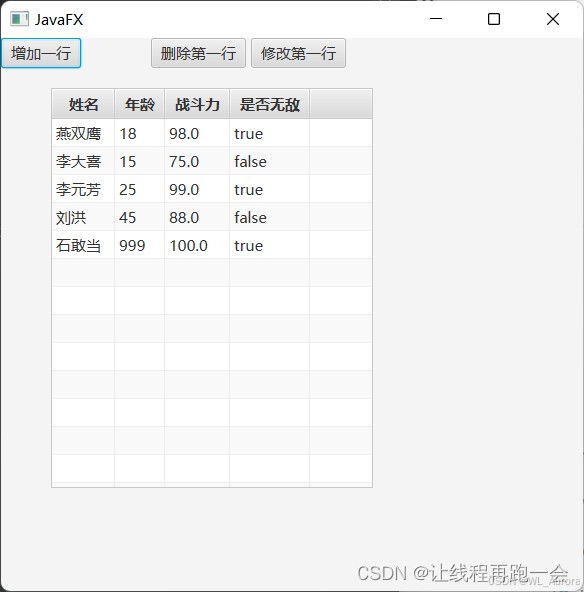
表格包含「姓名」「年龄」「战斗力」「是否无敌」四列,顶部有三个操作按钮。
二、核心组件介绍
2.1 数据模型:Student 实体类
TableView 的每一行数据对应一个 Java Bean 对象,类必须是 public 的:
public class Student {
    private String name;
    private int age;
    private double score;
    private boolean is;

    public Student(String name, int age, double score, boolean is) {
        this.name = name;
        this.age = age;
        this.score = score;
        this.is = is;
    }

    public String getName() { return name; }
    public void setName(String name) { this.name = name; }

    public int getAge() { return age; }
    public void setAge(int age) { this.age = age; }

    public double getScore() { return score; }
    public void setScore(double score) { this.score = score; }

    public boolean isIs() { return is; }
    public void setIs(boolean is) { this.is = is; }
}
注意:属性名和 getter/setter 方法命名要规范,后续 PropertyValueFactory 会通过反射自动匹配。
2.2 数据源:ObservableList
ObservableList<Student> list = FXCollections.observableArrayList();
ObservableList 是可观察的列表,数据变化会自动同步到 TableView 界面。
2.3 表格组件:TableView
TableView<Student> tableView = new TableView<>(list);
构造时传入数据源,TableView 会自动监听列表变化。
三、列定义与数据绑定
TableView 的核心特点是以列为单位进行配置。每列通过 TableColumn 定义,并通过 setCellValueFactory() 绑定数据。
3.1 方式一:Callback(灵活但冗长)
TableColumn<Student, String> colName = new TableColumn<>("姓名");
colName.setCellValueFactory(new Callback<TableColumn.CellDataFeatures<Student, String>, ObservableValue<String>>() {
    @Override
    public ObservableValue<String> call(TableColumn.CellDataFeatures<Student, String> param) {
        return new SimpleStringProperty(param.getValue().getName());
    }
});
tableView.getColumns().add(colName);
3.2 方式二:PropertyValueFactory(简洁推荐)
TableColumn<Student, String> colName = new TableColumn<>("姓名");
colName.setCellValueFactory(new PropertyValueFactory<>("name"));
tableView.getColumns().add(colName);
PropertyValueFactory<>("name") 会自动调用 Student.getName() 获取值。属性名必须与 getter 方法对应(去掉 get 前缀,首字母小写)。
四、完整代码实现
import javafx.application.Application;
import javafx.collections.FXCollections;
import javafx.collections.ObservableList;
import javafx.geometry.Insets;
import javafx.scene.Scene;
import javafx.scene.control.Button;
import javafx.scene.control.TableColumn;
import javafx.scene.control.TableView;
import javafx.scene.control.cell.PropertyValueFactory;
import javafx.scene.layout.HBox;
import javafx.scene.layout.VBox;
import javafx.stage.Stage;

public class TableViewDemo extends Application {

    private TableView<Student> tableView;
    private ObservableList<Student> list;

    @Override
    public void start(Stage primaryStage) {
        // 1. 初始化数据源
        list = FXCollections.observableArrayList(
            new Student("燕双鹰", 18, 98.0, true),
            new Student("李大喜", 15, 75.0, false),
            new Student("李元芳", 25, 99.0, true),
            new Student("刘洪", 45, 88.0, false),
            new Student("石敢当", 999, 100.0, true)
        );

        // 2. 创建 TableView
        tableView = new TableView<>(list);
        tableView.setPrefHeight(400);

        // 3. 定义列
        TableColumn<Student, String> colName = new TableColumn<>("姓名");
        colName.setCellValueFactory(new PropertyValueFactory<>("name"));

        TableColumn<Student, Integer> colAge = new TableColumn<>("年龄");
        colAge.setCellValueFactory(new PropertyValueFactory<>("age"));

        TableColumn<Student, Double> colScore = new TableColumn<>("战斗力");
        colScore.setCellValueFactory(new PropertyValueFactory<>("score"));

        TableColumn<Student, Boolean> colIs = new TableColumn<>("是否无敌");
        colIs.setCellValueFactory(new PropertyValueFactory<>("is"));

        tableView.getColumns().addAll(colName, colAge, colScore, colIs);

        // 4. 创建操作按钮
        Button addBtn = new Button("增加一行");
        Button delBtn = new Button("删除第一行");
        Button modBtn = new Button("修改第一行");

        addBtn.setOnAction(e -> addRow());
        delBtn.setOnAction(e -> deleteRow());
        modBtn.setOnAction(e -> modifyRow());

        HBox btnBox = new HBox(20);
        btnBox.setPadding(new Insets(10));
        btnBox.getChildren().addAll(addBtn, delBtn, modBtn);

        // 5. 布局
        VBox root = new VBox(10);
        root.setPadding(new Insets(10));
        root.getChildren().addAll(btnBox, tableView);

        Scene scene = new Scene(root, 500, 500);
        primaryStage.setTitle("JavaFX TableView 演示");
        primaryStage.setScene(scene);
        primaryStage.show();
    }

    // 增加一行
    private void addRow() {
        Student newStudent = new Student("新同学", 20, 60.0, false);
        // 方式1:通过 tableView.getItems()
        tableView.getItems().add(newStudent);
        // 方式2:直接操作 list(效果相同)
        // list.add(newStudent);
    }

    // 删除第一行
    private void deleteRow() {
        if (!tableView.getItems().isEmpty()) {
            // 方式1:通过 tableView.getItems()
            tableView.getItems().remove(0);
            // 方式2:直接操作 list
            // list.remove(0);
        }
    }

    // 修改第一行
    private void modifyRow() {
        if (!tableView.getItems().isEmpty()) {
            Student first = tableView.getItems().get(0);
            // 方式1:替换整行对象
            tableView.getItems().set(0, new Student("已修改", 99, 999.0, true));
            // 方式2:修改对象属性(需要属性绑定才能自动刷新)
            // first.setName("已修改");
        }
    }

    public static void main(String[] args) {
        launch(args);
    }
}
五、增删改操作详解
5.1 增加数据
// 方式1:通过 TableView 的 items
 tableView.getItems().add(new Student("新同学", 20, 60.0, false));

// 方式2:直接操作 ObservableList(效果相同)
list.add(new Student("新同学", 20, 60.0, false));
两种方式完全等价,因为
tableView.getItems()返回的就是构造时传入的list。
5.2 删除数据
// 删除指定索引行
tableView.getItems().remove(0);

// 删除指定对象
tableView.getItems().remove(student);

// 删除选中行
Student selected = tableView.getSelectionModel().getSelectedItem();
tableView.getItems().remove(selected);
5.3 修改数据
// 方式1:替换整行对象
tableView.getItems().set(0, new Student("已修改", 99, 999.0, true));

// 方式2:修改对象属性(需配合属性绑定)
Student first = tableView.getItems().get(0);
first.setName("已修改");
方式2 修改属性后界面不会自动刷新,需要使用 SimpleXxxProperty 属性绑定(见下文进阶)。
六、进阶:使用属性绑定实现自动刷新
如果希望修改对象属性后界面自动更新,需要将实体类改为使用 JavaFX 属性:
import javafx.beans.property.*;

public class StudentProperty {
    private final StringProperty name = new SimpleStringProperty();
    private final IntegerProperty age = new SimpleIntegerProperty();
    private final DoubleProperty score = new SimpleDoubleProperty();
    private final BooleanProperty is = new SimpleBooleanProperty();

    public StudentProperty(String name, int age, double score, boolean is) {
        this.name.set(name);
        this.age.set(age);
        this.score.set(score);
        this.is.set(is);
    }

    // JavaFX 属性 getter
    public StringProperty nameProperty() { return name; }
    public IntegerProperty ageProperty() { return age; }
    public DoubleProperty scoreProperty() { return score; }
    public BooleanProperty isProperty() { return is; }

    // 普通 getter/setter
    public String getName() { return name.get(); }
    public void setName(String name) { this.name.set(name); }

    public int getAge() { return age.get(); }
    public void setAge(int age) { this.age.set(age); }

    public double getScore() { return score.get(); }
    public void setScore(double score) { this.score.set(score); }

    public boolean isIs() { return is.get(); }
    public void setIs(boolean is) { this.is.set(is); }
}
使用属性类后,修改属性时界面会自动刷新:
StudentProperty first = tableView.getItems().get(0);
first.setName("自动刷新");  // 界面会立即更新!
常用 API 速查表
| 操作 | API |
|---|---|
| 添加行 | tableView.getItems().add(obj) / list.add(obj) |
| 删除指定行 | tableView.getItems().remove(index) |
| 删除选中行 | tableView.getItems().remove(tableView.getSelectionModel()) |
| 替换行 | tableView.getItems().set(index, newObj) |
| 清空表格 | tableView.getItems().clear() |
| 获取选中项 | tableView.getSelectionModel().getSelectedItem() |
| 获取选中索引 | tableView.getSelectionModel().getSelectedIndex() |
| 设置选中 | tableView.getSelectionModel().select(index) |
| 设置列宽 | colName.setPrefWidth(100) |
| 禁止列拖动 | tableView.setColumnResizePolicy(TableView) |
总结
| 知识点 | 要点 |
|---|---|
| 数据模型 | 每行对应一个 Java Bean,属性需有 getter/setter |
| ObservableList | FXCollections.observableArrayList() 创建可观察数据源 |
| 列定义 | PropertyValueFactory<>("属性名") 自动绑定 getter |
| 增删改 | 操作 tableView.getItems() 或原始 list 均可 |
| 自动刷新 | 使用 SimpleXxxProperty 属性类,修改属性后界面自动更新 |
以上就是使用JavaFX的TableView组件实现学生信息表格的完整过程的详细内容,更多关于JavaFX TableView学生信息表格的资料请关注脚本之家其它相关文章!
相关文章
 这篇文章主要介绍了selenium操作隐藏的元素(python+Java),文中通过示例代码介绍的非常详细,对大家的学习或者工作具有一定的参考学习价值,需要的朋友们下面随着小编来一起学习学习吧2019-07-07
 这篇文章主要介绍了java如何让带T的时间格式化问题,具有很好的参考价值,希望对大家有所帮助。如有错误或未考虑完全的地方,望不吝赐教2023-01-01
 这篇文章主要介绍了SpringSecurity的防Csrf攻击实现代码解析,文中通过示例代码介绍的非常详细,对大家的学习或者工作具有一定的参考学习价值,需要的朋友可以参考下2020-03-03
 这篇文章主要为大家详细介绍了如何通过Java实现时间对象和字符串互相转换,文中的示例代码讲解详细,感兴趣的小伙伴可以跟随小编一起学习一下2024-10-10
 这篇文章主要介绍了彻底了解java中ReentrantLock和AQS的源码,想了解锁机制的同学,一定要参考下2021-04-04
 在现在的日常开发中,不管前端还是后端,JSON 格式的数据是用得比较多的,甚至可以说无处不在。所以本文主要来讲讲JSON 格式的数据与 Java 对象之间的转化吧2023-03-03
 本文主要介绍了JavaEE多线程中阻塞队列的项目实践,文中通过示例代码介绍的非常详细,对大家的学习或者工作具有一定的参考学习价值,需要的朋友们下面随着小编来一起学习学习吧2023-09-09
如何使用java agent修改字节码并在springboot启动时自动生效
本文介绍了JavaAgent的使用方法和在SpringBoot中的应用,JavaAgent可以通过修改类的字节码,实现对非Spring容器管理对象的AOP处理,演示了如何定义切面逻辑,实现接口mock,感兴趣的朋友跟随小编一起看看吧2024-10-10 这篇文章主要介绍了使用springboot单例模式与线程安全问题踩的坑,具有很好的参考价值,希望对大家有所帮助。如有错误或未考虑完全的地方,望不吝赐教2021-08-08
当Transactional遇上synchronized的解决方法分享
前些时间刚好刷到了有关于“# 【事务与锁】当Transactional遇上synchronized”这一类的文章,感觉这也是工作中经常会遇到的一类问题了。所以就针对这个话题进行了分析并整理了常用的解决方法,希望对大家有所帮助2023-05-05
最新评论