

解决安装tomcat时出现的问题
在win10安装了JDK8并配置好了相关路径,在Tomcat在启动过程中出现startup.bat时闪退。
找出问题的原因
右键编辑打开“startup.bat"文件,然后找文件的最后一行代码是:end 在:end的后面输入pause
如下图所示:

接下来在DOS命令窗口运行startup.bat
此时提示报错信息如下:
the JRE_HOME environment variable is not defined correctly This environment variabl
原因知道了,下面来看解决办法
1、分析startup.bat启动脚本:发现其调用了catalina.bat,而catalina.bat调用了setclasspath.bat
2、在setclasspath.bat的头部定义了JAVA_HOME和JRE_HOME的值,那么这里需要我们手动设置JAVA_HOME变量和JRE_HOME变量(红色代码为新添加
注意:你所设置的变量要和自己的电脑中”环境变量“里的JAVA_HOME和JRE_HOME保持一致,我的是红色的代码。
第一还是配错了路径,是应为环境变量中JRE_HOME的问题。
错把jre的绝对路径放在JAVA_HOME中了。
把JAVA_HOME中的jre的绝对路径删除掉。
重新建一个JRE_HOME,并且加入jre的绝对路径。
改完后就如下:
@echo off
rem Licensed to the Apache Software Foundation (ASF) under one or more
rem contributor license agreements. See the NOTICE file distributed with
rem this work for additional information regarding copyright ownership.
rem The ASF licenses this file to You under the Apache License, Version 2.0
rem (the “License”); you may not use this file except in compliance with
rem the License. You may obtain a copy of the License at
rem
rem http://www.apache.org/licenses/LICENSE-2.0
rem
rem Unless required by applicable law or agreed to in writing, software
rem distributed under the License is distributed on an “AS IS” BASIS,
rem WITHOUT WARRANTIES OR CONDITIONS OF ANY KIND, either express or implied.
rem See the License for the specific language governing permissions and
rem limitations under the License.rem ---------------------------------------------------------------------------
rem Set JAVA_HOME or JRE_HOME if not already set, ensure any provided settings
rem are valid and consistent with the selected start-up options and set up the
rem endorsed directory.
rem ---------------------------------------------------------------------------
set JAVA_HOME=D:\D:\tomcat\apache-tomcat-8.5.43
set JRE_HOME= C:\Program Files\Java\jre-9.0.4
rem Make sure prerequisite environment variables are set
rem In debug mode we need a real JDK (JAVA_HOME)
if “”%1"" == ““debug”” goto needJavaHomerem Otherwise either JRE or JDK are fine
if not “%JRE_HOME%” == “” goto gotJreHome
if not “%JAVA_HOME%” == “” goto gotJavaHome
echo Neither the JAVA_HOME nor the JRE_HOME environment variable is defined
echo At least one of these environment variable is needed to run this program
goto exit:needJavaHome
rem Check if we have a usable JDK
if “%JAVA_HOME%” == “” goto noJavaHome
if not exist “%JAVA_HOME%\bin\java.exe” goto noJavaHome
if not exist “%JAVA_HOME%\bin\javaw.exe” goto noJavaHome
if not exist “%JAVA_HOME%\bin\jdb.exe” goto noJavaHome
if not exist “%JAVA_HOME%\bin\javac.exe” goto noJavaHome
set “JRE_HOME=%JAVA_HOME%”
goto okJava:noJavaHome
echo The JAVA_HOME environment variable is not defined correctly.
echo It is needed to run this program in debug mode.
echo NB: JAVA_HOME should point to a JDK not a JRE.
goto exit:gotJavaHome
rem No JRE given, use JAVA_HOME as JRE_HOME
set “JRE_HOME=%JAVA_HOME%”:gotJreHome
rem Check if we have a usable JRE
if not exist “%JRE_HOME%\bin\java.exe” goto noJreHome
if not exist “%JRE_HOME%\bin\javaw.exe” goto noJreHome
goto okJava:noJreHome
rem Needed at least a JRE
echo The JRE_HOME environment variable is not defined correctly
echo This environment variable is needed to run this program
goto exit:okJava
rem Don’t override the endorsed dir if the user has set it previously
if not “%JAVA_ENDORSED_DIRS%” == “” goto gotEndorseddir
rem Set the default -Djava.endorsed.dirs argument
set “JAVA_ENDORSED_DIRS=%CATALINA_HOME%\endorsed”
:gotEndorseddirrem Don’t override _RUNJAVA if the user has set it previously
if not “%_RUNJAVA%” == “” goto gotRunJava
rem Set standard command for invoking Java.
rem Also note the quoting as JRE_HOME may contain spaces.
set _RUNJAVA="%JRE_HOME%\bin\java.exe"
:gotRunJavarem Don’t override _RUNJDB if the user has set it previously
rem Also note the quoting as JAVA_HOME may contain spaces.
if not “%_RUNJDB%” == “” goto gotRunJdb
set _RUNJDB="%JAVA_HOME%\bin\jdb.exe"
:gotRunJdbgoto end
:exit
exit /b 1:end
exit /b 0
添加变量后保存,并关闭文件,重新启动tomcat,然后在点击startup.bat,看到下面这样就说明OK了
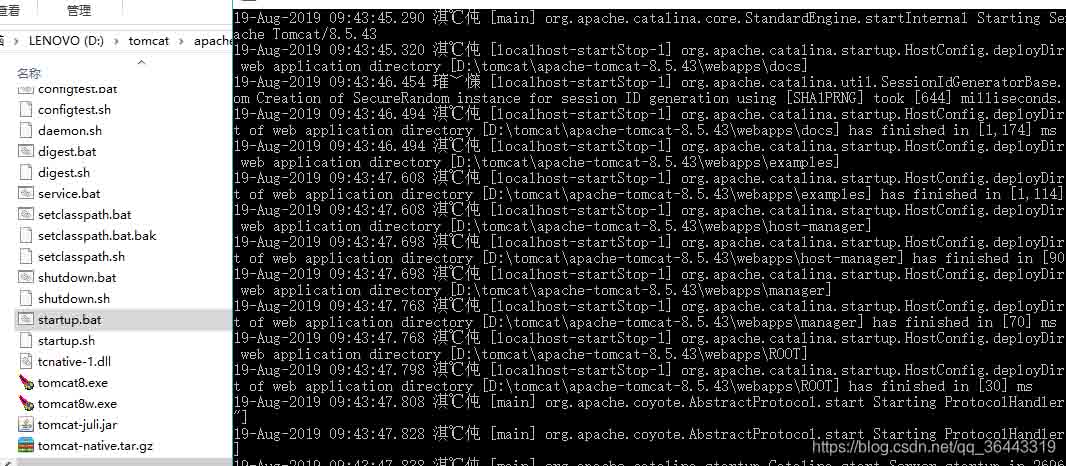
如果是启动后再次启动出现问题,可能是你没有关闭之前启动的,造成8080端口占
有两种方案:
1.在startup.bat 同级目录中,按 shutdown.bat 关闭 (建议用此方法)
2.Tomcat服务器的配置文件,全部都在tomcat的安装目录下conf目录下:修改tomcat的端口为9090修改完server.xml文件必须重启服务器才能有效。
通过浏览器的地址栏访问测试:http://localhost:9090

总结
以上为个人经验,希望能给大家一个参考,也希望大家多多支持脚本之家。
相关文章
 这篇文章主要给大家介绍了一次关于tomcat自动关闭的bug的解决过程,文中通过示例代码介绍的非常详细,对大家学习或者使用tomcat具有一定的参考学习价值,需要的朋友们下面来一起学习学习吧2019-08-08
 这篇文章主要介绍了Web应用中设置Context Path案例详解,本篇文章通过简要的案例,讲解了该项技术的了解与使用,以下就是详细内容,需要的朋友可以参考下2021-08-08
 一个tomcat下如何部署多个项目,Linux跟windows系统下的步骤都差不多,以下linux系统下部署为例,windows系统下部署同理,接下来小编就给大家详细的介绍一下在一个tomcat下部署多个项目的操作步骤,需要的朋友可以参考下2023-08-08
tomcat启动报错:java.util.zip.ZipException的解决方法
这篇文章主要给大家介绍了关于tomcat启动报:java.util.zip.ZipException错误的解决方法,文中通过示例代码介绍的非常详细,同样遇到这个问题的朋友可以参考借鉴,下面随着小编来一起学习学习吧2018-08-08 这篇文章主要介绍了Eclipse部署Tomcat实现JSP运行,本文通过图文并茂的形式给大家介绍的非常详细,对大家的学习或工作具有一定的参考借鉴价值,需要的朋友可以参考下2023-08-08
 这篇文章主要介绍了Eclipse/ tomcat 如何实现热部署和热启动,小编觉得挺不错的,现在分享给大家,也给大家做个参考。一起跟随小编过来看看吧2018-09-09
 这篇文章主要介绍了tomcat性能优化方式简单整理,文中通过示例代码介绍的非常详细,对大家的学习或者工作具有一定的参考学习价值,需要的朋友可以参考下2019-09-09
 这篇文章主要介绍了Tomcat 7-dbcp配置数据库连接池详解的相关资料,需要的朋友可以参考下2017-04-04
 Tomcat是一个流行的开源Web应用服务器,用于解析JSP程序,安装步骤包括下载并安装JDK,然后下载并解压Tomcat,最后启动Tomcat服务器,启动后,可以通过浏览器访问Tomcat的默认页面来验证安装是否成功,下面通过本文给大家介绍Tomcat的简介与安装过程,感兴趣的朋友一起看看吧2026-01-01
如何在IntelliJ IDEA 2018上配置Tomcat并运行第一个JavaWeb项目
这篇文章主要介绍了在IntelliJ IDEA 2018上配置Tomcat并运行第一个JavaWeb项目,需要的朋友可以参考下2020-09-09
最新评论