

tcping使用介绍 服务器监控软件
 我要评论
我要评论服务器所在的机房禁ping ,我如何监控服务器的情况 ?下面和大家介绍一个软件tcping,这个软件是针对TCP监控的,也可以看到ping 值,即使机房禁PING,服务器禁PING了,也可以通过它来监控服务器的情况。除了ping ,它还有一个功能,监听端口的状态。
方法
1、首先提供一下软件的下载地址:【打开这个地址便可以下载】
2、接下来介绍一下这个软件的用途,这个软件
一可以监听服务器的端口状态,默认是80端口的,也可以指定其它端口。
二可以看到ping 返回的时间,这样可以知道服务器是否有延时或者端口不通的状态。
3、软件的使用非常简单:
一、将下载的文件放在C:\WINDOWS\system32 目录下,就可以直接使用了。
二、在windows命令提示符里可以直接使用这个命令了,相关的参数可以自己查询一下,查询的命令是:tcping /?
三、简单地举两个例子的使用
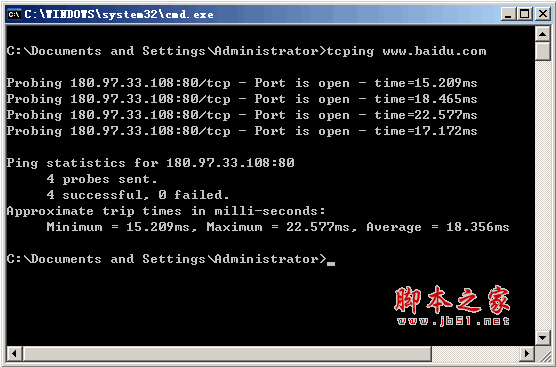
tcping www.baidu.com
tcping -t www.baidu.com 【参数-t 是让命令一直运行ping 】
tcping -d -t www.baidu.com 【参数 -d 是显示时间,这样就可以更清楚了】
tcping -d -t www.baidu.com 21 【这里只是举例,21是您所需要监听的端口,这个可以行定义。】
可以看一下图


4、软件的使用还有很多的参数,常用的就上面两个参数,大家也可以在使用的过程中打个问号看一下就知道了
C:\>tcping--------------------------------------------------------------
tcping.exe by Eli FulkersonPlease see for updates.--------------------------------------------------------------
Usage: tcping [-flags] server-address [server-port]Usage (full): tcping [-t] [-d] [-i interval] [-n times] [-w ms] [-b n] [-r times] [-s] [-v] [-j] [--tee filename] [-h] [-u] [--post] [--head] [-f] server-address [server-port]
-t : ping continuously until stopped via control-c
-n 5 : for instance, send 5 pings
-i 5 : for instance, ping every 5 seconds
-w 0.5 : for instance, wait 0.5 seconds for a response
-d : include date and time on each line
-b 1 : enable beeps (1 for on-down, 2 for on-up, 3 for on-change, 4 for always)
-r 5 : for instance, relookup the hostname every 5 pings
-s : automatically exit on a successful ping
-v : print version and exit -j [5] : include jitter. Optional argument controls rolling average size.
--tee : mirror output to a filename specified after '--tee'
-4 : prefer ipv4
-6 : prefer ipv6HTTP Options:
-h : HTTP mode (use url without http:// for server-address)
-u : include target URL on each line
--post : use POST rather than GET (may avoid caching) --head : use HEAD rather than GET --proxy-server : specify a proxy server --proxy-port : specify a proxy portDebug Options:
-f : force tcping to send at least one byte If you don't pass server-port, it defaults to 80.C:\>
常用的几个参数都已经加粗了,各位有兴趣的网友可以再深入了解下的。蛮有用的一个小软件。
5、结尾:这个软件是用于windows平台的,当然linux 平台也有tcping 不过就需要编译安装后才能使用了。这是后话,有空再和大家分享一下,谢谢。
官方给出的使用方法:
NAME
tcping - simulate "ping" over tcp by establishing a connection to network hosts.
Measures the time for your system to [SYN], receive the target's [SYN][ACK] and send [ACK]. Note that the travel time for
the last ACK is not included - only the time it takes to be put on the wire a tthe sending end.
SYNOPSIS
tcping [-tdsvf46] [-i interval] [-n times] [-w interval] [-b n] [-r times][-j depth] [--tee filename] [-f] destination [port]
DESCRIPTION
tcping measures the time it takes to perform a TCP 3-way handshake (SYN, SYN/ACK, ACK) between itself and a remote host.
The travel time of the outgoing final ACK is not included, only the (minimal) amount of time it has taken to drop it on
the wire at the near end. This allows the travel time of the (SYN, SYN/ACK) to approximate the travel time of the
ICMP (request, response) equivalent.
参数
-4 Prefer using IPv4
-6 Prefer using IPv6
-t ping continuously until stopped via control-c
-n count
send _count_ pings and then stop. Default 4.
-i interval
Wait _interval_ seconds between pings. Default 1. Decimals permitted.
-w interval
Wait _interval_ seconds for a response. Default 2. Decimals permitted.
-d include date and time on every output line
-f Force sending at least one byte in addition to making the connection.
-b type
Enable audible beeps.
'-b 1' will beep "on down". If a host was up, but now its not, beep.
'-b 2' will beep "on up". If a host was down, but now its up, beep.
'-b 3' will beep "on change". If a host was one way, but now its the other, beep.
'-b 4' will beep "always".
-r count
Every _count_ pings, we will perform a new DNS lookup for the host in case it changed.
-s Exit immediately upon a success.
-v Print version and exit.
-j depth
Calculate jitter. Jitter is defined as the difference between the last response time and the historical average.
If _depth_ is specified tcping will use the prior _depth_ values to calculate a rolling average. If _depth_ is not
specified tcping will use the overall average.
--tee _filename_
Duplicate output to the _filename_ specified. Windows can still not be depended upon to have a useful command line
environment. Don't tease me, *nix guys.
destination
A DNS name, an IP address, or (in "http" mode) a URL.
Do not specify the protocol ("http://") in "http" mode. Also do not specify server port via ":port" syntax.
For instance: "tcping http://www.elifulkerson.com:8080/index.html" would fail
Use the style: "tcping www.elifulkerson.com/index.html 8080" instead.
port
A numeric TCP port, 1-65535. If not specified, defaults to 80.
HTTP MODE OPTIONS
-h Use "http" mode. In http mode we will attempt to GET the specified document and return additional values including
the document's size, http response code, kbit/s.
-u In "http" mode, include the target URL on each output line.
--post Use POST instead of GET in http mode.
--head Use HEAD instead of GET in http mode.
--get Shorthand to invoke "http" mode for consistency's sake.
--proxy _proxyserver_
Connect to _proxyserver_ to request the url rather than the server indicated in the url itself.
--proxyport _port_
Specify the numeric TCP port of the proxy server. Defaults to 3128.
RETURN VALUE
tcping returns 0 if all pings are successful, 1 if zero pings are successful and 2 for mixed outcome.
BUGS/REQUESTS
Please report bugs and feature requests to the author via contact information on http://www.elifulkerson.com
AVAILABILITY
tcping is available at http://www.elifulkerson.com/projects/tcping.php
D:\tcping-devel>tcping www.reddit.com
Probing 72.14.204.104:80/tcp - Port is open - time=23.285ms
Probing 72.14.204.104:80/tcp - Port is open - time=21.651ms
Probing 72.14.204.104:80/tcp - Port is open - time=21.899ms
Probing 72.14.204.104:80/tcp - Port is open - time=21.789ms
Ping statistics for 72.14.204.104:80
4 probes sent.
4 successful, 0 failed.
Approximate trip times in milli-seconds:
Minimum = 21.651ms, Maximum = 23.285ms, Average = 22.156ms
--------------------------------------------------------------------------------
D:\tcping-devel>tcping -h www.elifulkerson.com
** Requesting "" from www.elifulkerson.com:
(for various reasons, kbit/s is an approximation)
Probing 64.22.103.201:80/tcp - HTTP is open - time=31.288ms rcv_time=31.951 status=200 bytes=4052 kbit/s=~1014.554
Probing 64.22.103.201:80/tcp - HTTP is open - time=29.553ms rcv_time=30.947 status=200 bytes=4052 kbit/s=~1047.479
Probing 64.22.103.201:80/tcp - HTTP is open - time=29.871ms rcv_time=31.727 status=200 bytes=4052 kbit/s=~1021.728
Probing 64.22.103.201:80/tcp - HTTP is open - time=29.976ms rcv_time=36.002 status=200 bytes=4052 kbit/s=~900.393
Ping statistics for 64.22.103.201:80
4 probes sent.
4 successful, 0 failed.
Approximate trip times in milli-seconds:
Minimum = 29.553ms, Maximum = 31.288ms, Average = 30.172ms
注意事项
在使用的过程中,要根据自己的实际需要好好利用。
相关文章

微软新版Outlook将推出邮件分类快捷键及多项优化:5月开始部署
微软计划在新版Outlook for Windows中引入邮件分类快捷功能,用户可通过预设快捷键快速对邮件进行分类,从而大幅提升工作效率并优化管理流程2025-04-21rsync The --password-file option may only be used when accessing a
客户端上传文件执行命令出错,提醒The --password-file option may only be used when accessing an rsync daemon.查找资料也很少这样的说法,最后发现是冒号的问题2025-02-26 邮箱在使用的时候,由于各种原因,有时候我们可能会遇到忘记密码、账号被盗等问题,这时候就需要进行163邮箱找回操作,本文将为大家介绍如何进行163邮箱找回操作2025-02-01
- 电子邮件成为了我们日常生活和工作中不可或缺的一部分,无论是注册社交媒体、购物平台,还是与他人沟通,一个稳定的邮箱账号都变得至关重要,本文将为您提供详细的电子邮件2025-02-01

wps调用Outlook 批量发送电子邮件时持续弹出警告框怎么办?
如何解决程序调用outlook时一直警告,wps调用outlook发送邮件时,发送的时候,会一直出现警告,需要你一个个点确定或拒绝,本文介绍如何解决这个警告2025-02-01
QQ邮箱文件怎么发送微信? 电脑qq邮箱中转站中文件分享到微信的方法
在使用邮箱软件的时候,有的用户想要通过QQ邮箱文件,QQ邮箱中存在这种功能,但是很多小伙伴不知道到底要如何操作,下面小编就给大家带来QQ邮箱文件发送微信教程,感兴趣的2024-09-29
微信电脑版怎么独立窗口中打开订阅号? 订阅号独立窗口显示的教程
微信电脑版看订阅号的时候,想要独立窗口显示订阅号,该怎么操作呢?下面我们就来看看详细的教程2024-09-29Outlook在windows系统中有哪些快捷键? Outlook的键盘快捷方式大全
Outlook可以用它来收发电子邮件、管理联系人信息、记日记、安排日程、分配任务,新版Outlook for Windows带来了许多新功能,今天我们就来看看Outlook快捷键汇总2024-09-13微信怎么调默认浏览器? 微信设置默认浏览器打开网页链接的教程
微信怎么调默认浏览器?只需简单设置,在微信就可以使用默认浏览器打开网站,该怎么设置呢?详细请看下文介绍2024-08-14
GameViewer怎么删除设备 GameViewer删除设备的步骤
GameViewer怎么删除设备?GameViewer 是一款专为游戏玩家设计的远程控制助手,下文中为大家带来了GameViewer删除设备步骤,需要的朋友快来看看吧2024-06-17
最新评论