

Illustrator 收缩和膨胀效果 隐藏功能
发布时间:2009-05-15 00:59:24 作者:佚名  我要评论
我要评论
我要评论Illustrator里也有好多隐藏的功能,我深深的感觉到我只是懂它的一部分,这也许由于我已养成的习惯造成思维局限,如果你在版本3的时候就用他的话你就知道我说得是什么了,探索新用法和技巧是有益的,可以寻找到更快更灵活的做法,今天网页教学网要讲得是收缩和膨胀效果。
原
为你喜欢的效果创建图形样式
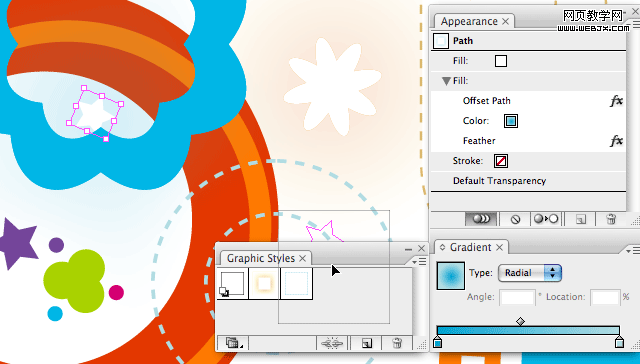
If you like the effects you’ve created and you want to apply them to other objects in the future, then you can create a Graphic Style simply by dragging the object into the Graphic Styles palette. You can reapply the style effect by selecting the object and then clicking the Style in the Graphic Styles palette.
当你做了一个效果还想用在其他的对象时,你可以将其保存为图形样式。 打开图形样式面板,把你要保存的效果对象拖到面板上,以后选中要用该样式的对象,在图形样式面板中点击样式就可以应用了。通过外观面板编辑对象外观
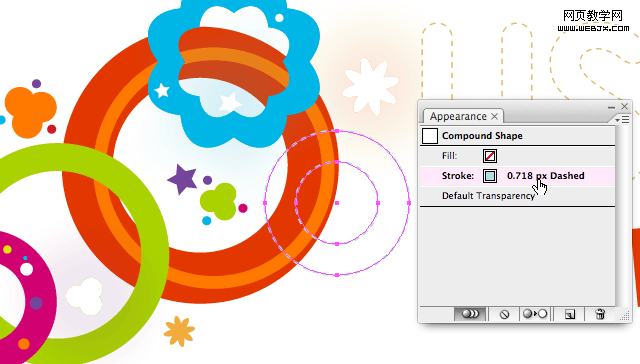
给对象指定了新的图形样式以后,你可以对这样式的每个属性进行设置,像效果、填色、描边的颜色、渐变填充、羽化设置等等。
If you like the effects you’ve created and you want to apply them to other objects in the future, then you can create a Graphic Style simply by dragging the object into the Graphic Styles palette. You can reapply the style effect by selecting the object and then clicking the Style in the Graphic Styles palette.
当你做了一个效果还想用在其他的对象时,你可以将其保存为图形样式。 打开图形样式面板,把你要保存的效果对象拖到面板上,以后选中要用该样式的对象,在图形样式面板中点击样式就可以应用了。通过外观面板编辑对象外观
给对象指定了新的图形样式以后,你可以对这样式的每个属性进行设置,像效果、填色、描边的颜色、渐变填充、羽化设置等等。
相关文章
 偏移文本或偏移路径意味着偏离了原来的位置,虽然听起来可能不太理想或杂乱无章,但在Illustrator中使用偏移技术处理文本可以给您带来一些很酷的效果,详细请看下文介绍2026-03-03
ai怎么混合两种颜色? illustrator混合两个色块的颜色的方法
ai填充不同颜色的图形重叠以后,想要将两种颜色混合,该怎么混合颜色呢?下面我们就来看看详细的教程2024-07-18 ai网格线间距默认的不是很喜欢,想要自己调整一下,该怎么调整呢?今天我们就来看看参考线调整技巧2024-05-28
ai路径平均效果怎么用? illustrator使用平均路径的教程
Adobe Illustrator中有一个路径平均功能,如何使用呢?下面小编为大家演示路径平均功能的一种使用方法2024-05-21ai保存pdf格式出现多余内容怎么解决? 去掉pdf文件多余内容的技巧
ai保存pdf格式出现多余内容怎么解决?ai中的文档保存为pdf文件的时候,发现有多余内容,该怎么操作呢?下面我们就来看看去掉pdf文件多余内容的技巧2023-12-19- ai描边在哪里?ai中想要设置描边,该怎么操作呢?下面我们就来看看ai设置描边的多种方法2023-12-19
- ai原位复制怎么用?复制图形的时候,想要原位复制粘贴,该怎么操作呢?下面我们就来看看ai原位复制快捷键介绍2023-12-19
ai怎么让文字随着路径变形? illustrator区域文字不跟着变换方向问题的
ai怎么让文字随着路径变形?选中文字后,发现文字不跟随变换区域旋转该怎么办呢?下面我们就来看看illustrator区域文字不跟着变换问题的解决办法2023-11-30ai渐变色怎么调方向? illustrator将渐变颜色反向的技巧
ai渐变色怎么调方向?ai中给图形填渐变色,想要进行反向,该怎么操作呢?下面我们就来看看illustrator将渐变颜色反向的技巧2023-11-30
Ai彩色logo怎么做反白反黑效果? ai彩色logo转化为黑白稿的技巧
Ai彩色logo怎么做反白反黑效果?设计的彩色logo想要做黑白稿,就是反黑反白效果,下面我们就来看看ai彩色logo转化为黑白稿的技巧2023-11-12
最新评论