

OpenClaw命令速查手册20+(核心命令 + 实战示例)
发布时间:2026-03-09 12:11:34 作者:佚名  我要评论
我要评论
我要评论本文为你整理了 20+ 最常用的 OpenClaw 命令,按功能分类,并提供实战示例,让你的日常工作效率提升 5 倍

OpenClaw 是一个强大的 AI 助手框架,但有 40+ 核心命令,记不住怎么办?
别担心!本文为你整理了 20+ 最常用的 OpenClaw 命令,按功能分类,并提供实战示例,让你的日常工作效率提升 5 倍!
无论是配置管理、消息发送、技能部署,还是 Gateway 控制,都能在这里找到快速答案。
一、快速入门
1.1 查看帮助信息
# 查看所有命令
openclaw --help
# 查看版本号
openclaw --version
# 查看特定命令的帮助
openclaw <command> --help
# 示例:查看 config 命令帮助
openclaw config --help
1.2 初始化配置
# 首次安装后初始化配置
openclaw setup
# 交互式引导配置(推荐新手)
openclaw onboard
#配置 + 安装系统后台服务(开机自启)
openclaw onboard --install-daemon
# 打开控制面板
openclaw dashboard
二、配置管理命令
2.1 查看配置
# 查看完整配置
openclaw config get
# 查看特定配置项
openclaw config get models.default
openclaw config get providers.mistral.apiKey
# 查看特定部分配置
openclaw config get --section models
openclaw config get --section providers
示例输出:
{
  "models": {
    "default": "mistral:mixtral-8x7b"
  },
  "providers": {
    "mistral": {
      "apiKey": "***REDACTED***"
    }
  }
}
2.2 设置配置
# 设置默认模型
openclaw config set models.default mistral:mixtral-8x7b
# 设置快速模型
openclaw config set models.fast mistral:mistral-7b
# 配置 Mistral API Key
openclaw config set providers.mistral.apiKey YOUR_API_KEY_HERE
# 启用缓存
openclaw config set cache.enabled true
openclaw config set cache.maxSize 5000
2.3 删除配置
# 删除特定配置项
openclaw config unset models.fast
# 重置某个节点
openclaw config unset models
2.4 配置向导
# 打开完整配置向导
openclaw configure
# 打开特定部分配置向导
openclaw configure --section models
openclaw configure --section providers
openclaw configure --section channels
三、Gateway 控制命令
3.1 启动/停止 Gateway
# 启动 Gateway(默认端口 18789)
openclaw gateway start
# 自定义端口启动
openclaw gateway start --port 19000
# 强制启动(杀死占用进程)
openclaw gateway start --force
# 停止 Gateway
openclaw gateway stop
# 重启 Gateway
openclaw gateway restart
# 查看运行状态
openclaw gateway status
3.2 运行时 Gateway
# 前台运行 Gateway(调试用)
openclaw gateway
# 开发模式运行(隔离状态)
openclaw --dev gateway
# 查看健康状态
openclaw health
3.3 查看日志
# 查看实时日志
openclaw logs
# 查看最近 50 行日志
openclaw logs --lines 50
# 查看错误日志
openclaw logs --filter error
# 持续监控日志
openclaw logs --follow
3.4 系统服务管理
# 使用 systemd 管理(推荐生产环境)
sudo systemctl start openclaw-gateway
sudo systemctl stop openclaw-gateway
sudo systemctl restart openclaw-gateway
sudo systemctl status openclaw-gateway
# 开机自启动
sudo systemctl enable openclaw-gateway
四、消息发送命令
4.1 发送消息
# 发送消息到当前会话
openclaw message send --message "Hello"
# 发送到特定目标(Telegram)
openclaw message send \
  --channel telegram \
  --target @mychat \
  --message "Hello from OpenClaw"
# 发送到特定目标(WhatsApp)
openclaw message send \
  --channel whatsapp \
  --target +8613800138000 \
  --message "您好"
# 发送到 Slack 频道
openclaw message send \
  --channel slack \
  --target C1234567890 \
  --message "@channel 重要通知"
4.2 发送媒体文件
# 发送图片
openclaw message send \
  --channel telegram \
  --target @mychat \
  --media /tmp/photo.jpg \
  --caption "这是一张图片"
# 发送音频
openclaw message send \
  --channel whatsapp \
  --target +8613800138000 \
  --media /tmp/voice.mp3
# 发送文档
openclaw message send \
  --channel telegram \
  --target @mychat \
  --media /tmp/report.pdf
4.3 高级消息功能
# 发送 JSON 格式(脚本自动化)
openclaw message send \
  --target @mychat \
  --message "Hello" \
  --json
# 回复消息
openclaw message send \
  --target @mychat \
  --message "收到" \
  --replyTo 12345
# 指定频道
openclaw message send \
  --channel discord \
  --target channel:1234567890 \
  --message "Hello"
4.4 频道动作(投票、反应等)
# 创建投票(Telegram)
openclaw message send \
  --channel telegram \
  --target @mychat \
  --pollQuestion "OpenClaw 好用吗?" \
  --pollOption 非常好用 \
  --pollOption 一般 \
  --pollOption 还需要改进 \
  --pollDurationHours 24
# 发送反应(Discord)
openclaw message send \
  --channel discord \
  --messageId 1234567890 \
  --emoji 👍 \
  --action react
五、技能管理命令
5.1 查看技能列表
# 查看所有已安装技能
openclaw skills list
# 搜索技能
openclaw skills search weather
# 查看技能详情
openclaw skills show weather
5.2 安装/卸载技能
# 安装技能
openclaw skills install weather
# 从指定来源安装
openclaw skills install weather --source github
# 指定版本安装
openclaw skills install weather@1.2.0
# 卸载技能
openclaw skills uninstall weather
5.3 更新技能
# 更新所有技能
openclaw skills update
# 更新特定技能
openclaw skills update weather
# 同步技能
openclaw skills sync
5.4 技能开发
# 创建新技能
openclaw skills create my-skill
# 验证技能
openclaw skills validate my-skill
# 打包技能
openclaw skills pack my-skill
六、模型配置命令
6.1 查看模型
# 查看所有配置的模型
openclaw models list
# 查看默认模型
openclaw models default
# 查看模型详情
openclaw models show mistral:mixtral-8x7b
6.2 配置模型
# 设置默认模型
openclaw models set-default mistral:mixtral-8x7b
# 添加新模型
openclaw models add \
  --name my-model \
  --provider mistral \
  --id mistral-medium \
  --maxTokens 8192
# 测试模型
openclaw models test \
  --model mistral:mixtral-8x7b \
  --prompt "Hello, OpenClaw!"
6.3 模型切换
# 临时指定模型
openclaw agent \
  --model mistral:mistral-7b \
  --message "快速响应"
# 使用内置模型别名
openclaw agent --model fast --message "这个用fast模型"
openclaw agent --model premium --message "这个用premium模型"
七、频道管理命令
7.1 查看频道
# 查看所有配置的频道
openclaw channels list
# 查看频道状态
openclaw channels status
# 查看特定频道详情
openclaw channels show telegram
7.2 登录频道
# Telegram 登录
openclaw channels login --channel telegram
# WhatsApp 登录(会显示 QR 码)
openclaw channels login --channel whatsapp --verbose
# Slack 登录
openclaw channels login --channel slack
# Discord 登录
openclaw channels login --channel discord
7.3 频道测试
# 测试频道连接
openclaw channels test --channel telegram
# 发送测试消息
openclaw channels test \
  --channel telegram \
  --target @mychat \
  --message "测试消息"
7.4 频道配置
# 配置频道
openclaw channels configure --channel telegram
# 更新频道 Token
openclaw channels update \
  --channel telegram \
  --token NEW_TOKEN
# 启用/禁用频道
openclaw channels enable telegram
openclaw channels disable telegram
八、会话管理命令
8.1 查看会话
# 列出所有会话
openclaw sessions
# 列出活跃会话
openclaw sessions --active
# 列出特定频道的会话
openclaw sessions --channel telegram
# 显示最近 10 个会话
openclaw sessions --limit 10
8.2 查看会话历史
# 查看特定会话的历史
openclaw sessions history <session-key>
# 查看最近的消息
openclaw sessions history <session-key> --limit 20
# 导出会话历史
openclaw sessions history <session-key> --export > history.json
8.3 会话操作
# 发送消息到会话
openclaw sessions send \
  --session <session-key> \
  --message "你好"
# 重置会话
openclaw sessions reset <session-key>
# 删除会话
openclaw sessions delete <session-key>
九、节点管理命令(智能家居控制)
9.1 查看节点
# 查看所有配对的节点
openclaw nodes list
# 查看节点状态
openclaw nodes status
# 描述节点详情
openclaw nodes describe <node-id>
9.2 节点操作
# 发送通知到节点
openclaw nodes notify \
  --node my-phone \
  --title "提醒" \
  --body "该吃饭了"
# 设置推送优先级
openclaw nodes notify \
  --node my-phone \
  --priority timeSensitive \
  --title "紧急通知" \
  --body "快递到了"
# 查看相册(手机)
openclaw nodes camera-list --node my-phone
# 拍照
openclaw nodes camera-snap \
  --node my-phone \
  --facing back \
  --output /tmp/photo.jpg
9.3 节点配对
# 启动配对
openclaw node pairing start
# 查看待配对节点
openclaw nodes pending
# 批准配对
openclaw nodes approve --node <node-id>
# 拒绝配对
openclaw nodes reject --node <node-id>
十、记忆管理命令
10.1 搜索记忆
# 搜索记忆
openclaw memory search "OpenClaw 配置"
# 搜索并显示多行上下文
openclaw memory search "配置" --lines 5
# 搜索特定路径的记忆
openclaw memory search "配置" --path MEMORY.md
# 限制结果数量
openclaw memory search "配置" --maxResults 10
10.2 记忆操作
# 查看记忆统计
openclaw memory stats
# 清理过期记忆
openclaw memory clean
# 备份记忆
openclaw memory backup --output /tmp/memory-backup.json
十一、Cron 定时任务命令
11.1 查看 Cron 任务
# 列出所有任务
openclaw cron list
# 查看任务运行历史
openclaw cron runs <job-id>
# 查看调度器状态
openclaw cron status
11.2 创建 Cron 任务
# 创建定时任务(每天凌晨触发)
openclaw cron add \
  --name "daily-report" \
  --schedule "0 0 * * *" \
  --text "生成每日报告"
# 创建重复任务(每 30 分钟)
openclaw cron add \
  --name "check-notifications" \
  --schedule "*/30 * * * *" \
  --text "检查通知"
# 创建单次任务(特定时间)
openclaw cron add \
  --name "special-task" \
  --schedule "at" \
  --at "2026-03-01T10:00:00" \
  --text "执行特殊任务"
11.3 Cron 任务操作
# 立即运行任务
openclaw cron run <job-id>
# 更新任务
openclaw cron update <job-id> --schedule "0 6 * * *"
# 删除任务
openclaw cron remove <job-id>
# 发送唤醒事件
openclaw cron wake --text "检查新消息"
十二、系统命令
12.1 健康检查
# 运行健康检查
openclaw doctor
# 快速修复常见问题
openclaw doctor --fix
# 检查特定组件
openclaw doctor --check gateway
openclaw doctor --check channels
12.2 系统状态
# 查看频道健康状态
openclaw status
# 查看系统事件
openclaw system events
# 查看心跳状态
openclaw system heartbeat
12.3 安全检查
# 运行安全检查
openclaw security audit
# 检查权限配置
openclaw security check-permissions
# 检查 API Key 有效性
openclaw security verify-keys
十三、插件管理命令
13.1 查看插件
# 查看已安装插件
openclaw plugins list
# 查看插件详情
openclaw plugins show <plugin-name>
# 检查插件状态
openclaw plugins status
13.2 插件操作
# 启用插件
openclaw plugins enable feishu
# 禁用插件
openclaw plugins disable feishu
# 重启插件
openclaw plugins restart feishu
# 更新插件
openclaw plugins update
十四、浏览器控制命令
14.1 启动/停止浏览器
# 启动浏览器
openclaw browser start
# 停止浏览器
openclaw browser stop
# 切换配置
openclaw browser start --profile chrome
openclaw browser start --profile openclaw
14.2 浏览器操作
# 打开网页
openclaw browser open https://example.com
# 截图
openclaw browser screenshot --output /tmp/screenshot.png
# 获取快照
openclaw browser snapshot --target main
# 查看标签页
openclaw browser tabs
十五、更新与维护命令
15.1 更新 OpenClaw
# 查看更新
openclaw update --dry-run
# 执行更新
openclaw update
# 更新到特定版本
openclaw update --tag 2026.2.22
# 更新到 Beta 版
openclaw update --channel beta
15.2 配置文件管理
# 备份配置
cp ~/.openclaw/config.json ~/.openclaw/config.json.backup
# 重置配置(保留 CLI)
openclaw reset
# 完全卸载(包括数据)
openclaw uninstall
15.3 Shell 自动补全
# 生成 Bash 补全脚本
openclaw completion bash > ~/.openclaw-completion
# 生成 Zsh 补全脚本
openclaw completion zsh > ~/.zsh-completion
# 应用补全(Bash)
echo "source ~/.openclaw-completion" >> ~/.bashrc
source ~/.bashrc
十六、常用组合命令
16.1 快速部署新技能
# 一键创建、开发、测试技能
openclaw skills create my-new-skill \
  && cd ~/.openclaw/workspace/skills/my-new-skill \
  && vim SKILL.md
16.2 批量发送通知
# 发送到多个目标
openclaw message send --target @user1 --message "通知内容"
openclaw message send --target @user2 --message "通知内容"
openclaw message send --target @user3 --message "通知内容"
# 使用循环批量发送(需要脚本配合)
for target in user1 user2 user3; do
  openclaw message send --target @$target --message "通知内容"
done
16.3 Gateway 重启 + 验证
# 重启并验证
openclaw gateway restart \
  && sleep 5 \
  && openclaw gateway status \
  && openclaw health
16.4 配置备份 + 更新
# 安全更新流程
cp ~/.openclaw/config.json ~/.openclaw/config.json.backup \
  && openclaw update --dry-run \
  && openclaw update \
  && openclaw gateway restart
16.5 每日报告生成
# 生成每日报告(Cron 脚本)
0 9 * * * openclaw cron add \
  --name daily-report \
  --schedule "0 9 * * *" \
  --text "生成昨日数据分析报告"
十七、故障排除命令
17.1 Gateway 无法启动
# 检查端口占用
sudo lsof -i :18789
# 强制重启
openclaw gateway start --force
# 查看错误日志
openclaw logs --filter error
# 运行健康检查
openclaw doctor
17.2 消息发送失败
# 检查频道状态
openclaw channels status
# 测试频道
openclaw channels test --channel telegram
# 重新登录频道
openclaw channels login --channel telegram
# 查看详细日志
openclaw message send --target @mychat --message "Test" --verbose
17.3 模型调用失败
# 检查 API Key
openclaw config get providers.openai.apiKey
# 测试模型
openclaw models test --model mistral:mixtral-8x7b --prompt "test"
# 检查网络连接
ping api.openai.com
# 运行诊断
openclaw doctor --check models
17.4 技能加载失败
# 检查技能列表
openclaw skills list
# 验证技能
openclaw skills validate my-skill
# 重新安装技能
openclaw skills uninstall my-skill
openclaw skills install my-skill
# 查看错误日志
openclaw logs --filter skill
十八、生产环境最佳实践
18.1 使用环境变量
# 推荐方式:使用环境变量存储敏感信息
export OPENAI_API_KEY="sk-xxx"
export MISTRAL_API_KEY="xxx"
export TELEGRAM_BOT_TOKEN="xxx"
# 然后启动 Gateway
openclaw gateway start
18.2 配置文件权限
# 限制配置文件权限
chmod 600 ~/.openclaw/config.json
# 检查权限
ls -la ~/.openclaw/config.json
18.3 日志管理
# 配置日志轮转
sudo tee /etc/logrotate.d/openclaw <<EOF
~/.openclaw/logs/*.log {
    daily
    rotate 7
    compress
    missingok
    notifempty
}
EOF
18.4 监控与告警
# 检查 Gateway 状态(Cron 脚本)
*/5 * * * * openclaw health || \
  openclaw message send --target @admin --message "Gateway 宕机!"
十九、快捷别名配置
19.1 创建常用别名
# 添加到 ~/.bashrc 或 ~/.zshrc
alias oc='openclaw'
alias ocg='openclaw gateway'
alias ocgl='openclaw logs --follow'
alias ocs='openclaw sessions'
alias ocm='openclaw message send'
alias occ='openclaw channels'
# 应用别名
source ~/.bashrc  # Bash
source ~/.zshrc   # Zsh
19.2 使用别名
# 启动 Gateway
ocg start
# 查看实时日志
ocgl
# 发送消息
ocm --target @mychat --message "Hello"
# 查看会话
ocs
二十、命令速查表
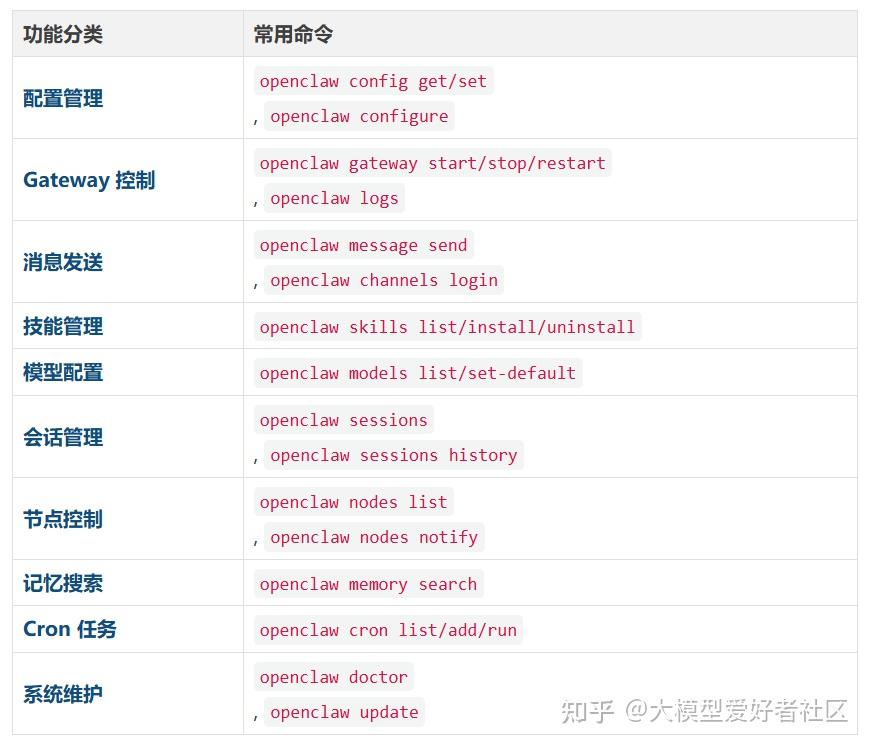
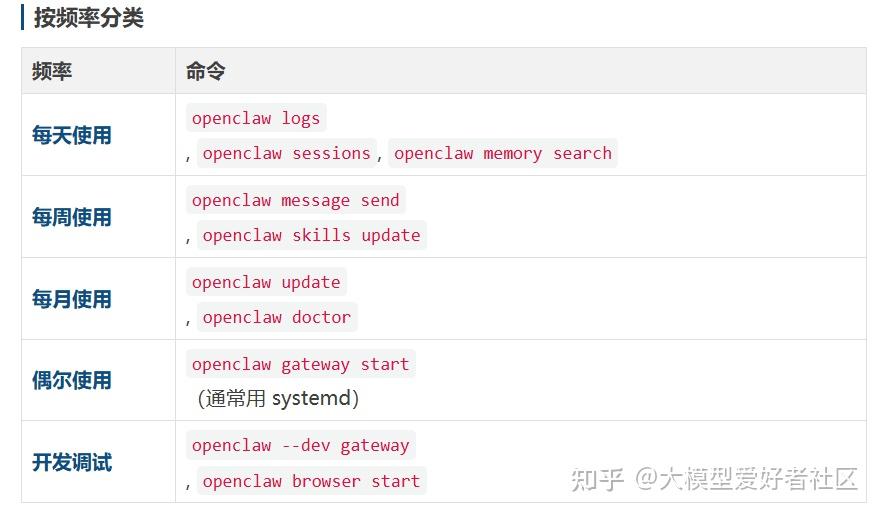
总结
OpenClaw 提供了丰富的命令行工具,掌握这些命令可以大幅提升工作效率。
相关文章
 还在为记不住 OpenClaw 命令烦恼?这份CLI 命令 + 聊天斜杠命令 + 关键路径 + 急救流程一站式手册,帮你快速上手、高效排错,轻松驾驭全功能2026-03-09
 OpenClaw是一款强大的AI助手框架,支持浏览器自动化,这篇文章主要介绍了OpenClaw远程浏览器从入门到踩坑完整使用的相关资料,并分享了在使用过程中遇到的问题和解决方案,需要2026-03-09
OpenClaw 安装与配置实战指南(含常用命令 + 故障排查)
OpenClaw安装与配置实战,涵盖了从安装到故障排查的详细流程,重点包括通道配置、模型接入和网关排障,提供了常用命令速查和故障排查步骤,帮助用户顺利上手和解决常见问题,本2026-03-06
OpenClaw 本地安装与配置十分钟完成(附常用命令速查)
OpenClaw 是一个开源的个人 AI 助手,支持系统操作、文件读写、代码执行等,它可以通过配置文件进行各种设置,这篇文章给大家介绍OpenClaw 快速入门:10 分钟完成本地安装与配2026-03-06
OpenClaw最强插件库:5400+Skills,22.7K Star,一条命令全搞定强的离谱
最近一段时间,一个叫OpenClaw(前身是 Clawdbot / Moltbot)的本地 AI Agent 项目突然爆火,技术圈几乎人人都在讨论,下面给大家分享OpenClaw最强插件库,5400+Skills,22.2026-03-05 OpenClaw 是一款功能强大的开源 AI 助手框架,支持对接多种大模型和通讯平台,下面就来介绍一下openclaw常用指令,需要的朋友们下面随着小编来一起学习学习吧2026-03-04
 OpenClaw(原Clawdbot/Moltbot)是一款开源的本地优先AI代理与自动化平台,支持多渠道通信集成、大模型调用及自动化任务执行,可满足个人与小型团队的智能辅助需求,这篇文章主2026-03-02
 本文围绕OpenClaw千帆模型切换展开,系统梳理从环境准备到配置落地的全流程,精准拆解关键配置步骤与核心命令,涵盖模型选择、授权登录、配置生效等环节,为开发者提供实操2026-03-02
 OpenClaw 的命令行工具非常强大,覆盖了从安装配置到日常使用的方方面面,为了让你能快速上手,我将最常用的命令整理为以下分类速查表,你可以将它看作一份随时查阅的急救手2026-03-01
OpenClaw常用操作命令完整速查手册:从入门到精通的终端 CLI & 聊天指令全解析
作为 OpenClaw 生态(包括 PicoClaw、ZeroClaw、losterAI、EasyClaw 等系列开源应用)的核心用户,我根据开源资料和个人使用体验整理了这份全网最全的命令速查手册2026-03-09
最新评论