

利用Prometheus与Grafana对Mysql服务器的性能监控详解
概述
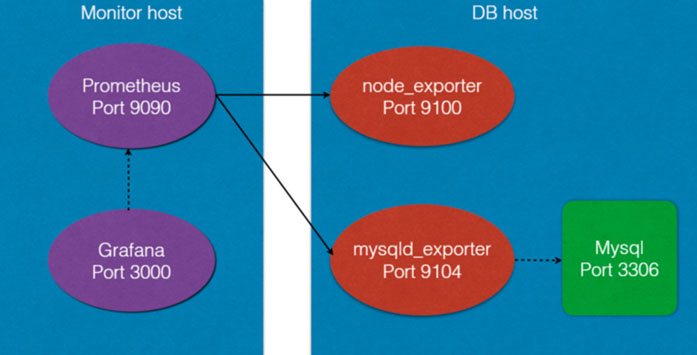
Prometheus是一个开源的服务监控系统,它通过HTTP协议从远程的机器收集数据并存储在本地的时序数据库上。它提供了一个简单的网页界面、一个功能强大的查询语言以及HTTP接口等等。Prometheus通过安装在远程机器上的exporter来收集监控数据,这里用到了以下两个exporter:
- node_exporter – 用于机器系统数据
- mysqld_exporter – 用于Mysql服务器数据
Grafana是一个开源的功能丰富的数据可视化平台,通常用于时序数据的可视化。它内置了以下数据源的支持:
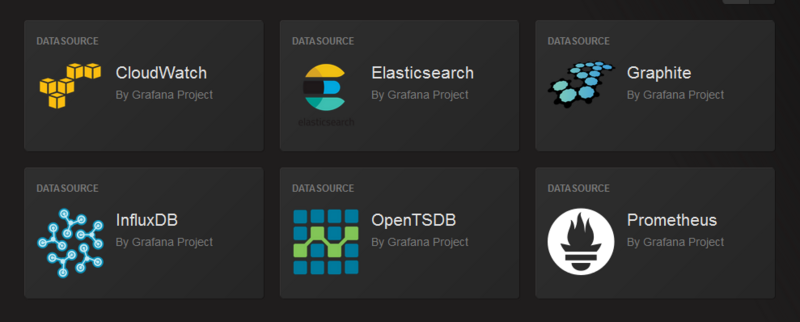
并可以通过插件扩展支持的数据源。
架构图
下面是本次部署的架构图
安装并运行Prometheus
1.在 Monitor 上安装 Prometheus
安装至/opt/prometheus
$ wget https://github.com/prometheus/prometheus/releases/download/v1.5.2/prometheus-1.5.2.linux-amd64.tar.gz
$ tar zxvf prometheus-1.5.2.linux-amd64.tar.gz
$ mv prometheus-1.5.2.linux-amd64 /opt/prometheus
2.在安装目下编辑配置文件 prometheus.yml
vim /opt/prometheus/prometheus.yml
# my global config
global:
 scrape_interval: 15s # Set the scrape interval to every 15 seconds. Default is every 1 minute.
 evaluation_interval: 15s # Evaluate rules every 15 seconds. The default is every 1 minute.
 # scrape_timeout is set to the global default (10s).
 # Attach these labels to any time series or alerts when communicating with
 # external systems (federation, remote storage, Alertmanager).
 external_labels:
 monitor: 'codelab-monitor'
# Load rules once and periodically evaluate them according to the global 'evaluation_interval'.
rule_files:
 # - "first.rules"
 # - "second.rules"
# A scrape configuration containing exactly one endpoint to scrape:
# Here it's Prometheus itself.
scrape_configs:
 # The job name is added as a label `job=<job_name>` to any timeseries scraped from this config.
 - job_name: 'prometheus'
 # metrics_path defaults to '/metrics'
 # scheme defaults to 'http'.
 static_configs:
 - targets: ['localhost:9090']
 # 以下是添加的部分
 - job_name: linux
 static_configs:
 - targets: ['172.30.251.214:9100']
 labels:
 instance: db1
 - job_name: mysql
 static_configs:
 - targets: ['172.30.251.214:9104']
 labels:
 instance: db1
其中:172.30.251.214是MySQL的IP,端口则是对应的exporter的监听端口。
3.启动Prometheus
[loya@centos6 prometheus]$ ./prometheus
INFO[0000] Starting prometheus (version=1.5.2, branch=master, revision=bd1182d29f462c39544f94cc822830e1c64cf55b) source=main.go:75
INFO[0000] Build context (go=go1.7.5, user=root@a8af9200f95d, date=20170210-14:41:22) source=main.go:76
INFO[0000] Loading configuration file prometheus.yml source=main.go:248
INFO[0000] Loading series map and head chunks... source=storage.go:373
INFO[0000] 0 series loaded. source=storage.go:378
INFO[0000] Starting target manager... source=targetmanager.go:61
INFO[0000] Listening on :9090 source=web.go:259
Prometheus内置了一个web界面,可以通过http://monitor_host:9090进行访问:

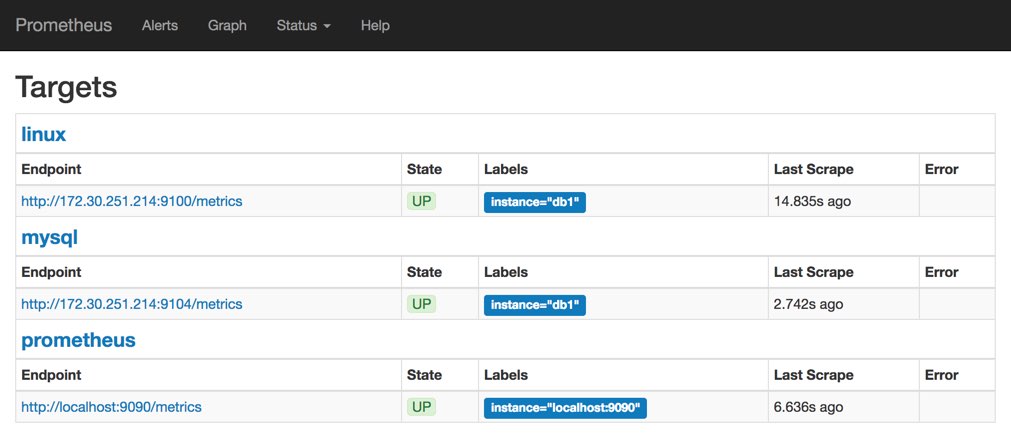
在Status->Targets页面下,可以看到我们配置的两个Target,它们的State为DOWN。

4.接下来需要在被监控机器上安装并运行exporter
下载exporters并解压:
$ mkdir /opt/prometheus/prometheus_exporters
$ cd /opt/prometheus/prometheus_exporters
$ wget https://github.com/prometheus/node_exporter/releases/download/v0.14.0-rc.1/node_exporter-0.14.0-rc.1.linux-amd64.tar.gz
$ wget https://github.com/prometheus/mysqld_exporter/releases/download/v0.9.0/mysqld_exporter-0.9.0.linux-amd64.tar.gz
$ tar zxvf node_exporter-0.14.0-rc.1.linux-amd64.tar.gz
$ tar zxvf mysqld_exporter-0.9.0.linux-amd64.tar.gz
# 将各自的可执行文件移动到/opt/prometheus/prometheus_exporters
$ ll /opt/prometheus/prometheus_exporters
total 24464
-rwxr-xr-x 1 root root 12182376 Feb 23 19:01 mysqld_exporter
-rwxr-xr-x 1 root root 12862209 Feb 23 19:01 node_exporter
运行node_exporter
$ cd /opt/prometheus/prometheus_exporters
$ ./node_exporter
INFO[0000] Starting node_exporter (version=0.14.0-rc.1, branch=master, revision=5a07f4173d97fa0dd307db5bd3c2e6da26a4b16e) source="node_exporter.go:136"
INFO[0000] Build context (go=go1.7.4, user=root@ed143c8f2fcd, date=20170116-16:00:03) source="node_exporter.go:137"
INFO[0000] No directory specified, see --collector.textfile.directory source="textfile.go:57"
INFO[0000] Enabled collectors: source="node_exporter.go:156"
INFO[0000] - entropy source="node_exporter.go:158"
INFO[0000] - loadavg source="node_exporter.go:158"
INFO[0000] - stat source="node_exporter.go:158"
INFO[0000] - diskstats source="node_exporter.go:158"
INFO[0000] - textfile source="node_exporter.go:158"
INFO[0000] - vmstat source="node_exporter.go:158"
INFO[0000] - meminfo source="node_exporter.go:158"
INFO[0000] - filefd source="node_exporter.go:158"
INFO[0000] - filesystem source="node_exporter.go:158"
INFO[0000] - mdadm source="node_exporter.go:158"
INFO[0000] - netdev source="node_exporter.go:158"
INFO[0000] - sockstat source="node_exporter.go:158"
INFO[0000] - time source="node_exporter.go:158"
INFO[0000] - zfs source="node_exporter.go:158"
INFO[0000] - edac source="node_exporter.go:158"
INFO[0000] - hwmon source="node_exporter.go:158"
INFO[0000] - netstat source="node_exporter.go:158"
INFO[0000] - uname source="node_exporter.go:158"
INFO[0000] - conntrack source="node_exporter.go:158"
INFO[0000] Listening on :9100 source="node_exporter.go:176"
mysqld_exporter需要连接到MySQL,所以需要MySQL权限,我们为其创建用户并赋予所需的权限:
mysql> GRANT REPLICATION CLIENT, PROCESS ON *.* TO 'prom'@'localhost' identified by 'abc123';
mysql> GRANT SELECT ON performance_schema.* TO 'prom'@'localhost';
创建.my.cnf文件并运行mysqld_exporter:
$ cd /opt/prometheus/prometheus_exporters
$
$ cat << EOF > .my.cnf
[client]
user=prom
password=abc123
EOF
$
$ ./mysqld_exporter -config.my-cnf=".my.cnf"
INFO[0000] Starting mysqld_exporter (version=0.9.0, branch=master, revision=8400af20ccdbf6b5e0faa2c925c56c48cd78d70b) source=mysqld_exporter.go:432
INFO[0000] Build context (go=go1.6.3, user=root@2c131c66ca20, date=20160926-18:28:09) source=mysqld_exporter.go:433
INFO[0000] Listening on :9104 source=mysqld_exporter.go:451
回到Prometheus web界面Status->Targets,可以看到两个Target的状态已经变成UP了:
安装和运行Grafana
安装:
Grafana 的安装官方文档比较清晰,这里不再赘述。
配置:
编辑配置文件/etc/grafana/grafana.ini,修改dashboards.json段落下两个参数的值:
[dashboards.json]
enabled = true
path = /var/lib/grafana/dashboards
导入Prometheus Dashboard:
$ git clone https://github.com/percona/grafana-dashboards.git
$ cp -r grafana-dashboards/dashboards /var/lib/grafana
启动:
$ /etc/init.d/grafana-server start
通过http://monitor_host:3000访问Grafana Web界面(缺省帐号/密码为admin/admin)
登录后,通过Data Sources页面添加数据源:

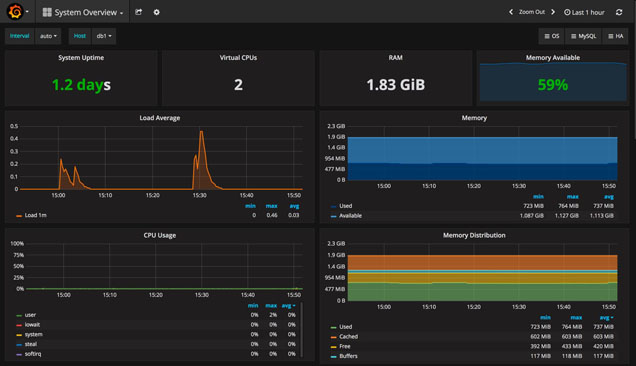
然后就可以通过选择不同的仪表盘(左上角)和时间段(右上角)来呈现图表了:
System Overview:
MySQL Overview:

总结
以上就是这篇文章的全部内容了,希望本文的内容对大家的学习或者工作能带来一定的帮助,如果有疑问大家可以留言交流,谢谢大家对脚本之家的支持。
相关文章
 这篇文章主要为大家详细介绍了史上最简单的MySQL数据备份与还原教程中篇,具有一定的参考价值,感兴趣的小伙伴们可以参考一下2017-10-10
 这篇文章主要给大家介绍了关于MySQL中explain语句的基本使用教程,文中通过示例代码介绍的非常详细,对大家的学习或者工作具有一定的参考学习价值,需要的朋友们下面随着小编来一起学习学习吧2021-03-03
 在当前的DevOps环境中,自动化部署已成为提升运维效率的核心手段,本教程将手把手教你编写一个智能化的MySQL部署脚本,感兴趣的小伙伴跟着小编一起来看看吧2025-03-03
 这篇文章主要介绍了一文了解mysql索引的数据结构为什么用B+树,在节点中存储某段数据的首地址,并且B+树的叶子节点用了一个链表串联起来,便于范围查找,下文利用各种索引的数据结构的方法与B+树做对比,看看它的优势到底是什么,感兴趣的小伙伴可以参考一下2022-04-04
 这篇文章主要介绍了MySQL之join查询优化方式,具有很好的参考价值,希望对大家有所帮助。如有错误或未考虑完全的地方,望不吝赐教2023-03-03
 这篇文章主要介绍了MySQL中七种SQL JOINS的实现方法及图文详解,文中也有相关的代码示例供大家参考,感兴趣的同学可以参考阅读下2023-06-06
 这篇文章主要介绍了如何将mysql存储位置迁移到一块新的磁盘上,本文给大家介绍的非常详细,具有一定的参考借鉴价值,需要的朋友可以参考下2019-12-12
 在后端开发或者面试中,常常会遇到深分页的问题,深分页问题会导致用户体验急剧下降,甚至造成服务器崩溃,下面就来介绍一下该问题的解决,感兴趣的可以了解一下2026-02-02
 这篇文章主要给大家介绍了关于MySQL存储过程(in、out、inout)的相关资料,文中通过示例代码介绍的非常详细,对大家的学习或者工作具有一定的参考学习价值,需要的朋友们下面随着小编来一起学习学习吧2020-11-11
 这篇文章主要介绍了MySQL数据库入门之多实例配置方法,结合实例形式分析了MySQL数据库多实例配置相关概念、原理、操作方法与注意事项,需要的朋友可以参考下2020-05-05
最新评论