

CentOS7下Oracle19c rpm安装过程
| 软件 | 下载地址 |
|---|---|
| CentOS-7-x86_64-Minimal-2009.iso | http://mirrors.163.com/centos/7.9.2009/isos/x86_64/CentOS-7-x86_64-Minimal-2009.iso |
| oracle-database-preinstall-19c-1.0-1.el7.x86_64.rpm | https://www.aliyundrive.com/s/F9ziMB6nPbp |
| oracle-database-ee-19c-1.0-1.x86_64.rpm | https://www.aliyundrive.com/s/E6m5e8CCGq2 |
一. 环境配置
虚拟机安装建议分2G内存,30G硬盘。
关闭防火墙(或放行相关端口)
systemctl stop firewalld
systemctl disable firewalld
关闭selinux
修改SELINUX=disabled
vi /etc/selinux/config
# This file controls the state of SELinux on the system.
# SELINUX= can take one of these three values:
# enforcing - SELinux security policy is enforced.
# permissive - SELinux prints warnings instead of enforcing.
# disabled - No SELinux policy is loaded.
SELINUX=disabled
# SELINUXTYPE= can take one of three values:
# targeted - Targeted processes are protected,
# minimum - Modification of targeted policy. Only selected processes are protected.
# mls - Multi Level Security protection.
SELINUXTYPE=targeted
重启
reboot
将oracle-database-ee-19c-1.0-1.x86_64.rpm和oracle-database-preinstall-19c-1.0-1.el7.x86_64.rpm上传到/opt下
二. 依赖安装
安装oracle-database-preinstall-19c-1.0-1.el7.x86_64.rpm
yum -y localinstall /opt/oracle-database-preinstall-19c-1.0-1.el7.x86_64.rpm

三. 安装配置Oracle 19c
安装Oracle 19c
yum -y localinstall /opt/oracle-database-ee-19c-1.0-1.x86_64.rpm

初始化Oracle数据库(时间较长)
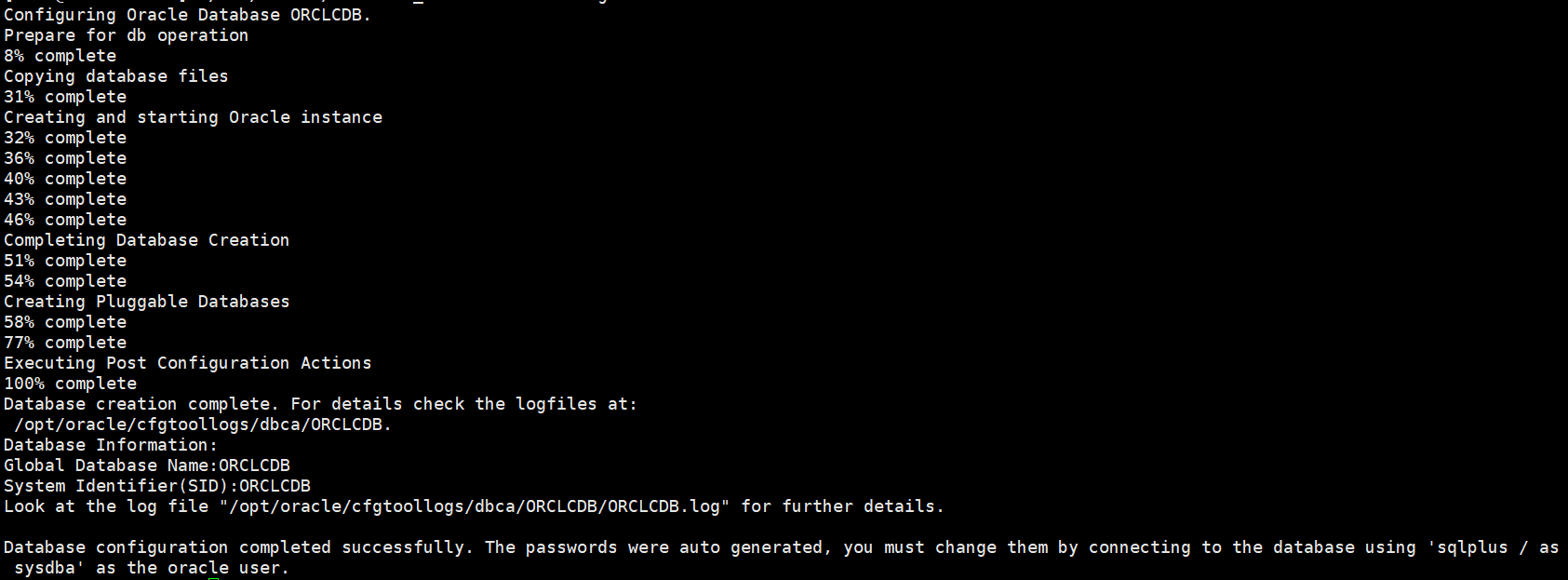
/etc/init.d/oracledb_ORCLCDB-19c configure
配置环境变量
却换到oracle用户
su - oracle
添加环境变量
vi /home/oracle/.bash_profile
# .bash_profile

# Get the aliases and functions
if [ -f ~/.bashrc ]; then
        . ~/.bashrc
fi

# User specific environment and startup programs

PATH=$PATH:$HOME/.local/bin:$HOME/bin

export PATH

export ORACLE_HOME=/opt/oracle/product/19c/dbhome_1
export PATH=$PATH:/opt/oracle/product/19c/dbhome_1/bin
export ORACLE_SID=ORCLCDB
使环境变量生效
source /home/oracle/.bash_profile
登陆数据库
sqlplus / as sysdba

修改system密码为123456
alter user system identified by 123456;
退出数据库
exit;
四. 设置数据库监听自启动
修改/etc/oratab文件N为Y
vi /etc/oratab
# This file is used by ORACLE utilities. It is created by root.sh
# and updated by either Database Configuration Assistant while creating
# a database or ASM Configuration Assistant while creating ASM instance.# A colon, ':', is used as the field terminator. A new line terminates
# the entry. Lines beginning with a pound sign, '#', are comments.
#
# Entries are of the form:
# $ORACLE_SID:$ORACLE_HOME:<N|Y>:
#
# The first and second fields are the system identifier and home
# directory of the database respectively. The third field indicates
# to the dbstart utility that the database should , "Y", or should not,
# "N", be brought up at system boot time.
#
# Multiple entries with the same $ORACLE_SID are not allowed.
#
#
ORCLCDB:/opt/oracle/product/19c/dbhome_1:Y
在/etc/rc.local中添加需执行的命令
su root # 却换为root用户
vi /etc/rc.local
#!/bin/bash
# THIS FILE IS ADDED FOR COMPATIBILITY PURPOSES
#
# It is highly advisable to create own systemd services or udev rules
# to run scripts during boot instead of using this file.
#
# In contrast to previous versions due to parallel execution during boot
# this script will NOT be run after all other services.
#
# Please note that you must run 'chmod +x /etc/rc.d/rc.local' to ensure
# that this script will be executed during boot.

touch /var/lock/subsys/local

su - oracle -c 'lsnrctl start'
su - oracle -c 'dbstart'
修改$ORACLE_HOME/bin/dbstart文件,修改ORACLE_HOME_LISTNER=$ORACLE_HOME
vi $ORACLE_HOME/bin/dbstart
$ORACLE_HOME/bin/dbstart 文件局部
...
#####################################

LOGMSG="logger -puser.alert -s "

trap 'exit' 1 2 3

# for script tracing
case $ORACLE_TRACE in
  T) set -x ;;
esac

# Set path if path not set (if called from /etc/rc)
SAVE_PATH=/bin:/usr/bin:/etc:${PATH} ; export PATH
SAVE_LLP=$LD_LIBRARY_PATH

# First argument is used to bring up Oracle Net Listener
ORACLE_HOME_LISTNER=$ORACLE_HOME
if [ ! $ORACLE_HOME_LISTNER ]; then
  echo "Since ORACLE_HOME is not set, cannot auto-start Oracle Net Listener."
  echo "Usage: $0 ORACLE_HOME"
else
...
设置CentOS7,8开机执行/etc/rc.local文件(CentOS7,8开机不执行/etc/rc.local文件)
给 /etc/rc.d/rc.local 添加 可执行权限
chmod a+x /etc/rc.d/rc.local
将 rc-local 服务设置成开机启动(默认状态是 static,会被其他service服务调用执行。不过还是修改一下,以防那个服务被停用就牵连了)
systemctl enable rc-local
重启,用sqldeveloper链接,验证是否成功
reboot

删除/opt下oracle-database-ee-19c-1.0-1.x86_64.rpm和oracle-database-preinstall-19c-1.0-1.el7.x86_64.rpm
rm /opt/oracle-database-ee-19c-1.0-1.x86_64.rpm /opt/oracle-database-preinstall-19c-1.0-1.el7.x86_64.rpm
到此这篇关于CentOS7下Oracle19c rpm安装过程的文章就介绍到这了,更多相关Oracle19c rpm安装内容请搜索脚本之家以前的文章或继续浏览下面的相关文章希望大家以后多多支持脚本之家!
相关文章
 因为在FOR .. IN () LOOP 游标中使用 所以不能采用下面的查询语句做游标2009-07-07
Oracle 11g安装错误提示未找到wfmlrsvcapp.ear的解决方法
这篇文章主要为大家详细介绍了Oracle 11g安装错误提示未找到wfmlrsvcapp.ear的解决方法,具有一定的参考价值,感兴趣的小伙伴们可以参考一下2017-04-04 想统一整理Oracle中常用的命令语句,以后遇到,会不断更新此博客中。为了以后方便查询,因此整理此博客中2012-11-11
 Oracle数据库集复制方法浅议...2007-03-03
Oracle中实现类似于Mysql中的Field()函数功能
这篇文章主要详细介绍了在Oracle中如何实现类似于Mysql中的Field()函数功能,本文主要通过代码示例介绍了Oracle中的Decode()函数和Oracle中的row_number,需要的朋友可以参考下2023-06-06
教你使用PLSQLDeveloper14连接Oracle11g的详细过程
今天给大家带来一篇教程关于用PLSQLDeveloper14连接Oracle11g的详细过程,本文分步骤通过图文并茂的形式给大家介绍的非常详细,需要的朋友参考下吧2021-09-09
如何使用Oracle PL/SQL 实现发送电子邮件功能(UTL_MAIL)
这篇文章主要介绍了Oracle PL/SQL 实现发送电子邮件功能,今天主要给大家介绍使用UTL_MAIL实现发送电子邮件功能,具体实例代码跟随小编一起看看吧2021-08-08
oracle数据库中chr()函数和concat函数的使用说明
这篇文章主要介绍了oracle数据库中chr()函数和concat函数的使用说明,具有很好的参考价值,希望对大家有所帮助,如有错误或未考虑完全的地方,望不吝赐教2024-07-07 这篇文章主要介绍了Oracle出现超出打开游标最大数的解决方法,涉及针对Oracle游标位置的判断与处理技巧,具有一定参考借鉴价值,需要的朋友可以参考下2016-06-06
Oracle数据库rownum和row_number的不同点
在Oracle中,有一个很有趣的东西,那就是rownum。当你从某个表中查询数据的时候,返回的结果集中都会带有rownum这个字段,而且有时候也可以使用rownum进行一些条件查询2015-11-11
最新评论