

C#实现窗体中的各个控件同比自动放缩大小
更新时间:2014年10月13日 11:43:32 投稿:junjie
这篇文章主要介绍了C#实现窗体中的各个控件同比自动放缩大小,实现方式主要是利用panel控件为主题,对于每个控件的大小位置和字体这几个属性进行记录,然后根据窗体改变的大小同时放缩,需要的朋友可以参考下
实现方式主要是利用panel控件为主题,对于每个控件的大小位置和字体这几个属性进行记录,然后根据窗体改变的大小同时放缩。
简要步骤如下:
1、创建C#窗体程序项目。
2、Panel放置到窗体。
3、设置属性dock为fill。
4、注意MinnumSize不能设置为0, 改成大于0都行。
复制代码 代码如下:
public partial class FrmDemo : Form
{
double dFrmWidth;
double dFrmHeight;
double dZoomHorizon;
double dZoomVerticality;
Dictionary<string, string> dicControlsAttribute = new Dictionary<string, string>();
protected void GetAllInitiateContrlInfo(Control CrlContainer)
{
if (CrlContainer.Parent == this)
{
dFrmWidth = Convert.ToDouble(CrlContainer.Width);
dFrmHeight = Convert.ToDouble(CrlContainer.Height);
}
foreach (Control item in CrlContainer.Controls)
{
if (item.Name.Trim() != "")
dicControlsAttribute.Add(item.Name, (item.Left + item.Width / 2) + "," + (item.Top + item.Height / 2)
+ "," + item.Width + "," + item.Height + "," + item.Font.Size);
if ((item as UserControl) == null && item.Controls.Count > 0)
GetAllInitiateContrlInfo(item);
}
}
private void ChangeControlsInitiate(Control CrlContainer)
{
dZoomHorizon = (Convert.ToDouble(CrlContainer.Width) / dFrmWidth);
dZoomVerticality = (Convert.ToDouble(CrlContainer.Height) / dFrmHeight);
}
private void ChangeCurrentControlAttr(Control CrlContainer)
{
double[] dPosition = new double[5];
foreach (Control item in CrlContainer.Controls)
{
if (item.Name.Trim() != "")
{
if ((item as UserControl) == null && item.Controls.Count > 0)
ChangeCurrentControlAttr(item);
string[] strs = dicControlsAttribute[item.Name].Split(',');
for (int j = 0; j < 5; j++)
{
dPosition[j] = Convert.ToDouble(strs[j]);
}
double itemWidth = dPosition[2] * dZoomHorizon;
double itemHeight = dPosition[3] * dZoomVerticality;
item.Left = Convert.ToInt32(dPosition[0] * dZoomHorizon - itemWidth / 2);
item.Top = Convert.ToInt32(dPosition[1] * dZoomVerticality - itemHeight / 2);
item.Width = Convert.ToInt32(itemWidth);
item.Height = Convert.ToInt32(itemHeight);
//item.Font = new Font(item.Font.Name, float.Parse
//((dPosition[4] * Math.Min(dZoomHorizon, dZoomVerticality)).ToString()));
//字体也可以实现同比放缩。
}
}
}
protected override void OnSizeChanged(EventArgs e)
{
base.OnSizeChanged(e);
if (dicControlsAttribute.Count > 0)
{
ChangeControlsInitiate(this.Controls[0]);
ChangeCurrentControlAttr(this.Controls[0]);
}
}
public FrmDemo()
{
InitializeComponent();
GetAllInitiateContrlInfo(this.Controls[0]);//构造函数里面调用即可。
}
}
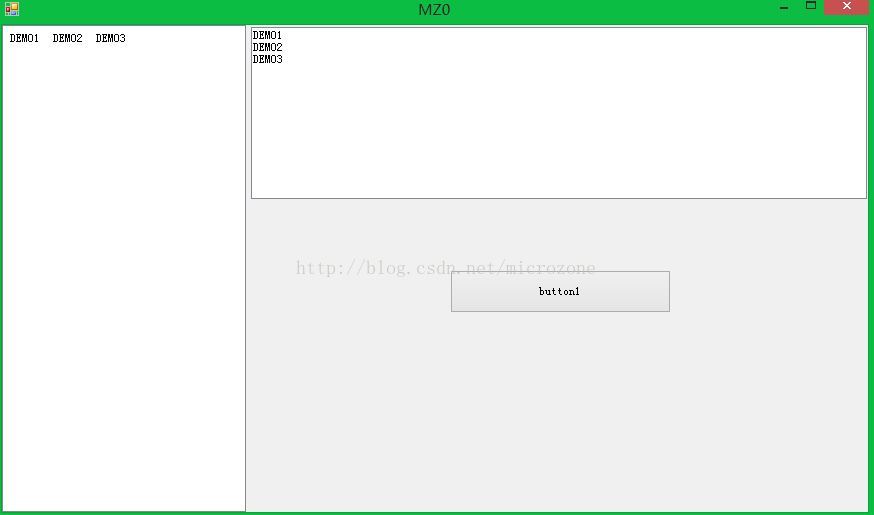
5、效果测试

相关文章
 这篇文章主要介绍了Mongodb批量删除gridfs文件实例,本文根据生产环境实际需求总结而来,需要的朋友可以参考下2015-01-01
 大家可能平时在开发过程中都使用客户端工具来连接和查询mongodb,但是一般生产当中的数据库是不允许本地客户端连接的,下面这篇文章主要给大家介绍了关于mongodb命令行连接及基础命令总结的相关资料,需要的朋友可以参考下2024-04-04
MongoDB在系统数据库local中无法创建用户的解决办法
这篇文章主要给大家介绍了关于MongoDB在系统数据库local中无法创建用户的解决办法,文中通过示例代码介绍的非常详细,对大家的学习或者工作具有一定的参考学习价值,需要的朋友们下面随着小编来一起学习学习吧2018-11-11
MongoDB错误32-bit servers don''t have journaling enabled by de
这篇文章主要介绍了MongoDB错误32-bit servers don't have journaling enabled by default解决方法,需要的朋友可以参考下2014-10-10 这篇文章主要给大家介绍了在Linux系统下下MongoDB数据库实现自动备份的相关资料,文中通过示例代码介绍的非常详细,对大家具有一定的参考学习价值,需要的朋友们下面跟着小编一起来学习学习吧。2017-06-06
 这篇文章主要介绍了springboot如何整合mongodb,mongodb的安装和使用,感兴趣的同学可以参考阅读本文2023-03-03
 本文主要介绍了mongodb本地连接失败的问题解决,文中通过示例代码介绍的非常详细,对大家的学习或者工作具有一定的参考学习价值,需要的朋友们下面随着小编来一起学习学习吧2023-07-07
 这篇文章主要介绍了MongoDB查询操作限制返回字段的方法,需要的朋友可以参考下2014-05-05
MongoDB的mongo shell常用操作方法及操作脚本笔记
mongo shell即相当于SQL语句在关系型数据库中的作用,MongoDB使用JavaScript作为shell操作命令,这里我们就来整理MongoDB的mongo shell常用操作方法及操作脚本笔记2016-07-07 下面小编就为大家分享一篇使用mongoose和bcrypt实现用户密码加密的示例,具有很好的参考价值,希望对大家有所帮助。一起跟随小编过来看看吧2018-02-02
最新评论