

MySQL5.7.16绿色版安装教程详解
更新时间:2016年10月18日 11:29:31 作者:SOIF
这篇文章主要介绍了MySQL5.7.16绿色版安装教程详解的相关资料,本文给大家介绍的非常详细,具有一定的参考借鉴价值,需要的朋友可以参考下
下面给大家介绍下MySQL5.7.16绿色版安装教程,具体内容如下所示:
如图所示:
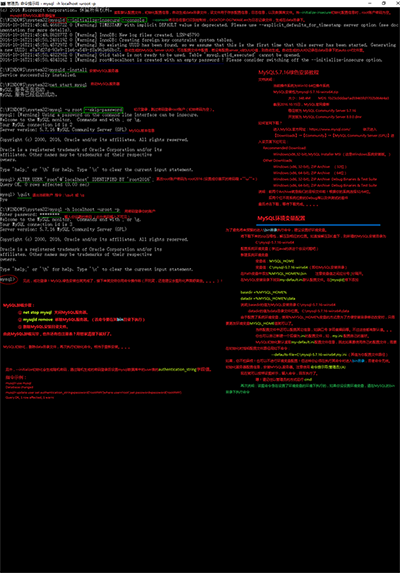
原窗口指令
Microsoft Windows [版本 10.0.xxxxx]
(c) 2016 Microsoft Corporation。保留所有权利。
C:\WINDOWS\system32>mysqld --initialize-insecure --console
2016-10-16T21:45:48.466872Z 0 [Warning] TIMESTAMP with implicit DEFAULT value is deprecated. Please use --explicit_defaults_for_timestamp server option (see documentation for more details).
2016-10-16T21:45:49.862877Z 0 [Warning] InnoDB: New log files created, LSN=45790
2016-10-16T21:45:50.240119Z 0 [Warning] InnoDB: Creating foreign key constraint system tables.
2016-10-16T21:45:50.457297Z 0 [Warning] No existing UUID has been found, so we assume that this is the first time that this server has been started. Generating a new UUID: e7a7d27d-93e9-11e6-a549-f8a963e68bc7.
2016-10-16T21:45:50.482293Z 0 [Warning] Gtid table is not ready to be used. Table 'mysql.gtid_executed' cannot be opened.
2016-10-16T21:45:50.484316Z 1 [Warning] root@localhost is created with an empty password ! Please consider switching off the --initialize-insecure option.
C:\WINDOWS\system32>mysqld -install
Service successfully installed.
C:\WINDOWS\system32>net start mysql
MySQL 服务正在启动 .
MySQL 服务已经启动成功。
C:\WINDOWS\system32>mysql -u root --skip-password
mysql: [Warning] Using a password on the command line interface can be insecure.
Welcome to the MySQL monitor. Commands end with ; or \g.
Your MySQL connection id is 2
Server version: 5.7.16 MySQL Community Server (GPL)
Copyright (c) 2000, 2016, Oracle and/or its affiliates. All rights reserved.
Oracle is a registered trademark of Oracle Corporation and/or its
affiliates. Other names may be trademarks of their respective
owners.
Type 'help;' or '\h' for help. Type '\c' to clear the current input statement.
mysql> ALTER USER 'root'@'localhost' IDENTIFIED BY 'root2016';
Query OK, 0 rows affected (0.00 sec)
mysql> \quit
Bye
C:\WINDOWS\system32>mysql -h localhost -uroot -p
Enter password: ********
Welcome to the MySQL monitor. Commands end with ; or \g.
Your MySQL connection id is 3
Server version: 5.7.16 MySQL Community Server (GPL)
Copyright (c) 2000, 2016, Oracle and/or its affiliates. All rights reserved.
Oracle is a registered trademark of Oracle Corporation and/or its
affiliates. Other names may be trademarks of their respective
owners.
Type 'help;' or '\h' for help. Type '\c' to clear the current input statement.
mysql>
以上所述是小编给大家介绍的MySQL5.7.16绿色版安装教程详解,希望对大家有所帮助,如果大家有任何疑问请给我留言,小编会及时回复大家的。在此也非常感谢大家对脚本之家网站的支持!
您可能感兴趣的文章:
- mysql 5.7.16 安装配置方法图文教程
- MySQL(win7x64 5.7.16版本)下载、安装、配置与使用的详细图文教程
- 64位 win10系统安装绿色版mysql-5.7.16-winx64的教程
- mysql installer community 5.7.16安装详细教程
- Linux 使用rpm方式安装最新mysql(5.7.16)步骤及常见问题解决方法
- mysql 5.7.16 zip包安装配置方法图文教程
- 详解CentOS 6.5中安装mysql 5.7.16 linux glibc2.5 x86 64(推荐)
- mysql 5.7.16 winx64安装配置方法图文教程
- linux下mysql 5.7.16 免安装版本图文教程
- mysql 5.7.16 ZIP包安装配置教程
相关文章
 这篇文章主要为大家详细介绍了Centos7下MySQL安装教程,具有一定的参考价值,感兴趣的小伙伴们可以参考一下2017-06-06
MySQL5.6 Replication主从复制(读写分离) 配置完整版
这篇文章主要介绍了MySQL5.6 Replication主从复制(读写分离) 配置完整版,需要的朋友可以参考下2016-04-04 这篇文章主要介绍了MySQL中处理各种重复的一些方法,包括对表和查询结果的重复的一些处理,需要的朋友可以参考下2015-05-05
 这篇文章主要介绍了MySQL 用户权限管理的相关资料,帮助大家更好的理解和学习使用MySQL,感兴趣的朋友可以了解下2021-04-04
 MySQL依据一些规则,竭尽全力的把这些很糟糕的语句转换成某种可以比较高效执行的形式,这个过程也可以被称作查询重写,本章主要就是详细讲解下这些比较重要的重写规则,感兴趣的小伙伴可跟着小编一起来学习2023-05-05
 这篇文章主要介绍了MySQL如何通过Navicat实现远程连接,帮助大家更好的理解和使用MySQL数据库,感兴趣的朋友可以了解下2020-09-09
 今天小编就为大家分享一篇关于基于MySQL数据库的数据约束实例及五种完整性约束介绍,小编觉得内容挺不错的,现在分享给大家,具有很好的参考价值,需要的朋友一起跟随小编来看看吧2019-01-01
 这篇文章主要介绍了MySQL服务器连接过程浅析,本文从源码分析了MySQL服务器的连接过程,需要的朋友可以参考下2015-03-03
 MySQL在备份方面包含了自身的mysqldump工具,但其只支持单线程工作,这就使得它无法迅速的备份数据。而 mydumper作为一个实用工具,能够良好支持多线程工作,这使得它在处理速度方面十倍于传统的2013-11-11
 这篇文章主要介绍了MySQL之表连接方式(内连接与外连接),具有很好的参考价值,希望对大家有所帮助,如有错误或未考虑完全的地方,望不吝赐教2025-04-04
最新评论