

PHPWind7.0风格css样式详解
 我要评论
我要评论#infobox{ border:1px solid #eee; border-top:0; padding:.2em .5em .5em;margin-top:1px; background:#fff url($imgpath/$stylepath/bg.png) 0 -400px repeat-x;}
#infobox td{ vertical-align:top}
/* 首页登陆框的样式 [包含公告栏] */
/*收藏板块*/
#fav-fid{ line-height:150%}
#fav-fid ul{ padding:0; margin:0 0 0 75px; color:#aaa;}
#fav-fid li{float:left;*word-wrap:normal;*white-space:nowrap;padding:0; margin:0; padding-left:1em;list-style:none;background:url($imgpath/$stylepath/fav-fid.gif) .2em .5em no-repeat;}
/*头部签名*/
#honor {color:#333;line-height:1.3em; padding:.2em 0 0 .1em;}
/*通用公告框*/
#breadcrumbs{ margin-top:8px;overflow:hidden;border:1px solid $tdcolor; height:28px; padding:0 1em 0 0;background:url($imgpath/$stylepath/menubg.gif) repeat-x #EFFCFE;
line-height:27px;*line-height:26px;}
#breadcrumbs .crumbs-item{ overflow:hidden; height:28px; padding:0 1.3em 0 1.3em;background:url($imgpath/$stylepath/breadcrumbs-item.gif) right top no-repeat; float:left; position:relative ; margin-right:-7px;}
#breadcrumbs .crumbs-item .strong{color:#60afe6;*line-height:29px;_line-height:29px;}
#breadcrumbs .crumbs-item i { position:absolute; height:28px; width:7px; left:0px; top:0}
#breadcrumbs .crumbs-item:hover i{ background:url($imgpath/$stylepath/breadcrumbs-item.gif) right bottom no-repeat;}
#breadcrumbs .crumbs-item:hover{ background-color: #EFF9C8;text-decoration:none}
#notice{padding:.3em 0;height:18px;}
#notice a{padding-left:1em; background:url($imgpath/$stylepath/dotB.png) no-repeat 0 .2em; margin-left:1em}
/*main*/
#main{width:$tablewidth;margin: auto; padding:1px 0 0} /* 中间得整体框架样式 */
/*table*/
.t{border:1px solid $tablecolor;border-top:2px solid $tablecolor;margin:0 auto 8px; height:auto; overflow:hidden;}
/* 风格里所有的框架边框样式 [后台风格编辑里的 表格外边框颜色 ] */
.t table{border:0px solid $forumcolorone;margin:0; width:100%;border-top:none;}
/* 样式.t里的table框架样式 */
.t2{border-top:$tablecolor 1px solid;margin:0px auto 5px;}
/* 浏览页里的框架 [ 无修改必要 ] */
.t3{margin:4px auto 3px;}
.t3 table{padding:0px;}
/* [ 无修改必要 ] */
.t4{padding:0px;} /* [ 无修改必要 ] */
.t5{border:1px solid $tdcolor;margin:0 auto 8px; height:auto; overflow:hidden;}
/*浅边框样式*/
/*table head*/
.h{border-bottom:1px solid $headborder;background:$headcolor;text-align:left;color:$headfontone;padding:2px .5em 0; line-height:220%;}
.h span{font-weight:normal;}
.h h2{font-weight:bold}
.h a{font-family:Arial;color:$headfontone}
.h span a,.h span{color:$headfonttwo;}
.h a.a2{margin-left:12px;}
/*标题栏样式*/
.h1{color:#008ef1;margin:0 0 1em 0;} /*文章浏览页标题补充样式*/
.h2{background:$headcolor;color:$headfontone;text-align:left;padding:0 12px 0 12px;height:28px;line-height:28px;border-bottom:1px solid $tdcolor;}
.h2 a{color:$headfontone;}
相关文章
css行内元素padding,margin,width,height没有变化
这篇文章主要介绍了css行内元素设置padding,margin,width,height没有变化的解决方法,需要的朋友可以参考下2014-05-07- 本文从语法结构、可能取的值、浏览器兼容问题等方面为大家介绍下padding和margin的异同点另附截图,有想学习的朋友可以参考下哈,希望对大家有所帮助2013-07-28
CSS边距属性定义是用margin还是用padding的两者对比
用CSS做网页时.边距用哪个属于好呢?是margin属性还是padding属性呢.2012-06-12- 关键字描述:注释 大全 样式 默认 模板 定义 margin:0 10px padding:0 下面这个是默认的ZBLOG CSS样式表 里面附带有最全的CSS注释 让你一看就理解了。如果您觉得麻烦2009-06-06
- 网页制作Webjx文章简介:CSS重设就是由于各种浏览器解释CSS样式的初始值有所不同,导致设计师在没有定义某个CSS属性时,不同的浏览器会按照自己的默认值来为没有定义的样式2009-04-02
Css Reset(复位)的简单介绍-CSS教程-网页制作-网页教学网
Css Reset是什么? 有些同行叫 "css复位",有些可能叫 "默认css"..... 相信看完全文您会对Css Reset有个重新的认识 原文地址: http://perishablepre2008-10-17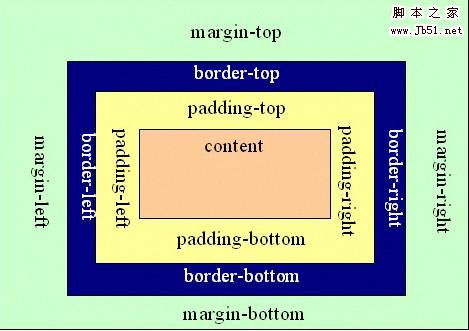 在CSS中margin是指从自身边框到另一个容器边框之间的距离,就是容器外距离。在CSS中padding是指自身边框到自身内部另一个容器边框之间的距离,就是容器内距离。下面讲解 pa2017-06-26
最新评论