

CSS3提交意见输入框样式代码
发布时间:2014-10-30 16:43:29 作者:佚名  我要评论
我要评论
我要评论这个提交意见输入框,结构使用到了table,样式用的css3,包含了多方面的知识,比较适合新手朋友们
做了个输入框样式,如图:
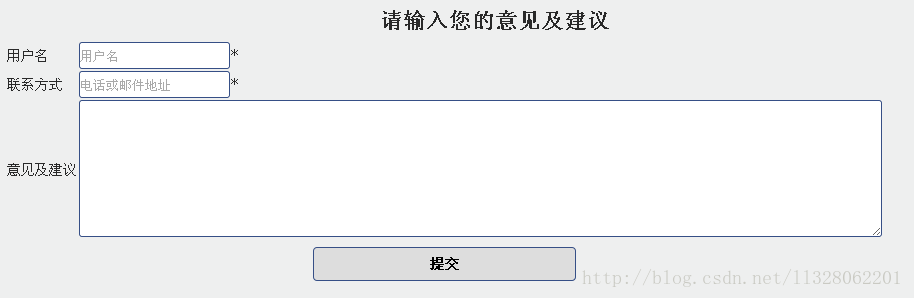
CSS代码如下:
#button {
cursor:pointer;
width:30%;
margin:5px;
padding:8px;
border-radius:4px 4px 4px 4px;
font-size:14px;
font-weight:bold;
}
input{
transition:all 0.30s ease-in-out;
-webkit-transition: all 0.30s ease-in-out;
-moz-transition: all 0.30s ease-in-out;
border:#364f86 1px solid;
border-radius:3px;
outline:none;
}
input:focus{
box-shadow:0 0 5px rgba(81, 203, 238, 1);
-webkit-box-shadow:0 0 5px rgba(81, 203, 238, 1);
-moz-box-shadow:0 0 5px rgba(81, 203, 238, 1);
}
textarea{
transition:all 0.30s ease-in-out;
-webkit-transition: all 0.30s ease-in-out;
-moz-transition: all 0.30s ease-in-out;
border:#364f86 1px solid;
border-radius:3px;
outline:none;
}
textarea:focus{
box-shadow:0 0 5px rgba(81, 203, 238, 1);
-webkit-box-shadow:0 0 5px rgba(81, 203, 238, 1);
-moz-box-shadow:0 0 5px rgba(81, 203, 238, 1);
}
table代码如下:
<table>
<tr>
<td>用户名</td>
<td><input name="username" type="text" id="username" placeholder="用户名" style="height:25px"></input>*</td>
</tr>
<tr>
<td>联系方式</td>
<td><input name="contact" type="text" id="contact" placeholder="电话或邮件地址" style="height:25px"></input>*</td>
</tr>
<tr>
<td>意见及建议</td>
<td><textarea name="comment" id="comment" rows="9" cols="112" ></textarea></td>
</tr>
<tr>
<td colspan="2"align="center"><input type="submit" id="button" value="提交" /></td>
</tr>
</table>
CSS代码如下:
复制代码
代码如下:#button {
cursor:pointer;
width:30%;
margin:5px;
padding:8px;
border-radius:4px 4px 4px 4px;
font-size:14px;
font-weight:bold;
}
input{
transition:all 0.30s ease-in-out;
-webkit-transition: all 0.30s ease-in-out;
-moz-transition: all 0.30s ease-in-out;
border:#364f86 1px solid;
border-radius:3px;
outline:none;
}
input:focus{
box-shadow:0 0 5px rgba(81, 203, 238, 1);
-webkit-box-shadow:0 0 5px rgba(81, 203, 238, 1);
-moz-box-shadow:0 0 5px rgba(81, 203, 238, 1);
}
textarea{
transition:all 0.30s ease-in-out;
-webkit-transition: all 0.30s ease-in-out;
-moz-transition: all 0.30s ease-in-out;
border:#364f86 1px solid;
border-radius:3px;
outline:none;
}
textarea:focus{
box-shadow:0 0 5px rgba(81, 203, 238, 1);
-webkit-box-shadow:0 0 5px rgba(81, 203, 238, 1);
-moz-box-shadow:0 0 5px rgba(81, 203, 238, 1);
}
table代码如下:
复制代码
代码如下:<table>
<tr>
<td>用户名</td>
<td><input name="username" type="text" id="username" placeholder="用户名" style="height:25px"></input>*</td>
</tr>
<tr>
<td>联系方式</td>
<td><input name="contact" type="text" id="contact" placeholder="电话或邮件地址" style="height:25px"></input>*</td>
</tr>
<tr>
<td>意见及建议</td>
<td><textarea name="comment" id="comment" rows="9" cols="112" ></textarea></td>
</tr>
<tr>
<td colspan="2"align="center"><input type="submit" id="button" value="提交" /></td>
</tr>
</table>
相关文章
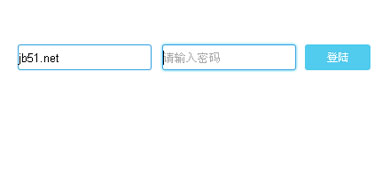 这是一款基于CSS3实现的input输入框蓝光特效源码,是一款CSS3 transition过渡制作发蓝光的input输入框样式代码。当输入框获得焦点时可呈现出发光的特效。2014-10-30
- css3都推出好久了,虽然各大主流浏览器对其兼容性还不是很好,特别是IE…但通过添加-moz- -webkit-这样的前缀可以在chrome和Firefox下获得更好的效果,还是Transition实现2014-04-02
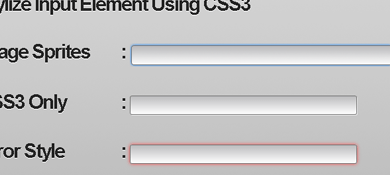 无需图片可以实现文本框的边框高亮显示,获得焦点后的高亮显示效果2013-09-09
- webkit特有的一个css,可以控制里面的文字样式,配合css3的动画效果和伪类,我们就可以很容易做出一个带动画的输入框,在系统登录、搜索等位置很适合,感兴趣的你可以参考2013-03-08
 CSS3实现input动态输入框特效源码是一款当鼠标放在输入框文字靠左排放输入框变长,文字靠右对齐输入框不变。效果非常棒的动态输入框效果代码。需要的朋友前来下载源码2016-04-19

最新评论