

浅谈MySQL中使用IN会走索引吗
更新时间:2025年02月21日 10:49:32 作者:cxSmiles
本文主要介绍了浅谈MySQL中使用IN会走索引吗,通过三个案例分析了MySQL 5.7.34版本中IN操作符的执行情况,感兴趣的可以了解一下
结论: MySQL优化器在发现执行全表扫描效率 > 索引的效率时,会选择全表扫描。
- 至于IN的数据量占全表的20%或30%以内会走索引,没有明确的答案。
- 根据优化器分析来选择查询成本更低的执行方式。
MySQL IN流程验证
mysql版本为5.7.34
CREATE TABLE `_default` (
  `id` bigint(20) NOT NULL AUTO_INCREMENT COMMENT '主键id',
  `default_name` varchar(100) NOT NULL COMMENT '默认名称',
  `default_code` varchar(50) NOT NULL COMMENT '默认编码',
  `default_type` tinyint(3) unsigned NOT NULL COMMENT '默认类型',
  `start_time` datetime NOT NULL COMMENT '开始时间',
  `end_time` datetime NOT NULL COMMENT '结束时间',
  `status` tinyint(3) unsigned NOT NULL DEFAULT '1' COMMENT '状态(1:未发布, 2:已发布, 3:已生效, 4:已失效, 5:已作废)',
  `deleted` tinyint(3) unsigned NOT NULL DEFAULT '0' COMMENT '是否删除 0:否 1:是',
  `create_by` varchar(50) NOT NULL COMMENT '创建人',
  `create_time` datetime NOT NULL COMMENT '创建时间',
  `update_by` varchar(50) DEFAULT NULL COMMENT '更新人',
  `update_time` datetime DEFAULT NULL COMMENT '更新时间',
  PRIMARY KEY (`id`),
  UNIQUE KEY `uk_default_code` (`default_code`) USING BTREE,
  KEY `idx_status` (`status`) USING BTREE
) ENGINE=InnoDB DEFAULT CHARSET=utf8mb4 COMMENT='_default';
-- 测试数据
INSERT INTO `_default` VALUES (1, 'test2024-07-29 13:56:03', 'DEFAULT23121410204', 1, '2023-08-11 14:35:41', '2023-08-11 14:35:41', 2, 0, '1', '2023-12-14 16:25:39', NULL, NULL);
INSERT INTO `_default` VALUES (2, 'demoData', 'DEFAULT23121410205', 1, '2023-08-11 14:35:41', '2023-08-11 14:35:41', 2, 0, '1', '2023-12-14 16:25:40', NULL, NULL);
INSERT INTO `_default` VALUES (3, 'demoData', 'DEFAULT23121410206', 1, '2023-08-11 14:35:41', '2023-08-11 14:35:41', 2, 0, '2', '2023-12-14 16:25:41', NULL, NULL);
INSERT INTO `_default` VALUES (4, 'demoData', 'DEFAULT23121410207', 1, '2023-08-11 14:35:41', '2023-08-11 14:35:41', 2, 0, '1', '2023-12-14 16:25:42', NULL, NULL);
INSERT INTO `_default` VALUES (5, 'demoData', 'DEFAULT23121410208', 1, '2023-08-11 14:35:41', '2023-08-11 14:35:41', 2, 0, '1', '2023-12-14 16:25:43', NULL, NULL);
INSERT INTO `_default` VALUES (6, 'demoData', 'DEFAULT23121410209', 0, '2023-08-11 14:35:41', '2023-08-11 14:35:41', 2, 0, '1', '2023-12-14 16:27:09', NULL, NULL);
INSERT INTO `_default` VALUES (7, 'demoData', 'DEFAULT23121410210', 0, '2023-08-11 14:35:41', '2023-08-11 14:35:41', 2, 0, '1', '2023-12-14 16:27:10', NULL, NULL);
INSERT INTO `_default` VALUES (8, 'demoData', 'DEFAULT23121410211', 0, '2023-08-11 14:35:41', '2023-08-11 14:35:41', 2, 0, '1', '2023-12-14 16:27:11', NULL, NULL);
INSERT INTO `_default` VALUES (9, 'demoData', 'DEFAULT23121410212', 0, '2023-08-11 14:35:41', '2023-08-11 14:35:41', 1, 0, '1', '2023-12-14 16:27:12', NULL, NULL);
INSERT INTO `_default` VALUES (10, 'demoData', 'DEFAULT23121410213', 0, '2023-08-11 14:35:41', '2023-08-11 14:35:41', 1, 1, '1', '2023-12-14 16:27:13', NULL, NULL);
案例一:
explain select * from _default where id in (1);

案例二:
explain select * from _default where id in (1,2,3);

案例三:
explain select * from _default where id in (1,2,3,4,5,6,7);

从上面三个案例可以看出案例一、案例二走了索引,案例三没有走索引。why?
MySQL TRACE解析
-- step1:查询mysql optimizer_trace是否开启,on为开启
show variables like 'optimizer_trace';
-- step2:若未开启,设置为开启
set optimizer_trace = 'enabled=on';

-- step3:需要注意查询sql和TRACE一起查询, 如果单独查询完再查询TRAC,查询结果为空
select * from _default where id in (1,2,3,4,5,6,7);
select TRACE from `information_schema`.`OPTIMIZER_TRACE`
案例一
{
	"steps": [
		{
			"join_preparation": {
				"select#": 1,
				"steps": [
					{
						"expanded_query": "/* select#1 */ select `_default`.`id` AS `id`,`_default`.`default_name` AS `default_name`,`_default`.`default_code` AS `default_code`,`_default`.`default_type` AS `default_type`,`_default`.`start_time` AS `start_time`,`_default`.`end_time` AS `end_time`,`_default`.`status` AS `status`,`_default`.`deleted` AS `deleted`,`_default`.`create_by` AS `create_by`,`_default`.`create_time` AS `create_time`,`_default`.`update_by` AS `update_by`,`_default`.`update_time` AS `update_time` from `_default` where (`_default`.`id` = 1)"
					}
				]
			}
		},
		{
			"join_optimization": { -- sql优化阶段
				"select#": 1,
				"steps": [
					{
						"condition_processing": {
							"condition": "WHERE",
							"original_condition": "(`_default`.`id` = 1)",
							"steps": [
								{
									"transformation": "equality_propagation",
									"resulting_condition": "multiple equal(1, `_default`.`id`)"
								},
								{
									"transformation": "constant_propagation",
									"resulting_condition": "multiple equal(1, `_default`.`id`)"
								},
								{
									"transformation": "trivial_condition_removal",
									"resulting_condition": "multiple equal(1, `_default`.`id`)"
								}
							]
						}
					},
					{
						"substitute_generated_columns": {}
					},
					{
						"table_dependencies": [
							{
								"table": "`_default`",
								"row_may_be_null": false,
								"map_bit": 0,
								"depends_on_map_bits": []
							}
						]
					},
					{
						"ref_optimizer_key_uses": [
							{
								"table": "`_default`",
								"field": "id",
								"equals": "1",
								"null_rejecting": false
							}
						]
					},
					{
						"rows_estimation": [
							{
								"table": "`_default`",
								"rows": 1,
								"cost": 1,
								"table_type": "const",
								"empty": false
							}
						]
					},
					{
						"condition_on_constant_tables": "1",
						"condition_value": true
					},
					{
						"attaching_conditions_to_tables": {
							"original_condition": "1",
							"attached_conditions_computation": [],
							"attached_conditions_summary": []
						}
					},
					{
						"refine_plan": []
					}
				]
			}
		},
		{
			"join_execution": {
				"select#": 1,
				"steps": []
			}
		}
	]
}
案例二
{
	"steps": [
		{
			"join_preparation": {
				"select#": 1,
				"steps": [
					{
						"IN_uses_bisection": true
					},
					{
						"expanded_query": "/* select#1 */ select `_default`.`id` AS `id`,`_default`.`default_name` AS `default_name`,`_default`.`default_code` AS `default_code`,`_default`.`default_type` AS `default_type`,`_default`.`start_time` AS `start_time`,`_default`.`end_time` AS `end_time`,`_default`.`status` AS `status`,`_default`.`deleted` AS `deleted`,`_default`.`create_by` AS `create_by`,`_default`.`create_time` AS `create_time`,`_default`.`update_by` AS `update_by`,`_default`.`update_time` AS `update_time` from `_default` where (`_default`.`id` in (1,2,3))"
					}
				]
			}
		},
		{
			"join_optimization": {
				"select#": 1,
				"steps": [
					{
						"condition_processing": {
							"condition": "WHERE",
							"original_condition": "(`_default`.`id` in (1,2,3))",
							"steps": [
								{
									"transformation": "equality_propagation",
									"resulting_condition": "(`_default`.`id` in (1,2,3))"
								},
								{
									"transformation": "constant_propagation",
									"resulting_condition": "(`_default`.`id` in (1,2,3))"
								},
								{
									"transformation": "trivial_condition_removal",
									"resulting_condition": "(`_default`.`id` in (1,2,3))"
								}
							]
						}
					},
					{
						"substitute_generated_columns": {}
					},
					{
						"table_dependencies": [
							{
								"table": "`_default`",
								"row_may_be_null": false,
								"map_bit": 0,
								"depends_on_map_bits": []
							}
						]
					},
					{
						"ref_optimizer_key_uses": []
					},
					{
						"rows_estimation": [
							{
								"table": "`_default`",
								"range_analysis": {
									"table_scan": {
										"rows": 26,
										"cost": 8.3
									},
									"potential_range_indexes": [
										{
											"index": "PRIMARY",
											"usable": true,
											"key_parts": [
												"id"
											]
										},
										{
											"index": "uk_default_code",
											"usable": false,
											"cause": "not_applicable"
										},
										{
											"index": "idx_status",
											"usable": false,
											"cause": "not_applicable"
										},
										{
											"index": "idx_default_name",
											"usable": false,
											"cause": "not_applicable"
										}
									],
									"setup_range_conditions": [],
									"group_index_range": {
										"chosen": false,
										"cause": "not_group_by_or_distinct"
									},
									"analyzing_range_alternatives": {
										"range_scan_alternatives": [
											{
												"index": "PRIMARY",
												"ranges": [
													"1 <= id <= 1",
													"2 <= id <= 2",
													"3 <= id <= 3"
												],
												"index_dives_for_eq_ranges": true,
												"rowid_ordered": true,
												"using_mrr": false,
												"index_only": false,
												"rows": 3,
												"cost": 3.6153,
												"chosen": true
											}
										],
										"analyzing_roworder_intersect": {
											"usable": false,
											"cause": "too_few_roworder_scans"
										}
									},
									"chosen_range_access_summary": {
										"range_access_plan": {
											"type": "range_scan",
											"index": "PRIMARY",
											"rows": 3,
											"ranges": [
												"1 <= id <= 1",
												"2 <= id <= 2",
												"3 <= id <= 3"
											]
										},
										"rows_for_plan": 3,
										"cost_for_plan": 3.6153,
										"chosen": true
									}
								}
							}
						]
					},
					{
						"considered_execution_plans": [
							{
								"plan_prefix": [],
								"table": "`_default`",
								"best_access_path": {
									"considered_access_paths": [
										{
											"rows_to_scan": 3,
											"access_type": "range",
											"range_details": {
												"used_index": "PRIMARY"
											},
											"resulting_rows": 3,
											"cost": 4.2153,
											"chosen": true
										}
									]
								},
								"condition_filtering_pct": 100,
								"rows_for_plan": 3,
								"cost_for_plan": 4.2153,
								"chosen": true
							}
						]
					},
					{
						"attaching_conditions_to_tables": {
							"original_condition": "(`_default`.`id` in (1,2,3))",
							"attached_conditions_computation": [],
							"attached_conditions_summary": [
								{
									"table": "`_default`",
									"attached": "(`_default`.`id` in (1,2,3))"
								}
							]
						}
					},
					{
						"refine_plan": [
							{
								"table": "`_default`"
							}
						]
					}
				]
			}
		},
		{
			"join_execution": {
				"select#": 1,
				"steps": []
			}
		}
	]
}
案例三
{
	"steps": [
		{
			"join_preparation": {
				"select#": 1,
				"steps": [
					{
						"IN_uses_bisection": true
					},
					{
						"expanded_query": "/* select#1 */ select `_default`.`id` AS `id`,`_default`.`default_name` AS `default_name`,`_default`.`default_code` AS `default_code`,`_default`.`default_type` AS `default_type`,`_default`.`start_time` AS `start_time`,`_default`.`end_time` AS `end_time`,`_default`.`status` AS `status`,`_default`.`deleted` AS `deleted`,`_default`.`create_by` AS `create_by`,`_default`.`create_time` AS `create_time`,`_default`.`update_by` AS `update_by`,`_default`.`update_time` AS `update_time` from `_default` where (`_default`.`id` in (1,2,3,4,5,6,7))"
					}
				]
			}
		},
		{
			"join_optimization": {
				"select#": 1,
				"steps": [
					{
						"condition_processing": {
							"condition": "WHERE",
							"original_condition": "(`_default`.`id` in (1,2,3,4,5,6,7))",
							"steps": [
								{
									"transformation": "equality_propagation",
									"resulting_condition": "(`_default`.`id` in (1,2,3,4,5,6,7))"
								},
								{
									"transformation": "constant_propagation",
									"resulting_condition": "(`_default`.`id` in (1,2,3,4,5,6,7))"
								},
								{
									"transformation": "trivial_condition_removal",
									"resulting_condition": "(`_default`.`id` in (1,2,3,4,5,6,7))"
								}
							]
						}
					},
					{
						"substitute_generated_columns": {}
					},
					{
						"table_dependencies": [
							{
								"table": "`_default`",
								"row_may_be_null": false,
								"map_bit": 0,
								"depends_on_map_bits": []
							}
						]
					},
					{
						"ref_optimizer_key_uses": []
					},
					{
						"rows_estimation": [ -- 预估表的访问成本
							{
								"table": "`_default`",
								"range_analysis": {
									"table_scan": { -- 全表扫描的分析
										"rows": 26,	-- 扫描行数
										"cost": 8.3 -- 查询成本
									},
									"potential_range_indexes": [
										{
											"index": "PRIMARY",
											"usable": true,
											"key_parts": [
												"id"
											]
										},
										{
											"index": "uk_default_code",
											"usable": false,
											"cause": "not_applicable"
										},
										{
											"index": "idx_status",
											"usable": false,
											"cause": "not_applicable"
										},
										{
											"index": "idx_default_name",
											"usable": false,
											"cause": "not_applicable"
										}
									],
									"setup_range_conditions": [],
									"group_index_range": {
										"chosen": false,
										"cause": "not_group_by_or_distinct"
									},
									"analyzing_range_alternatives": { -- 分析各个索引使用成本
										"range_scan_alternatives": [
											{
												"index": "PRIMARY",
												"ranges": [		-- 索引使用范围
													"1 <= id <= 1",
													"2 <= id <= 2",
													"3 <= id <= 3",
													"4 <= id <= 4",
													"5 <= id <= 5",
													"6 <= id <= 6",
													"7 <= id <= 7"
												],
												"index_dives_for_eq_ranges": true,
												"rowid_ordered": true,
												"using_mrr": false,
												"index_only": false,
												"rows": 7,		 -- 扫描行数
												"cost": 8.4224,  -- 索引使用成本
												"chosen": false, -- 是否使用索引
												"cause": "cost"
											}
										],
										"analyzing_roworder_intersect": {
											"usable": false,
											"cause": "too_few_roworder_scans"
										}
									}
								}
							}
						]
					},
					{
						"considered_execution_plans": [
							{
								"plan_prefix": [],
								"table": "`_default`",
								"best_access_path": {
									"considered_access_paths": [
										{
											"rows_to_scan": 26,
											"access_type": "scan",
											"resulting_rows": 26,
											"cost": 6.2,
											"chosen": true
										}
									]
								},
								"condition_filtering_pct": 100,
								"rows_for_plan": 26,
								"cost_for_plan": 6.2,
								"chosen": true
							}
						]
					},
					{
						"attaching_conditions_to_tables": {
							"original_condition": "(`_default`.`id` in (1,2,3,4,5,6,7))",
							"attached_conditions_computation": [],
							"attached_conditions_summary": [
								{
									"table": "`_default`",
									"attached": "(`_default`.`id` in (1,2,3,4,5,6,7))"
								}
							]
						}
					},
					{
						"refine_plan": [
							{
								"table": "`_default`"
							}
						]
					}
				]
			}
		},
		{
			"join_execution": {
				"select#": 1,
				"steps": []
			}
		}
	]
}
join_optimization.rows_estimation.range_analysis.table_scan 和 join_optimization.rows_estimation.range_analysis.analyzing_range_alternatives
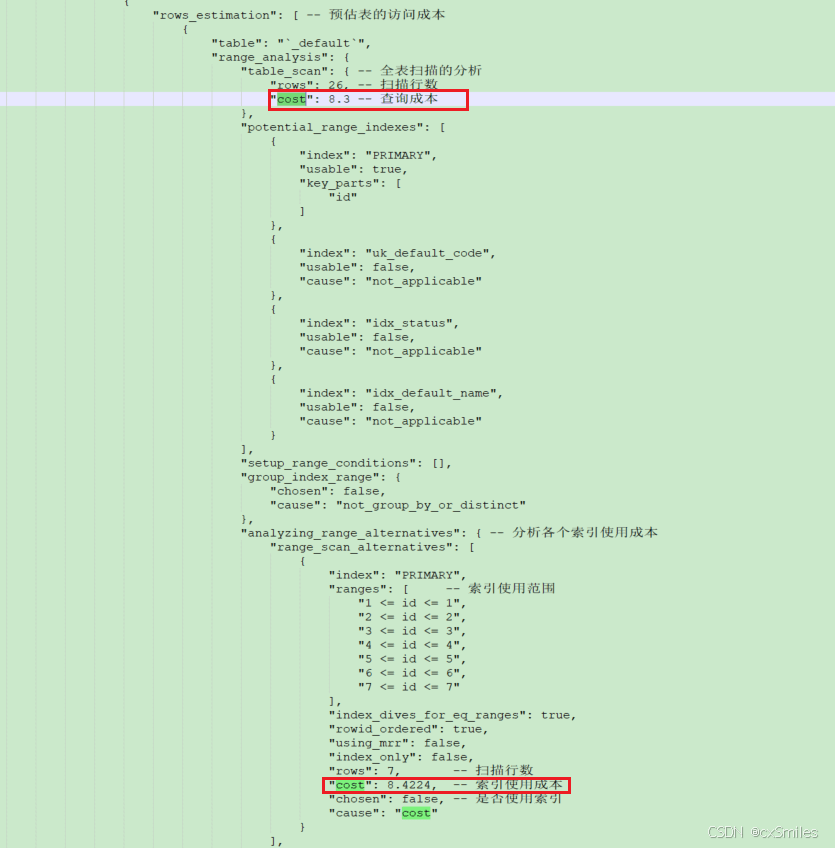
当索引使用成本 > 全表扫描的成本时就会选择全表扫描,全表rows为26,索引rows为7,为什么不用索引?
- 如果是查所有数据,存在回表的情况,IN的越多回表成本越高
- 如果是查询条件和返回字段相同并且存在索引的情况(覆盖索引),这种情况可能优化器是可能选择索引
system > const> eq_ref > ref > range > index > all
system:只有一行记录。const:索引一次就找到了,主键和唯一索引。eq_ref:唯一的索引,表与表之间关联,关联条件为主键或唯一索引。ref:非唯一的索引,根据某个字段查询(有二级索引),存在多行数据。range:范围查询。index:查询索引树(覆盖索引的场景)。all:查询所有数据(与index的区别在于index只遍历索引树,all会在磁盘中查找)。
小结
到此这篇关于浅谈MySQL中使用IN会走索引吗的文章就介绍到这了,更多相关MySQL IN索引内容请搜索脚本之家以前的文章或继续浏览下面的相关文章希望大家以后多多支持脚本之家!
相关文章
 这篇文章主要为大家介绍了mysql主从同步原理及应用场景示例详解,有需要的朋友可以借鉴参考下,希望能够有所帮助,祝大家多多进步,早日升职加薪2022-08-08
MYSQL无法启动提示: Default storage engine (InnoDB) is not availabl
自己用的MYSQL都是用MYISAM数据库,还没涉及到需要INNODB,因此打算直接不加载INNODB引擎。2011-05-05 这篇文章主要给大家介绍了关于MySQL中CASE WHEN语句用法、示例与解析的相关资料,case when语句用于计算条件列表并返回多个可能结果表达式之一,文中通过代码介绍的非常详细,需要的朋友可以参考下2024-05-05
 MySQL是中小型网站普遍使用的数据库之一,然而,很多人并不清楚MySQL到底能支持多大的数据量,再加上某些国内CMS厂商把数据承载量的责任推给它,导致很多不了解MySQL的站长对它产生了很多误解2008-12-12
mysql正确删除数据的方法(drop,delete,truncate)
这篇文章主要给大家介绍了关于mysql正确删除数据的相关资料,DELETE语句是MySQL中最常用的删除数据的方式之一,但也有几种其他方法来实现,需要的朋友可以参考下2023-10-10 为了使索引的使用效率更高,在创建索引时,必须考虑在哪些字段上创建索引和创建什么类型的索引。索引设计不合理或者缺少索引都会对数据库和应用程序的性能造成障碍。高效的索引对于获得良好的性能非常重要。设计索引时,应该考虑相应准则2023-04-04
 这篇文章主要介绍了MySQL使用Partition功能实现水平分区,给大家提到了水平分区的5种策略,通过sql语句给大家介绍的非常详细,需要的朋友可以参考下2021-12-12
 这篇文章主要介绍了在SQL中对同一个字段不同值,进行数据统计操作,具有很好的参考价值,希望对大家有所帮助。一起跟随小编过来看看吧2020-10-10
mysql 8.0.15 安装配置方法图文教程(Windows10 X64)
这篇文章主要为大家详细介绍了Windows10 X64 mysql 8.0.15 安装配置方法图文教程,具有一定的参考价值,感兴趣的小伙伴们可以参考一下2019-03-03 MySQL8.0 GA版本发布了,展现了众多新特性,下面这篇文章主要给大家介绍了关于MySQL8新特性:自增主键的持久化的相关资料,文中通过示例代码介绍的非常详细,需要的朋友可以参考借鉴,下面随着小编来一起学习学习吧2018-07-07
最新评论