

Redis集群扩容的实现示例
更新时间:2025年02月27日 11:32:58 作者:元气满满的热码式
本文介绍了在虚拟机上新建Redis集群,并将新增节点加入现有集群,通过配置文件和`redis-cli`命令,成功实现了Redis集群的扩容,感兴趣的可以了解一下
在虚拟机上新建两个6387,6388服务配置文件,新建之后启动
[root@redis-cluster1 cluster]# cat redisCluster6387.conf
bind 0.0.0.0
daemonize yes
protected-mode no
logfile "/myredis/cluster/cluster6387.log"
pidfile /myredis/cluster6387.pid
dir /myredis/cluster
dbfilename dump6387.rdb
appendonly yes
appendfilename "appendonly6387.aof"
requirepass 111111
masterauth 111111
port 6387
cluster-enabled yes
cluster-config-file nodes-6387.conf
cluster-node-timeout 5000

[root@redis-cluster1 cluster]# cat redisCluster6388.conf
bind 0.0.0.0
daemonize yes
protected-mode no
logfile "/myredis/cluster/cluster6388.log"
pidfile /myredis/cluster6388.pid
dir /myredis/cluster
dbfilename dump6388.rdb
appendonly yes
appendfilename "appendonly6388.aof"
requirepass 111111
masterauth 111111
port 6388
cluster-enabled yes
cluster-config-file nodes-6388.conf
cluster-node-timeout 5000
启动87,88两个服务,此时他们都是master,没有加入集群
[root@redis-cluster1 cluster]# redis-server redisCluster6387.conf
[root@redis-cluster1 cluster]# redis-server redisCluster6388.conf
[root@redis-cluster1 cluster]# ps -ef | grep redis
root        2038       1  0 15:31 ?        00:00:31 redis-server 0.0.0.0:6386 [cluster]
root        2221       1  0 15:47 ?        00:00:24 redis-server 0.0.0.0:6385 [cluster]
root        2327    1753  0 16:01 pts/0    00:00:00 redis-cli -a 111111 -p 6385
root        2472       1  0 16:44 ?        00:00:00 redis-server 0.0.0.0:6387 [cluster]
root        2479       1  0 16:44 ?        00:00:00 redis-server 0.0.0.0:6388 [cluster]
root        2486    1954  0 16:44 pts/1    00:00:00 grep --color=auto redis
[root@redis-cluster1 cluster]# redis-cli -a 111111 -p 6387
Warning: Using a password with '-a' or '-u' option on the command line interface may not be safe.
127.0.0.1:6387>
127.0.0.1:6387>
127.0.0.1:6387> cluster nodes
494e60980fac86000312e544f71c0e835bc1445b :6387@16387 myself,master - 0 0 0 connected
127.0.0.1:6387>
将新增的6387节点作为master加入原集群
将新增的6387作为master节点加入原有集群
redis-cli -a 密码 --cluster add-node,自己实际IP地址:6387 自己实际IP地址:6381
6387 就是将要作为master新增节点
6381 就是原来集群节点里面的领路人,相当于6387拜拜6381的码头从而找到组织加入集群redis-cli -a 111111 --cluster add-node 192.168.111.174:6387 192.168.111.175:6381
[root@redis-cluster1 cluster]# redis-cli -a 111111  --cluster add-node 192.168.58.212:6387 192.168.58.129:6381
Warning: Using a password with '-a' or '-u' option on the command line interface may not be safe.
>>> Adding node 192.168.58.212:6387 to cluster 192.168.58.129:6381
>>> Performing Cluster Check (using node 192.168.58.129:6381)
M: ba40235fdad71fb36c3bf165ea51055825d453c2 192.168.58.129:6381
   slots:[0-5460] (5461 slots) master
   1 additional replica(s)
S: fedf4b13be2122f44dde749a08c4b943582b3566 192.168.58.129:6382
   slots: (0 slots) slave
   replicates be191621d4aa881d864a113c385d58b751753392
S: 91cf395e8f04a5df1aeec4602dd38b3e4a708d55 192.168.58.130:6384
   slots: (0 slots) slave
   replicates ba40235fdad71fb36c3bf165ea51055825d453c2
M: 0a820807a70885c1d87d141824d3869dcf2418ee 192.168.58.130:6383
   slots:[5461-10922] (5462 slots) master
   1 additional replica(s)
M: be191621d4aa881d864a113c385d58b751753392 192.168.58.212:6385
   slots:[10923-16383] (5461 slots) master
   1 additional replica(s)
S: 30e5bdec200a671e4de666551d4489f0035235ba 192.168.58.212:6386
   slots: (0 slots) slave
   replicates 0a820807a70885c1d87d141824d3869dcf2418ee
[OK] All nodes agree about slots configuration.
>>> Check for open slots...
>>> Check slots coverage...
[OK] All 16384 slots covered.
>>> Getting functions from cluster
>>> Send FUNCTION LIST to 192.168.58.212:6387 to verify there is no functions in it
>>> Send FUNCTION RESTORE to 192.168.58.212:6387
>>> Send CLUSTER MEET to node 192.168.58.212:6387 to make it join the cluster.
[OK] New node added correctly.
第一次检查集群状态:
6387还没有被分配槽位
[root@redis-cluster1 cluster]# redis-cli -a 111111 --cluster check 192.168.58.129:6381
Warning: Using a password with '-a' or '-u' option on the command line interface may not be safe.
192.168.58.129:6381 (ba40235f...) -> 0 keys | 5461 slots | 1 slaves.
192.168.58.130:6383 (0a820807...) -> 0 keys | 5462 slots | 1 slaves.
192.168.58.212:6385 (be191621...) -> 0 keys | 5461 slots | 1 slaves.
192.168.58.212:6387 (494e6098...) -> 0 keys | 0 slots | 0 slaves.
[OK] 0 keys in 4 masters.
0.00 keys per slot on average.
>>> Performing Cluster Check (using node 192.168.58.129:6381)
M: ba40235fdad71fb36c3bf165ea51055825d453c2 192.168.58.129:6381
   slots:[0-5460] (5461 slots) master
   1 additional replica(s)
S: fedf4b13be2122f44dde749a08c4b943582b3566 192.168.58.129:6382
   slots: (0 slots) slave
   replicates be191621d4aa881d864a113c385d58b751753392
S: 91cf395e8f04a5df1aeec4602dd38b3e4a708d55 192.168.58.130:6384
   slots: (0 slots) slave
   replicates ba40235fdad71fb36c3bf165ea51055825d453c2
M: 0a820807a70885c1d87d141824d3869dcf2418ee 192.168.58.130:6383
   slots:[5461-10922] (5462 slots) master
   1 additional replica(s)
M: be191621d4aa881d864a113c385d58b751753392 192.168.58.212:6385
   slots:[10923-16383] (5461 slots) master
   1 additional replica(s)
S: 30e5bdec200a671e4de666551d4489f0035235ba 192.168.58.212:6386
   slots: (0 slots) slave
   replicates 0a820807a70885c1d87d141824d3869dcf2418ee
M: 494e60980fac86000312e544f71c0e835bc1445b 192.168.58.212:6387
   slots: (0 slots) master
[OK] All nodes agree about slots configuration.
>>> Check for open slots...
>>> Check slots coverage...
[OK] All 16384 slots covered.
重新分配槽号
16384处于4,因为现在有四个主机;
填写6387的id号;
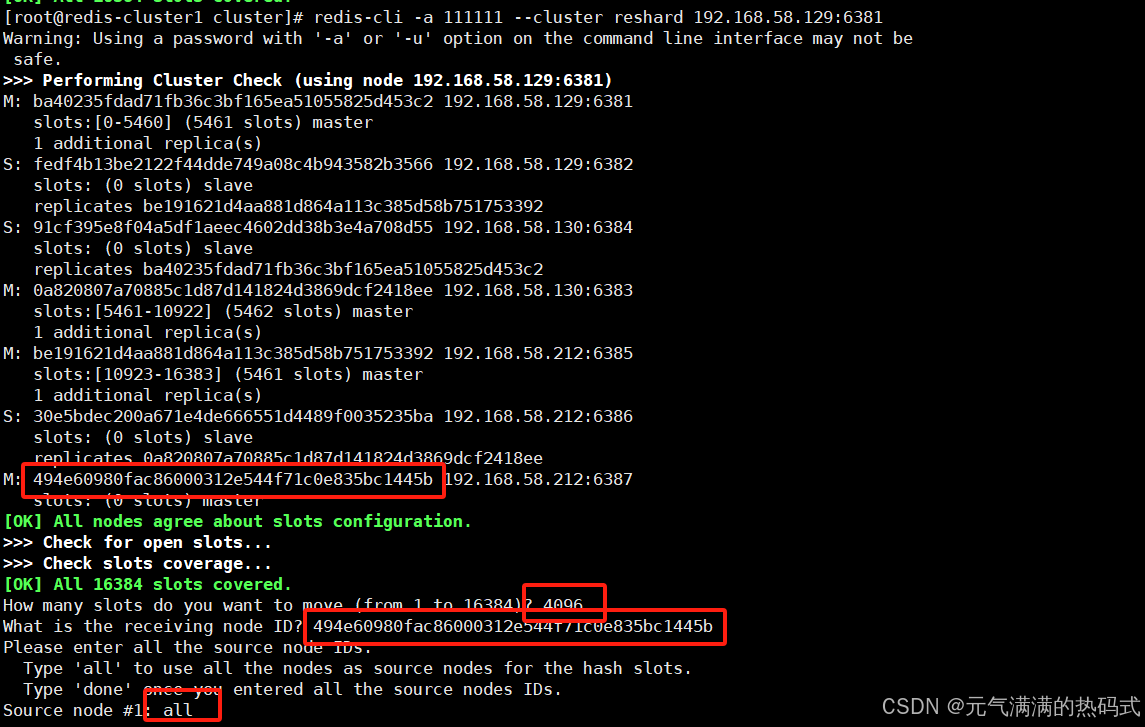
[root@redis-cluster1 cluster]# redis-cli -a 111111 --cluster reshard 192.168.58.129:6381
Warning: Using a password with '-a' or '-u' option on the command line interface may not be safe.
>>> Performing Cluster Check (using node 192.168.58.129:6381)
M: ba40235fdad71fb36c3bf165ea51055825d453c2 192.168.58.129:6381
   slots:[0-5460] (5461 slots) master
   1 additional replica(s)
S: fedf4b13be2122f44dde749a08c4b943582b3566 192.168.58.129:6382
   slots: (0 slots) slave
   replicates be191621d4aa881d864a113c385d58b751753392
S: 91cf395e8f04a5df1aeec4602dd38b3e4a708d55 192.168.58.130:6384
   slots: (0 slots) slave
   replicates ba40235fdad71fb36c3bf165ea51055825d453c2
M: 0a820807a70885c1d87d141824d3869dcf2418ee 192.168.58.130:6383
   slots:[5461-10922] (5462 slots) master
   1 additional replica(s)
M: be191621d4aa881d864a113c385d58b751753392 192.168.58.212:6385
   slots:[10923-16383] (5461 slots) master
   1 additional replica(s)
S: 30e5bdec200a671e4de666551d4489f0035235ba 192.168.58.212:6386
   slots: (0 slots) slave
   replicates 0a820807a70885c1d87d141824d3869dcf2418ee
M: 494e60980fac86000312e544f71c0e835bc1445b 192.168.58.212:6387
   slots: (0 slots) master
[OK] All nodes agree about slots configuration.
>>> Check for open slots...
>>> Check slots coverage...
[OK] All 16384 slots covered.
How many slots do you want to move (from 1 to 16384)? 4096
What is the receiving node ID? 494e60980fac86000312e544f71c0e835bc1445b
Please enter all the source node IDs.
  Type 'all' to use all the nodes as source nodes for the hash slots.
  Type 'done' once you entered all the source nodes IDs.
Source node #1: all

Ready to move 4096 slots.
  Source nodes:
    M: ba40235fdad71fb36c3bf165ea51055825d453c2 192.168.58.129:6381
       slots:[0-5460] (5461 slots) master
       1 additional replica(s)
    M: 0a820807a70885c1d87d141824d3869dcf2418ee 192.168.58.130:6383
       slots:[5461-10922] (5462 slots) master
       1 additional replica(s)
    M: be191621d4aa881d864a113c385d58b751753392 192.168.58.212:6385
       slots:[10923-16383] (5461 slots) master
       1 additional replica(s)
  Destination node:
    M: 494e60980fac86000312e544f71c0e835bc1445b 192.168.58.212:6387
       slots: (0 slots) master
  Resharding plan:
再次查看集群状态
四个主节点均已被分配槽位;
当前状态为三主三从,一主零从
[root@redis-cluster1 cluster]# redis-cli -a 111111 --cluster check 192.168.58.129:6381
Warning: Using a password with '-a' or '-u' option on the command line interface may not be safe.
192.168.58.129:6381 (ba40235f...) -> 0 keys | 4096 slots | 1 slaves.
192.168.58.130:6383 (0a820807...) -> 0 keys | 4096 slots | 1 slaves.
192.168.58.212:6385 (be191621...) -> 0 keys | 4096 slots | 1 slaves.
192.168.58.212:6387 (494e6098...) -> 0 keys | 4096 slots | 0 slaves.
[OK] 0 keys in 4 masters.
0.00 keys per slot on average.
>>> Performing Cluster Check (using node 192.168.58.129:6381)
M: ba40235fdad71fb36c3bf165ea51055825d453c2 192.168.58.129:6381
   slots:[1365-5460] (4096 slots) master
   1 additional replica(s)
S: fedf4b13be2122f44dde749a08c4b943582b3566 192.168.58.129:6382
   slots: (0 slots) slave
   replicates be191621d4aa881d864a113c385d58b751753392
S: 91cf395e8f04a5df1aeec4602dd38b3e4a708d55 192.168.58.130:6384
   slots: (0 slots) slave
   replicates ba40235fdad71fb36c3bf165ea51055825d453c2
M: 0a820807a70885c1d87d141824d3869dcf2418ee 192.168.58.130:6383
   slots:[6827-10922] (4096 slots) master
   1 additional replica(s)
M: be191621d4aa881d864a113c385d58b751753392 192.168.58.212:6385
   slots:[12288-16383] (4096 slots) master
   1 additional replica(s)
S: 30e5bdec200a671e4de666551d4489f0035235ba 192.168.58.212:6386
   slots: (0 slots) slave
   replicates 0a820807a70885c1d87d141824d3869dcf2418ee
M: 494e60980fac86000312e544f71c0e835bc1445b 192.168.58.212:6387
   slots:[0-1364],[5461-6826],[10923-12287] (4096 slots) master
[OK] All nodes agree about slots configuration.
>>> Check for open slots...
>>> Check slots coverage...
[OK] All 16384 slots covered.
为主节点87分配从节点88
[root@redis-cluster1 cluster]# redis-cli -a 111111 --cluster add-node 192.168.58.212:6388 192.168.58.212:6387 --cluster-slave --cluster-master-id 494e60980fac86000312e544f71c0e835bc1445b
--cluster-master-id 494e60980fac86000312e544f71c0e835bc1445b :主节点id号
再次查看当前的集群状态:
127.0.0.1:6385> cluster nodes
0a820807a70885c1d87d141824d3869dcf2418ee 192.168.58.130:6383@16383 master - 0 1733303488000 3 connected 6827-10922
91cf395e8f04a5df1aeec4602dd38b3e4a708d55 192.168.58.130:6384@16384 slave ba40235fdad71fb36c3bf165ea51055825d453c2 0 1733303487073 1 connected
be191621d4aa881d864a113c385d58b751753392 192.168.58.212:6385@16385 myself,master - 0 0 8 connected 12288-16383
30e5bdec200a671e4de666551d4489f0035235ba 192.168.58.212:6386@16386 slave 0a820807a70885c1d87d141824d3869dcf2418ee 0 1733303488559 3 connected
ba40235fdad71fb36c3bf165ea51055825d453c2 192.168.58.129:6381@16381 master - 0 1733303488000 1 connected 1365-5460
c26c4f5ec9882083544326df9249fa48e35c6a2a 192.168.58.212:6388@16388 slave 494e60980fac86000312e544f71c0e835bc1445b 0 1733303488345 9 connected
494e60980fac86000312e544f71c0e835bc1445b 192.168.58.212:6387@16387 master - 0 1733303488675 9 connected 0-1364 5461-6826 10923-12287
fedf4b13be2122f44dde749a08c4b943582b3566 192.168.58.129:6382@16382 slave be191621d4aa881d864a113c385d58b751753392 0 1733303488106 8 connected
127.0.0.1:6385>
四主四从,集群扩容完成!
[root@redis-cluster1 cluster]# redis-cli -a 111111 --cluster check 192.168.58.129:6381
Warning: Using a password with '-a' or '-u' option on the command line interface may not be safe.
192.168.58.129:6381 (ba40235f...) -> 0 keys | 4096 slots | 1 slaves.
192.168.58.212:6387 (494e6098...) -> 0 keys | 4096 slots | 1 slaves.
192.168.58.130:6383 (0a820807...) -> 0 keys | 4096 slots | 1 slaves.
192.168.58.212:6385 (be191621...) -> 0 keys | 4096 slots | 1 slaves.
[OK] 0 keys in 4 masters.
0.00 keys per slot on average.
>>> Performing Cluster Check (using node 192.168.58.129:6381)
M: ba40235fdad71fb36c3bf165ea51055825d453c2 192.168.58.129:6381
   slots:[1365-5460] (4096 slots) master
   1 additional replica(s)
S: 30e5bdec200a671e4de666551d4489f0035235ba 192.168.58.212:6386
   slots: (0 slots) slave
   replicates 0a820807a70885c1d87d141824d3869dcf2418ee
M: 494e60980fac86000312e544f71c0e835bc1445b 192.168.58.212:6387
   slots:[0-1364],[5461-6826],[10923-12287] (4096 slots) master
   1 additional replica(s)
S: fedf4b13be2122f44dde749a08c4b943582b3566 192.168.58.129:6382
   slots: (0 slots) slave
   replicates be191621d4aa881d864a113c385d58b751753392
M: 0a820807a70885c1d87d141824d3869dcf2418ee 192.168.58.130:6383
   slots:[6827-10922] (4096 slots) master
   1 additional replica(s)
S: 91cf395e8f04a5df1aeec4602dd38b3e4a708d55 192.168.58.130:6384
   slots: (0 slots) slave
   replicates ba40235fdad71fb36c3bf165ea51055825d453c2
M: be191621d4aa881d864a113c385d58b751753392 192.168.58.212:6385
   slots:[12288-16383] (4096 slots) master
   1 additional replica(s)
S: c26c4f5ec9882083544326df9249fa48e35c6a2a 192.168.58.212:6388
   slots: (0 slots) slave
   replicates 494e60980fac86000312e544f71c0e835bc1445b
[OK] All nodes agree about slots configuration.
>>> Check for open slots...
>>> Check slots coverage...
[OK] All 16384 slots covered.
到此这篇关于Redis集群扩容的实现示例的文章就介绍到这了,更多相关Redis集群扩容内容请搜索脚本之家以前的文章或继续浏览下面的相关文章希望大家以后多多支持脚本之家!
您可能感兴趣的文章:
相关文章

Redission实现分布式锁lock()和tryLock()方法的区别小结
Redisson是一种基于Redis的分布式锁框架,提供了lock()和tryLock()两种获取锁的方法,本文主要介绍了Redission实现分布式锁lock()和tryLock()方法的区别小结,具有一定的参考价值,感兴趣的可以了解一下2024-07-07 本文主要介绍了Redis使用ZSET实现消息队列的项目实践,文中通过示例代码介绍的非常详细,对大家的学习或者工作具有一定的参考学习价值,需要的朋友们下面随着小编来一起学习学习吧2023-07-07
 这篇文章主要介绍了redis如何实现保存对象,具有很好的参考价值,希望对大家有所帮助。如有错误或未考虑完全的地方,望不吝赐教2022-06-06
 这篇文章主要给大家介绍了关于redis的bigkey扫描脚本的相关资料,文中通过示例代码介绍的非常详细,对大家的学习或者工作具有一定的参考学习价值,需要的朋友们下面随着小编来一起学习学习吧2018-07-07
 Redis是一个基于内存的键值存储系统,采用单线程事件驱动架构和epoll/kqueue实现I/O多路复用,本文给大家介绍Redis 底层运行机制与原理流程分析,感兴趣的朋友一起看看吧2025-11-11
 这篇文章主要介绍了Redis持久化策略解读以及如何选择问题,具有很好的参考价值,希望对大家有所帮助,如有错误或未考虑完全的地方,望不吝赐教2025-06-06
 Redis集群是Redis官方推出的分布式解决方案,它允许将数据分布在多个Redis节点中,从而提高Redis的性能和可扩展性,本文给大家介绍了Redis集群部署的过程步骤,需要的朋友可以参考下2024-06-06
 在单体应用中,如果我们对共享数据不进行加锁操作,会出现数据一致性问题,我们的解决办法通常是加锁。下面我们一起聊聊使用redis来实现分布式锁2022-06-06
 本文详细介绍了Redis缓存设计中常见的问题及解决方案,包括缓存穿透、缓存失效(击穿)、缓存雪崩、热点缓存key重建优化、缓存与数据库双写不一致以及开发规范与性能优化,感兴趣的可以了解一下2024-11-11
 为了提高数据处理效率和降低存储成本,优化数据结构和采用高效的存储策略至关重要,使用最小存储形式、整数编码、Redis的HyperLogLog等方法可以有效减少内存占用,Redis6引入的对象压缩、设置合理的过期时间、数据分片2024-09-09
最新评论