

MySQL增删改查SQL怎么写?新手必看CRUD操作详解
前言
适用环境:本文示例基于 MySQL 8.0.36 + InnoDB,字符集 utf8mb4。8.0 下 group by 不再隐式排序,on duplicate key update 的别名写法需 8.0.19+;版本不同请先 select version(); 确认。
上一篇我们把表结构、约束、列属性都讲完了。表建好了,约束也立好了,接下来终于可以往里面放数据。
可真正开始写 CRUD,你会发现几个很反直觉的现象:
- 插入一条重复数据,报
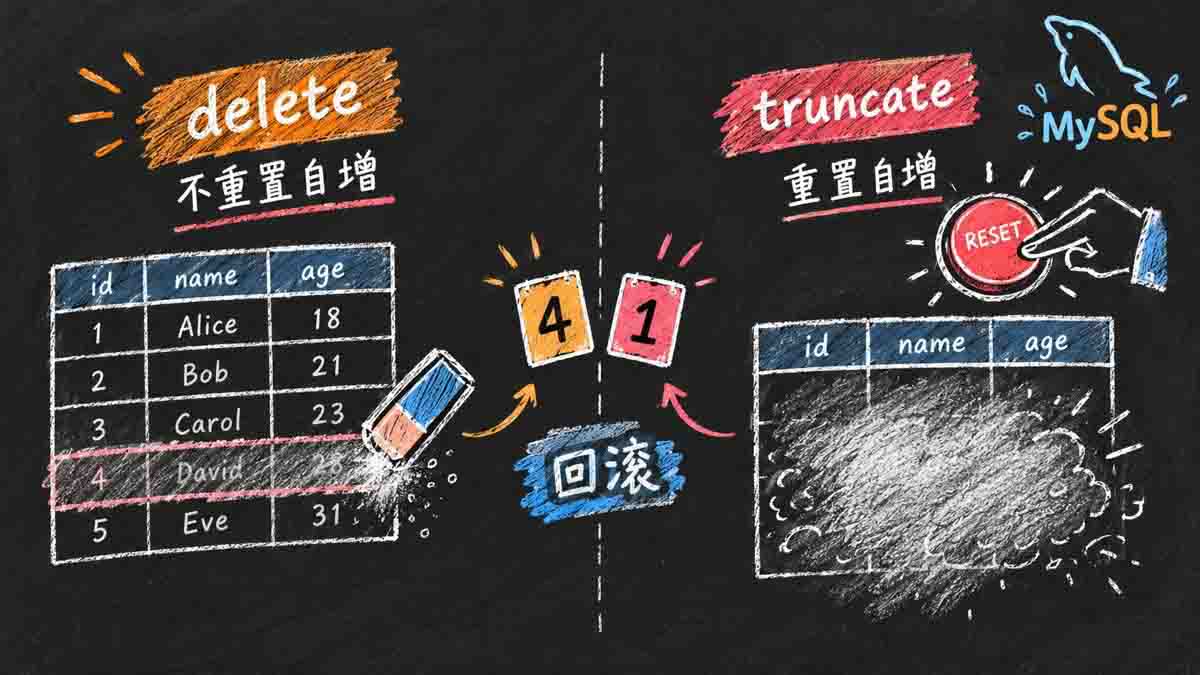
1062; select不加order by,返回顺序每次可能不一样;count(*)和count(qq)的结果不一样;update忘了where,整张表都被改了;delete整表之后,自增id没有回到 1;truncate后却回到了 1。
本篇把 C/R/U/D 四条线串起来:先会写,再知道为什么,最后能解释这些结果。读完后,你至少能独立写出这四类 SQL,并能解释 1062、Empty set、NULL、1055 这些结果是怎么来的;看到一条查询,也知道该先看 where、order by 还是 group by。
一、CRUD 全景:四条线,一张表
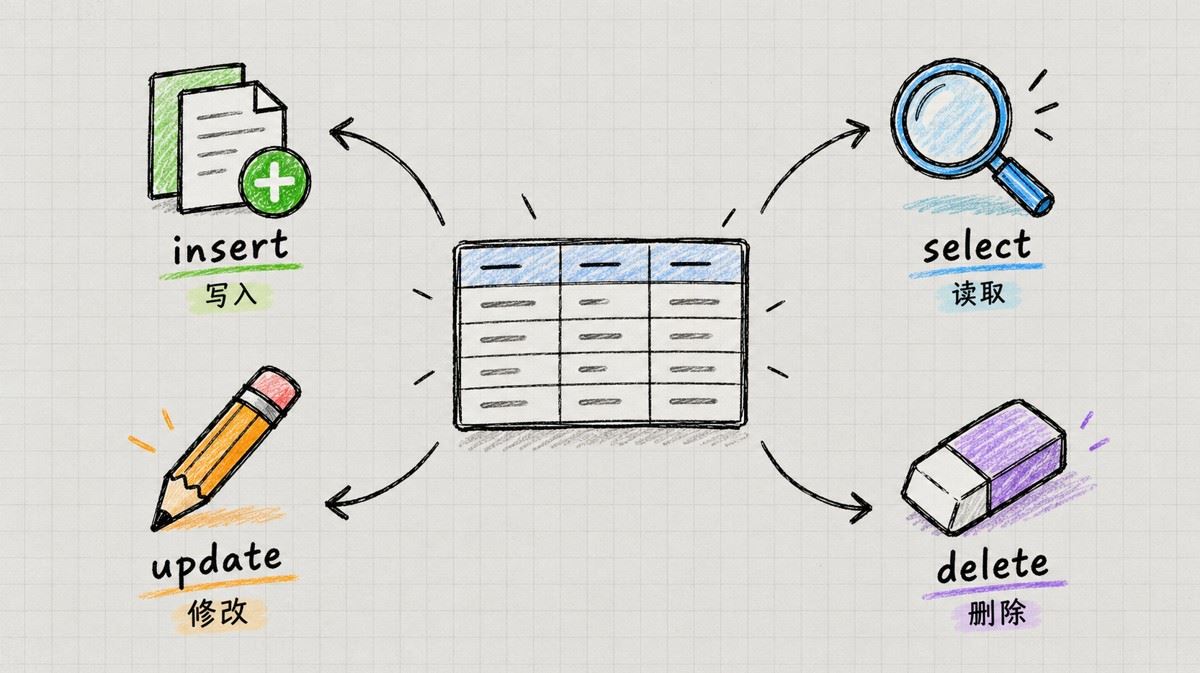
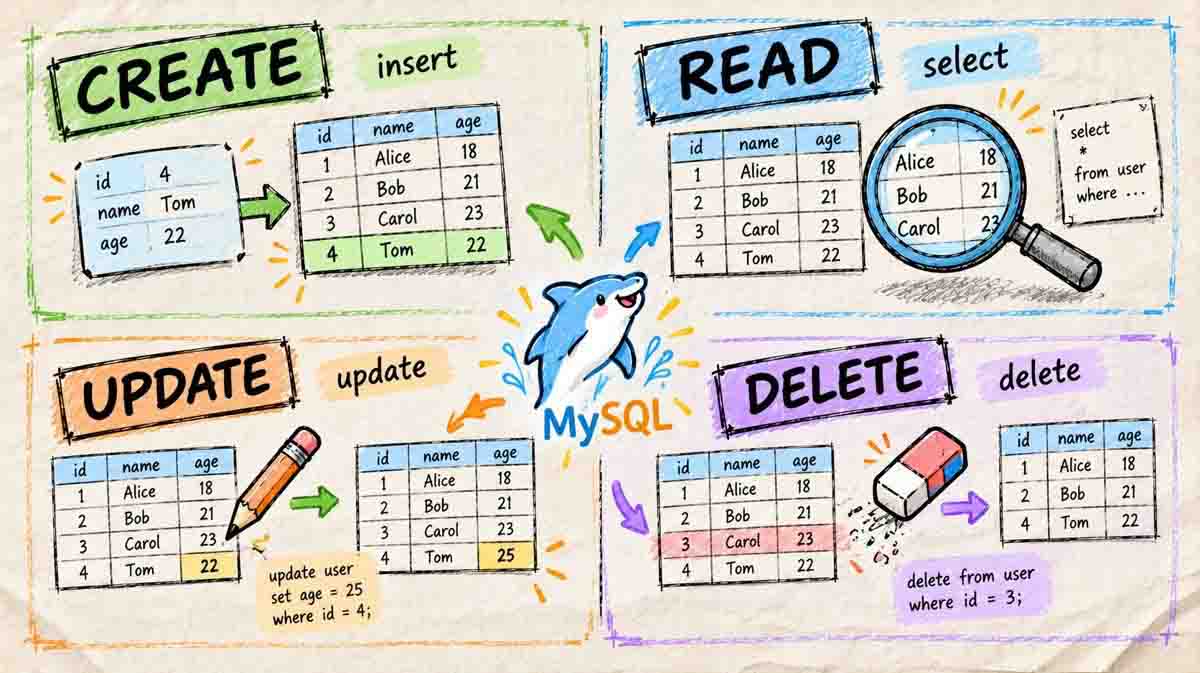
CRUD 是四个动作的缩写:
| 动作 | 关键字 | 做什么 | 典型风险 |
|---|---|---|---|
| C(Create) | insert | 往表里放数据 | 列数/顺序错、主键冲突 1062 |
| R(Retrieve) | select | 把数据查出来 | 条件写错、顺序不稳定、NULL 踩坑 |
| U(Update) | update | 改已有数据 | 忘写 where,整表被改 |
| D(Delete) | delete | 删数据 | 忘写 where,整表被删 |
这一篇我们用三张主表串起来(另外还有几张辅助表)进行CRUD:
students:插入、冲突、替换;exam_result:查询、排序、分页、更新、删除、聚合;emp:分组统计。
先建 exam_result:
create table exam_result (
    id int unsigned primary key auto_increment,
    name varchar(20) not null comment '同学姓名',
    chinese float default 0.0 comment '语文成绩',
    math float default 0.0 comment '数学成绩',
    english float default 0.0 comment '英语成绩'
);
插入 7 条测试数据:
insert into exam_result (name, chinese, math, english) values
('唐三藏', 67, 98, 56),
('孙悟空', 87, 78, 77),
('猪悟能', 88, 98, 90),
('曹孟德', 82, 84, 67),
('刘玄德', 55, 85, 45),
('孙权', 70, 73, 78),
('宋公明', 75, 65, 30);
MySQL 8.0 默认字符集是 utf8mb4,示例省略了 charset;如果你显式写,建议写 utf8mb4,不要写 utf8(8.0 里它是 utf8mb3 的别名,已标记为废弃)。
1.1 先记住一条执行顺序
在开始之前,我们先同步一条认知:同样一条 SQL,写在前面的关键字不一定先执行。MySQL 的逻辑执行顺序大致是:
from → where → group by → having → select → distinct → order by → limit
这条顺序能解释很多“为什么”:
where在select之前,所以where里不能用select的别名;order by在select之后,所以order by可以用别名;having在group by之后,所以having可以过滤分组;limit最后执行,所以它是对最终结果做截断。
知道了执行顺序,我们在后面的使用中面对一些问题就能直接知晓答案。
二、Create:把数据放进去
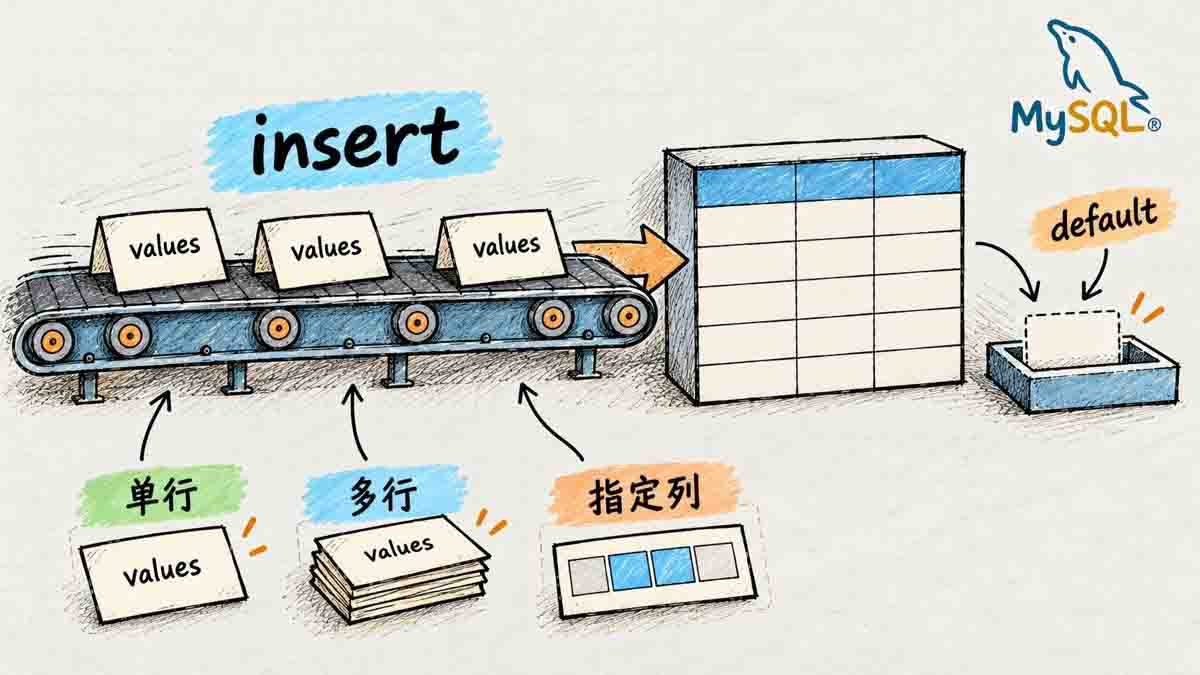
insert 是往表里放数据的第一步:没有它,后面的查询、更新、删除都无从谈起。它看起来只是“写一行”,但列的顺序、自增、默认值、唯一键冲突都会在这里暴露出来。
2.1 insert 的两种基本写法
完整语法:
insert [into] table_name
    [(column [, column] ...)]
    values (value_list) [, (value_list)] ...;

value_list: value [, value] ...
下面我们通过一张学生表来演示insert的用法:
create table students (
    id int unsigned primary key auto_increment,
    sn int not null unique comment '学号',
    name varchar(20) not null,
    qq varchar(20)
);
首先是单行 + 全列插入:
insert into students values (100, 10000, '唐三藏', null);
insert into students values (101, 10001, '孙悟空', '11111');
values 的数量必须和表的列数、顺序一致。id 是自增的,但这里显式给了值;如果省略 id,就要写清楚插入哪些列,让 MySQL 用默认值/自增补上。
然后是多行 + 指定列插入:
insert into students (id, sn, name) values
(102, 20001, '曹孟德'),
(103, 20002, '孙仲谋');
可以看到,插入数据其实非常简单,就三步:
- 插入的关键字
insert into加上要插入的表; values的左边是你要插入的列;values的右边是你要插入的列的数据;
values右边值的数量必须和表的列数、顺序一致。我们不指定插入的列那就是全列插入;如果要一条语句插入多条数据就像上面代码所示,直接在后面添加即可。
我们来看一下查询结果:
select * from students;
+-----+-------+-----------+-------+
| id  | sn    | name      | qq    |
+-----+-------+-----------+-------+
| 100 | 10000 | 唐三藏     | NULL  |
| 101 | 10001 | 孙悟空     | 11111 |
| 102 | 20001 | 曹孟德     | NULL  |
| 103 | 20002 | 孙仲谋     | NULL  |
+-----+-------+-----------+-------+
几个细节:
insert into的into可以省略;values和value是同义词,为了可读性统一用values;- 没写的列如果有
default,用默认值;没有default且允许NULL,填NULL;既没默认值又不允许NULL,就会报错1364。
MySQL 8 默认严格模式;插入超长字符串、非法日期、越界整数会直接报错,不会静默截断。
2.2 主键/唯一键冲突:1062
students.sn 是唯一键。那我们再插一个 sn = 20001 的同学看一看MySQL是否会报错:
insert into students (sn, name) values (20001, '曹阿瞒');
执行后会报错1062:
-- ERROR 1062 (23000): Duplicate entry '20001' for key 'students.sn'
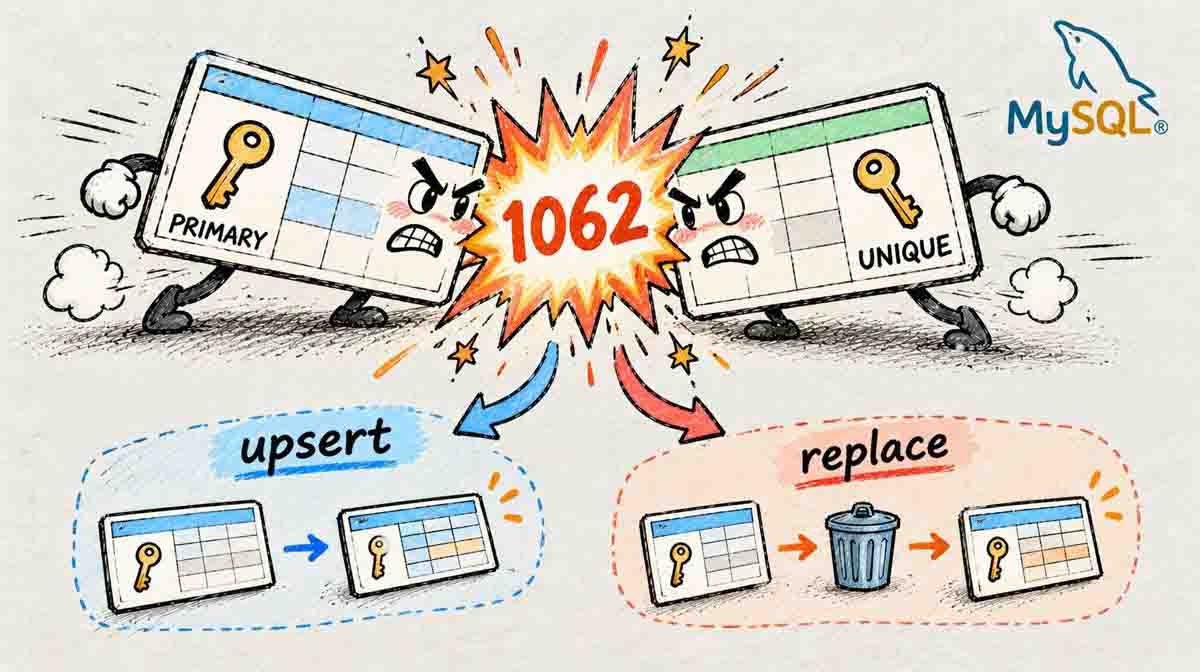
它的意思是:你插入的值,和主键或唯一键上已有的值重复了。看 for key 'students.sn' 就知道是哪个唯一键冲突;如果是主键,会显示 for key 'PRIMARY'。
那么遇到这种情况我们该如何去处理呢?有下面三种处理方式:
方式一:on duplicate key update(冲突就更新)
insert into students (id, sn, name) values (100, 10010, '唐大师')
    on duplicate key update sn = 10010, name = '唐大师';
执行上面的SQL语句后,因为id = 100 已经存在,所以不会插入,而是把 sn 和 name 更新掉。
Query OK 后面的行数有讲究:
0 row affected:有冲突,但更新的值和原值一样;1 row affected:没有冲突,插入成功;2 row affected:有冲突,并且真的更新了。
可以用 row_count() 拿到这个值:
select row_count();
on duplicate key update 在 MySQL 8.0.20 之后建议用别名写法(as new_row),values() 函数被标记为废弃;别名语法本身从 8.0.19 开始支持。老项目里两种写法都能见到。
MySQL 8.0.19+ 可以写成:
insert into students (id, sn, name) values (100, 10010, '唐大师') as new_row
    on duplicate key update sn = new_row.sn, name = new_row.name;
方式二:replace into(冲突就删了重插)
replace into students (sn, name) values (20001, '曹阿瞒');
replace 的语义是:主键/唯一键没冲突就插入;有冲突就先删除旧行,再插入新行。所以:
- 受影响行数可能是 2(删 1 + 插 1);
- 旧行里没在新
replace里指定的列,会被重置为默认值/NULL; - 如果表上有外键、触发器,
replace的删除动作可能带来副作用。
方式三:insert ignore(冲突就跳过)
insert ignore into students (sn, name) values (20001, '曹阿瞒');
冲突时忽略,返回 warning,不报错。适合“有就跳过”的批量导入,但不要用它掩盖真正的数据问题。
下面是insert常用用法的总结:
| 写法 | 冲突时 | 优点 | 注意 |
|---|---|---|---|
| insert | 报 1062 | 语义最清楚 | 需要应用层处理冲突 |
| insert ignore | 跳过 | 批量导入方便 | 可能吞掉其他错误 |
| on duplicate key update | 更新指定列 | 原子 upsert | 更新列要写全 |
| replace into | 删除后重插 | 写法短 | 未指定的列会被重置 |
2.3 insert … select:把查询结果插进去
insert 的 values 不一定是字面量,也可以是一条 select,语法如下:
insert into table_name [(column, ...)] select ...;
下面来看一个经典场景:删除重复记录,只保留一份。
create table duplicate_table (id int, name varchar(20));

insert into duplicate_table values
(100, 'aaa'), (100, 'aaa'),
(200, 'bbb'), (200, 'bbb'), (200, 'bbb'),
(300, 'ccc');
我们的思路是:建一张结构相同的空表,把去重后的数据插进去,再用 rename table 进行原子替换。具体操作如下所示:
create table no_duplicate_table like duplicate_table;

insert into no_duplicate_table
    select distinct * from duplicate_table;

rename table duplicate_table to old_duplicate_table,
             no_duplicate_table to duplicate_table;
create table ... like 只复制结构,不复制数据;rename table 可以一次改多张表,是原子的。这样比 delete 一条条删更干净,也不用担心删到一半失败。
insert ... select 也可以用来做批量迁移、备份、归档;但目标表的列数、类型要能对上。
distinct :作用是去除查询结果中的重复数据,只保留不重复的记录。
三、Retrieve:把数据查出来
select 是日常最常用的 SQL:报表、搜索、分页、统计,最后都要落到“把数据查出来”。它也是最容易写错的——条件、排序、分页、NULL,任何一处含糊都会让结果看起来“时对时错”。我们按“选列 → 筛行 → 排序 → 截断”的顺序,把 select 拆开讲。
为了更好的去进行演示,我们先建一张表 exam_result:
create table exam_result (
    id int unsigned primary key auto_increment,
    name varchar(20) not null comment '同学姓名',
    chinese float default 0.0 comment '语文成绩',
    math float default 0.0 comment '数学成绩',
    english float default 0.0 comment '英语成绩'
);
插入 7 条测试数据:
insert into exam_result (name, chinese, math, english) values
('唐三藏', 67, 98, 56),
('孙悟空', 87, 78, 77),
('猪悟能', 88, 98, 90),
('曹孟德', 82, 84, 67),
('刘玄德', 55, 85, 45),
('孙权', 70, 73, 78),
('宋公明', 75, 65, 30);
MySQL 8.0 默认字符集是 utf8mb4,示例省略了 charset;如果你显式写,建议写 utf8mb4,不要写 utf8(8.0 里它是 utf8mb3 的别名,已标记为废弃)。
3.1 select 的骨架
完整语法:
select
    [distinct] {* | column [, column] ...}
    [from table_name]
    [where ...]
    [order by column [asc | desc], ...]
    limit ...;
select的用法有很多,我们先来看一些简单常用的,下面是一些具体的查询操作,首先是最简单的全列查询:
select * from exam_result;
7 行成绩数据如下:
+-----+-----------+---------+------+---------+
| id  | name      | chinese | math | english |
+-----+-----------+---------+------+---------+
|   1 | 唐三藏    |      67 |   98 |      56 |
|   2 | 孙悟空    |      87 |   78 |      77 |
|   3 | 猪悟能    |      88 |   98 |      90 |
|   4 | 曹孟德    |      82 |   84 |      67 |
|   5 | 刘玄德    |      55 |   85 |      45 |
|   6 | 孙权      |      70 |   73 |      78 |
|   7 | 宋公明    |      75 |   65 |      30 |
+-----+-----------+---------+------+---------+
select * 写起来虽然省事,但不要滥用,原因有下面几点:
- 列越多,传输的数据量越大;
- 可能让覆盖索引失效;
- 表结构变了,结果集也跟着变,应用层容易踩坑。
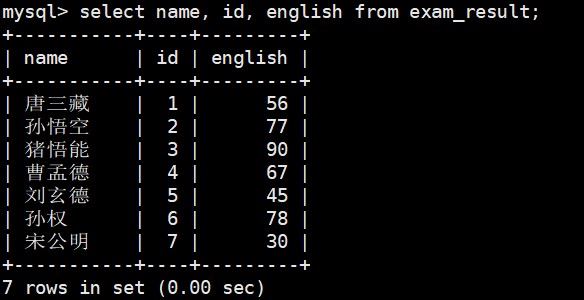
指定列查询:
select name, id, english from exam_result;
指定列的顺序不需要和表定义顺序一致,查询结果显示列的顺序是指定的顺序:
表达式查询:
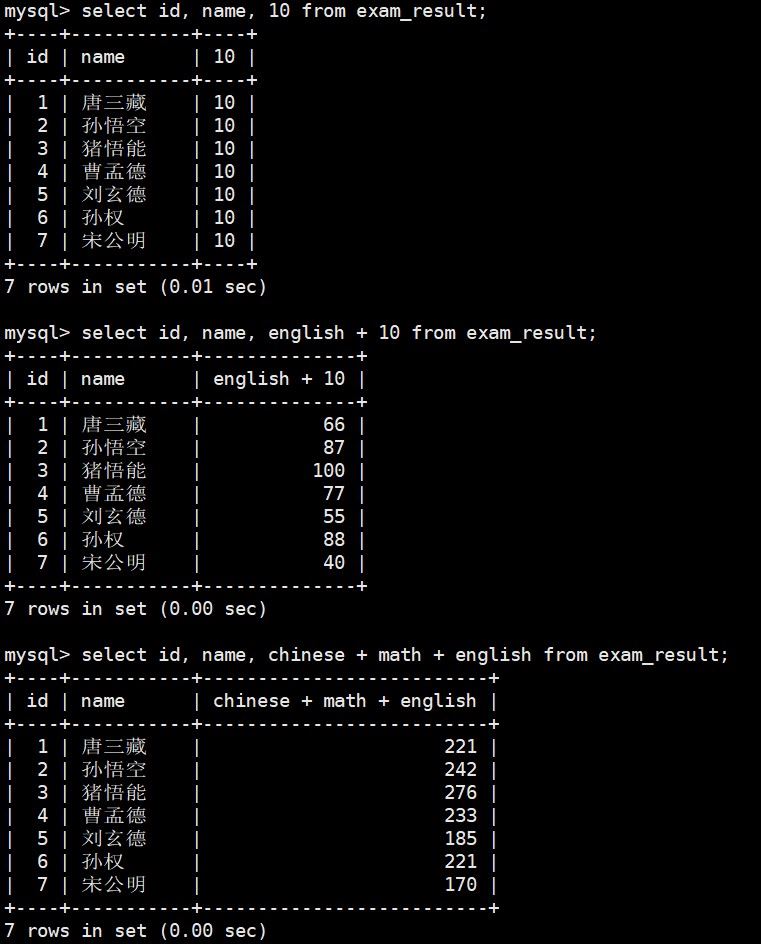
select id, name, 10 from exam_result;
select id, name, english + 10 from exam_result;
select id, name, chinese + math + english from exam_result;
表达式不包含字段时,每行都显示同一个值;包含字段时,按行计算。
别名:
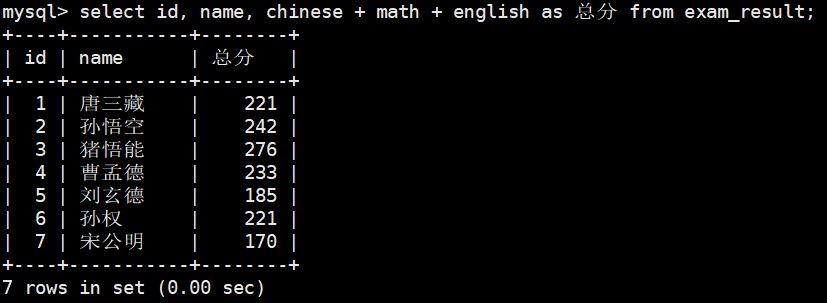
select id, name, chinese + math + english 总分 from exam_result;
-- 或者
select id, name, chinese + math + english as 总分 from exam_result;
-- 一般情况下尽量都加上as,方便阅读
别名可以让结果更好读,但是对于别名有一处地方要特别注意:在 where 里不能用别名,因为在SQL执行顺序中, where 比 select 先执行,所以我们where的时候这个别名还没有被成功赋值,MySQL读不到这个别名。
去重:
select math from exam_result;
select distinct math from exam_result;
distinct 作用于整行:select distinct math, english 是 (math, english) 组合去重,不是只对 math 去重。
3.2 where:把行筛出来
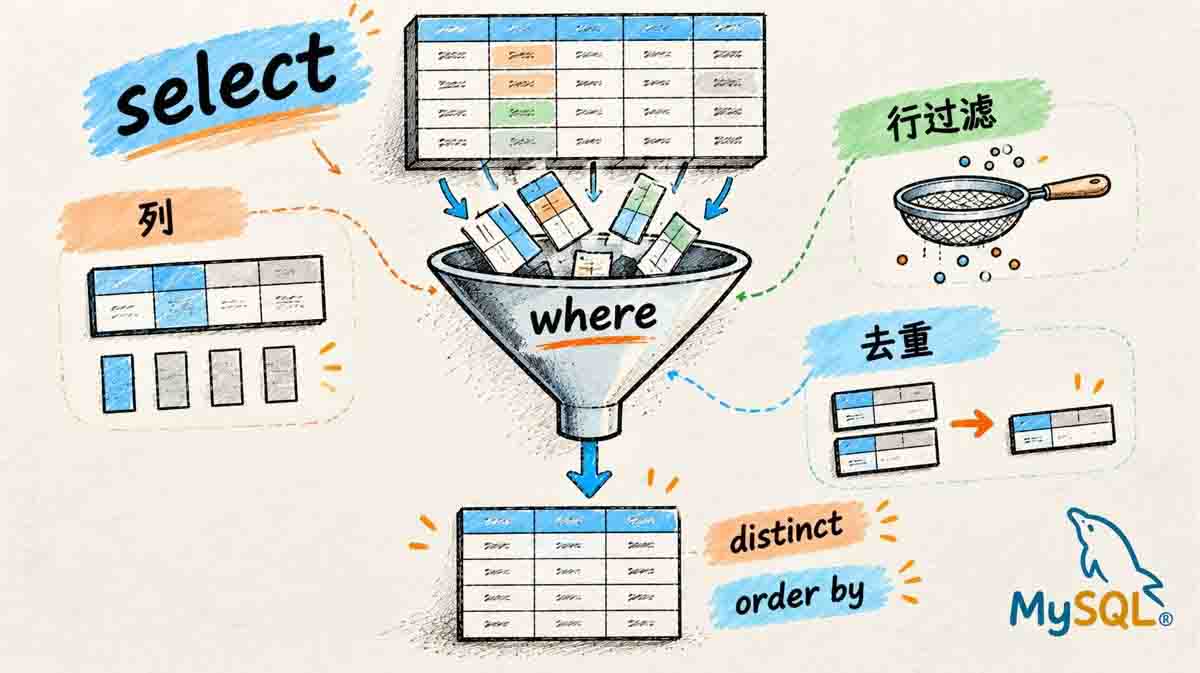
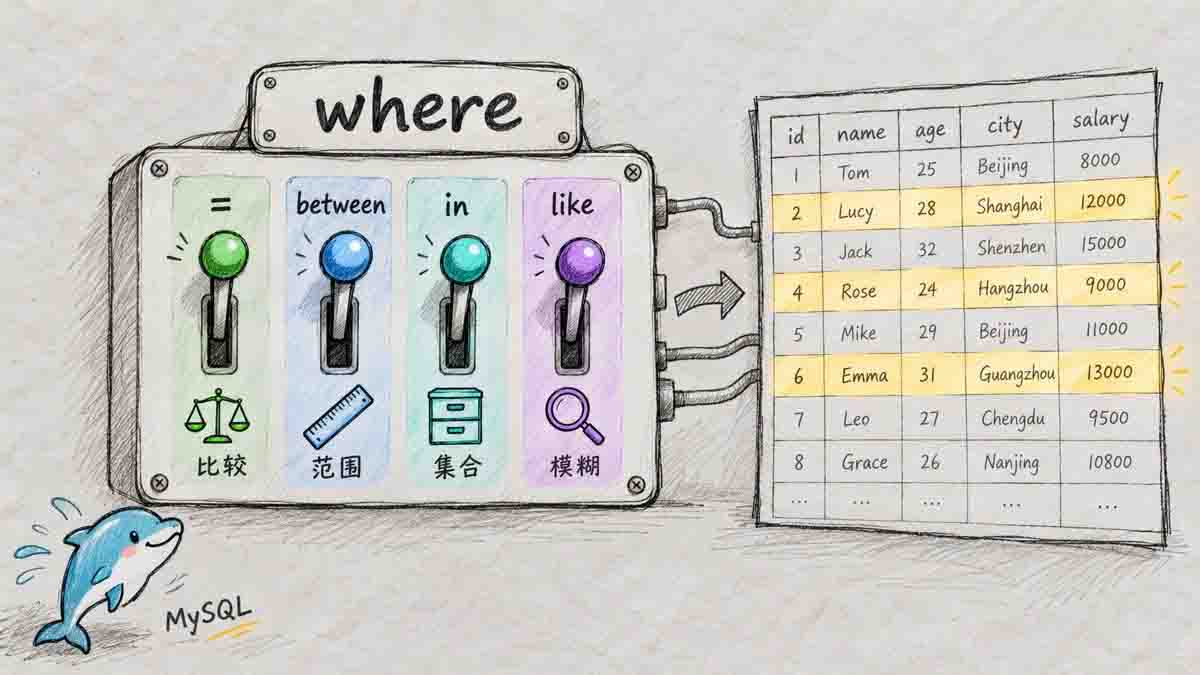
where 的作用是筛选行:在查询(以及 update、delete)中指定条件,只让满足条件的行参与后续操作。指定条件就是一个布尔表达式,将结果为 true 的行留下。MySQL的常用运算符如下表所示:
比较运算符:
| 运算符 | 说明 |
|---|---|
| >、>=、<、<= | 大于、大于等于、小于、小于等于 |
| = | 等于;NULL 不安全,NULL = NULL 结果是 NULL |
| <=> | 等于;NULL 安全,NULL <=> NULL 结果是 1 |
| !=、<> | 不等于 |
| between a0 and a1 | 范围 [a0, a1],闭区间 |
| in (option, ...) | 是列表中的任意一个 |
| is null / is not null | 是/不是 NULL |
| like | 模糊匹配;% 任意多个字符,_ 任意一个字符 |
逻辑运算符:
| 运算符 | 说明 |
|---|---|
| and | 都为真才为真 |
| or | 任意一个为真就为真 |
| not | 取反 |
下面是几个例子:
-- 英语不及格
select name, english from exam_result where english < 60;

-- 语文 80~90
select name, chinese from exam_result
where chinese between 80 and 90;

-- 数学 58/59/98/99
select name, math from exam_result
where math in (58, 59, 98, 99);

-- 姓孙的同学
select name from exam_result where name like '孙%';

-- 孙某同学(两个字)
select name from exam_result where name like '孙_';

-- 语文好于英语
select name, chinese, english from exam_result
where chinese > english;

-- 总分 < 200
select name, chinese + math + english 总分 from exam_result
where chinese + math + english < 200;

-- 语文 > 80 且不姓孙
select name, chinese from exam_result
where chinese > 80 and name not like '孙%';
注意 and 的优先级高于 or。复杂条件建议加括号,别靠优先级猜。
NULL 的查询:
select name, qq from students where qq is not null;
只返回 qq 非空的行:
+-----------+-------+
| name      | qq    |
+-----------+-------+
| 孙悟空    | 11111 |
+-----------+-------+
NULL 不是 0,也不是空字符串。判断 NULL 只能用 is null / is not null;= null 的结果是 NULL,不是 true。
select null = null, null = 1, null = 0;
select null <=> null, null <=> 1, null <=> 0;
两个查询的结果分别是:
-- null = null, null = 1, null = 0
+-------------+----------+----------+
| null = null | null = 1 | null = 0 |
+-------------+----------+----------+
|        NULL |     NULL |     NULL |
+-------------+----------+----------+
-- null <=> null, null <=> 1, null <=> 0
+---------------+------------+------------+
| null <=> null | null <=> 1 | null <=> 0 |
+---------------+------------+------------+
|             1 |          0 |          0 |
+---------------+------------+------------+
<=> 是 NULL 安全的等于:NULL <=> NULL 返回 1,NULL <=> 1 返回 0。
3.3 order by:把结果排好
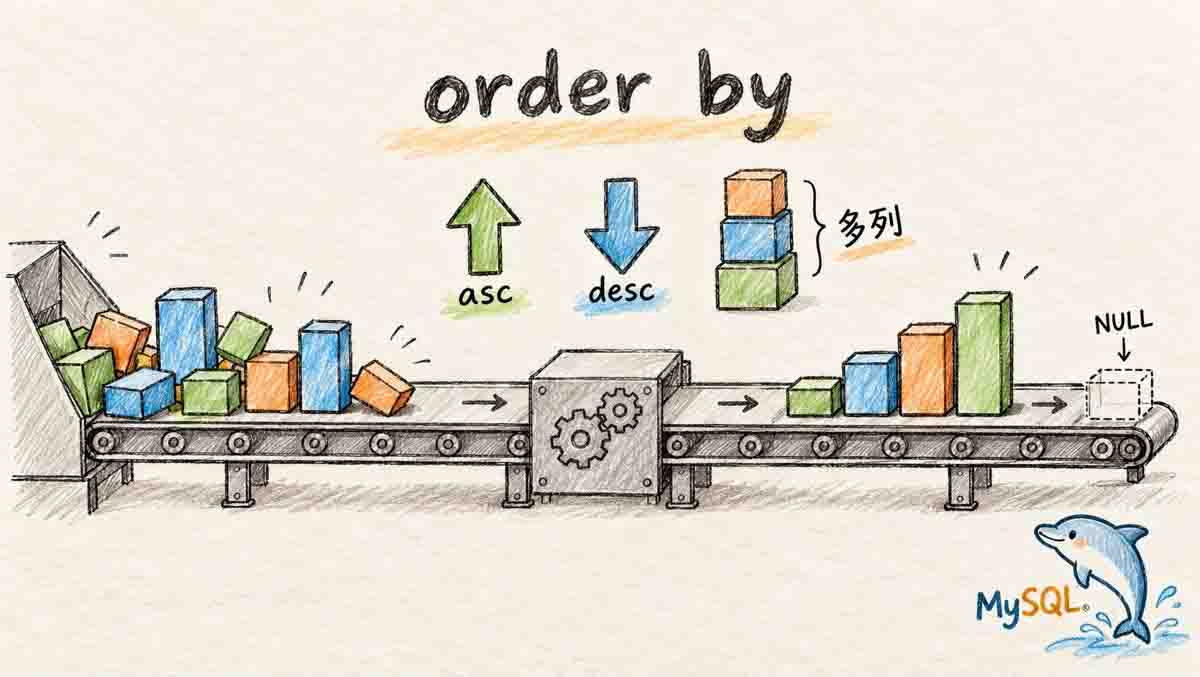
order by 的作用是对查询结果进行排序。它的用法细节如下:
select ... from table_name [where ...]
order by column [asc | desc], [...];
asc升序(默认),desc降序;- 多字段排序时,先按第一个字段排,第一个相同再按第二个;
order by可以用表达式、别名;- 没有
order by,返回顺序是未定义的,不要依赖它。
-- 数学升序
select name, math from exam_result order by math;

-- 数学降序,英语升序,语文升序
select name, math, english, chinese from exam_result
order by math desc, english, chinese;

-- 按总分降序
select name, chinese + math + english 总分 from exam_result
order by 总分 desc;

-- 姓孙或姓曹,按数学降序
select name, math from exam_result
where name like '孙%' or name like '曹%'
order by math desc;
NULL 在排序里被视为“比任何值都小”:升序出现在最上面,降序出现在最下面。
-- 升序:NULL 在最前面
select name, qq from students order by qq;

-- 降序:NULL 到最后面
select name, qq from students order by qq desc;
升序和降序的结果分别是:
-- 升序
+-----------+-------+
| name      | qq    |
+-----------+-------+
| 唐三藏    | NULL  |
| 曹孟德    | NULL  |
| 孙仲谋    | NULL  |
| 孙悟空    | 11111 |
+-----------+-------+
-- 降序
+-----------+-------+
| name      | qq    |
+-----------+-------+
| 孙悟空    | 11111 |
| 唐三藏    | NULL  |
| 曹孟德    | NULL  |
| 孙仲谋    | NULL  |
+-----------+-------+
3.4 limit:只取一部分
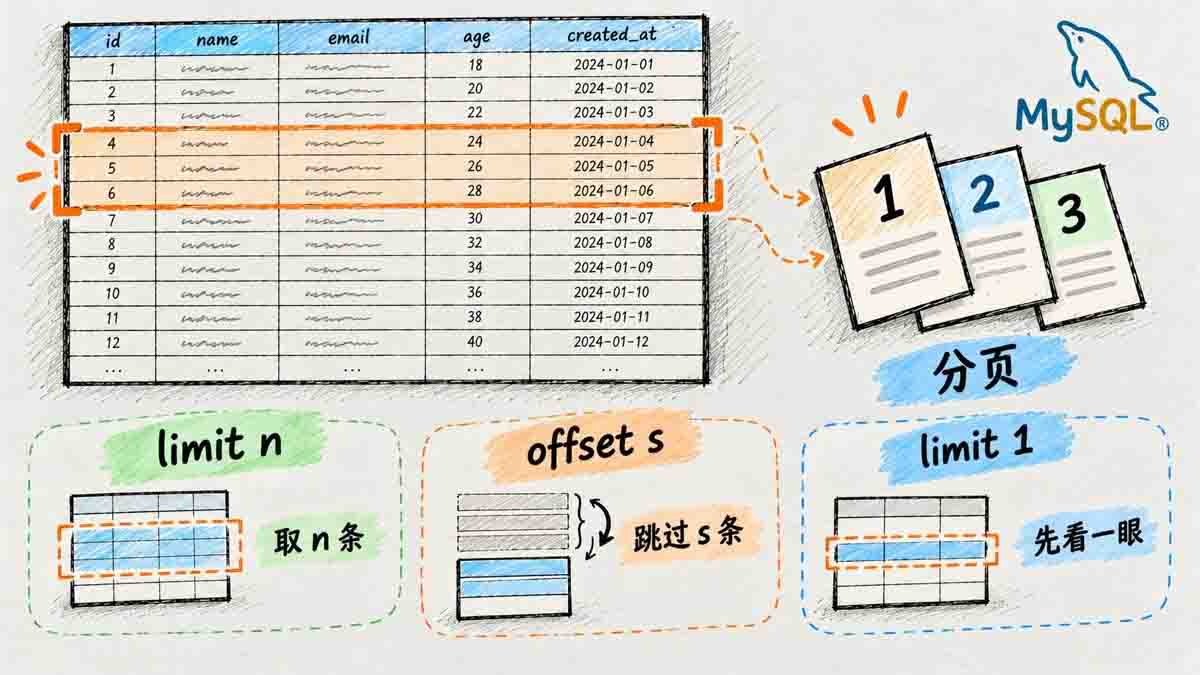
limit 在 MySQL 中用于限制查询结果返回的行数,常用于分页和只取前几条记录。limit的用法:
-- 从 0 开始,取 n 条
select ... from table_name ... limit n;

-- 从 s 开始,取 n 条
select ... from table_name ... limit s, n;

-- 从 s 开始,取 n 条,这是更明确的写法,比较推荐
select ... from table_name ... limit n offset s;
分页例子:按 id 排序,每页 3 条。
-- 第 1 页
select id, name, math, english, chinese from exam_result
order by id limit 3 offset 0;

-- 第 2 页
select id, name, math, english, chinese from exam_result
order by id limit 3 offset 3;

-- 第 3 页
select id, name, math, english, chinese from exam_result
order by id limit 3 offset 6;
三页的结果分别是:
-- 第 1 页
+-----+-----------+------+---------+---------+
| id  | name      | math | english | chinese |
+-----+-----------+------+---------+---------+
|   1 | 唐三藏    |   98 |      56 |      67 |
|   2 | 孙悟空    |   78 |      77 |      87 |
|   3 | 猪悟能    |   98 |      90 |      88 |
+-----+-----------+------+---------+---------+
-- 第 2 页
+-----+-----------+------+---------+---------+
| id  | name      | math | english | chinese |
+-----+-----------+------+---------+---------+
|   4 | 曹孟德    |   84 |      67 |      82 |
|   5 | 刘玄德    |   85 |      45 |      55 |
|   6 | 孙权      |   73 |      78 |      70 |
+-----+-----------+------+---------+---------+
-- 第 3 页
+-----+-----------+------+---------+---------+
| id  | name      | math | english | chinese |
+-----+-----------+------+---------+---------+
|   7 | 宋公明    |   65 |      30 |      75 |
+-----+-----------+------+---------+---------+
几个坑:
limit s, n的s从 0 开始,不是 1;- 分页一定要配合
order by,否则“第 2 页”可能和第 1 页重叠; limit大偏移(比如offset 1000000)会先扫描再丢弃,性能不好;深分页要用“记住上一页最后一个 id”的写法;- 对未知表做查询,先
limit 1看一眼,避免全表太大把数据库拖死。
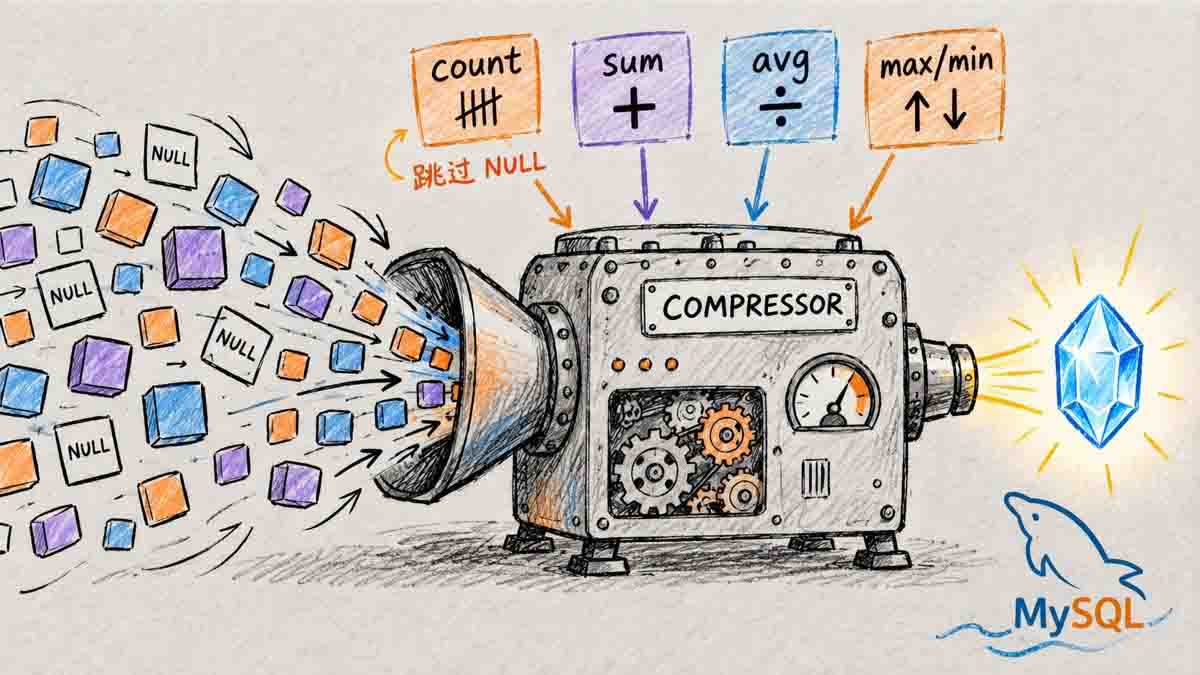
3.5 聚合函数:把多行压成一个数
前面的查询都是一行一行地看;而聚合函数的作用是把多行数据压缩成一个汇总值,用于统计、汇总和分析。它回答的是“有多少、总共多少、平均多少、最大最小是多少”这类问题。常用的聚合函数有五个:
| 函数 | 作用 | 注意 |
|---|---|---|
| count([distinct] expr) | 计数 | count(*) 统计行数;count(col) 跳过 NULL |
| sum([distinct] expr) | 求和 | 不是数字没有意义;没有行时返回 NULL |
| avg([distinct] expr) | 平均 | 分母不含 NULL |
| max([distinct] expr) | 最大 | 可以用于数字、字符串、日期 |
| min([distinct] expr) | 最小 | 同上 |
3.5.1 count 的三种写法
select count(*) from students;
select count(1) from students;
select count(qq) from students;
select count(distinct math) from exam_result;
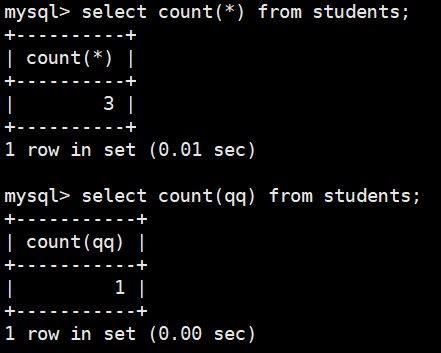
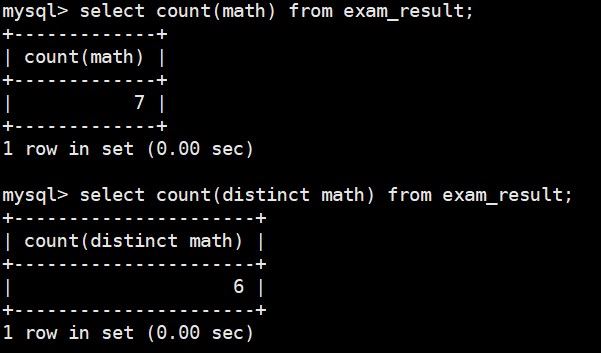
count(*)统计所有行,包括NULL;count(1)和count(*)在 InnoDB 里基本等价;count(qq)只统计qq is not null的行;count(distinct math)统计去重后的非NULL值。
students 有 3 行,qq 只有 1 行非 NULL,所以统计结果如下:
count(*) = 4
count(qq) = 1
exam_result 的 math 有 7 行、6 个不同的值,所以 count(math) = 7,count(distinct math) = 6。
3.5.2 sum / avg 的 NULL 语义
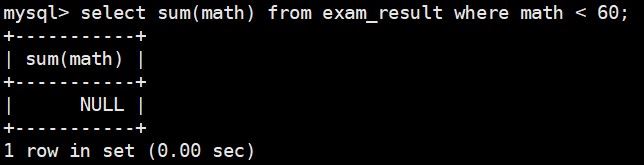
select sum(math) from exam_result;
select sum(math) from exam_result where math < 60;
select avg(chinese + math + english) 平均总分 from exam_result;
sum/avg会跳过NULL;- 如果没有行满足条件,
sum返回NULL,不是 0; avg的分母是非 NULL 的行数,不是总行数。
因为where math < 60 没有行,所以 sum(math) 返回 NULL。
3.5.3 max / min
select max(english) from exam_result;
select min(math) from exam_result where math > 70;
max / min 也可以用于字符串(按排序规则)和日期;用在字符串上时,得到的是字典序最大/最小,不一定是你以为的“最长/最短”。同样,max / min 也是忽略NULL的。
3.6 group by 与 having:分组统计
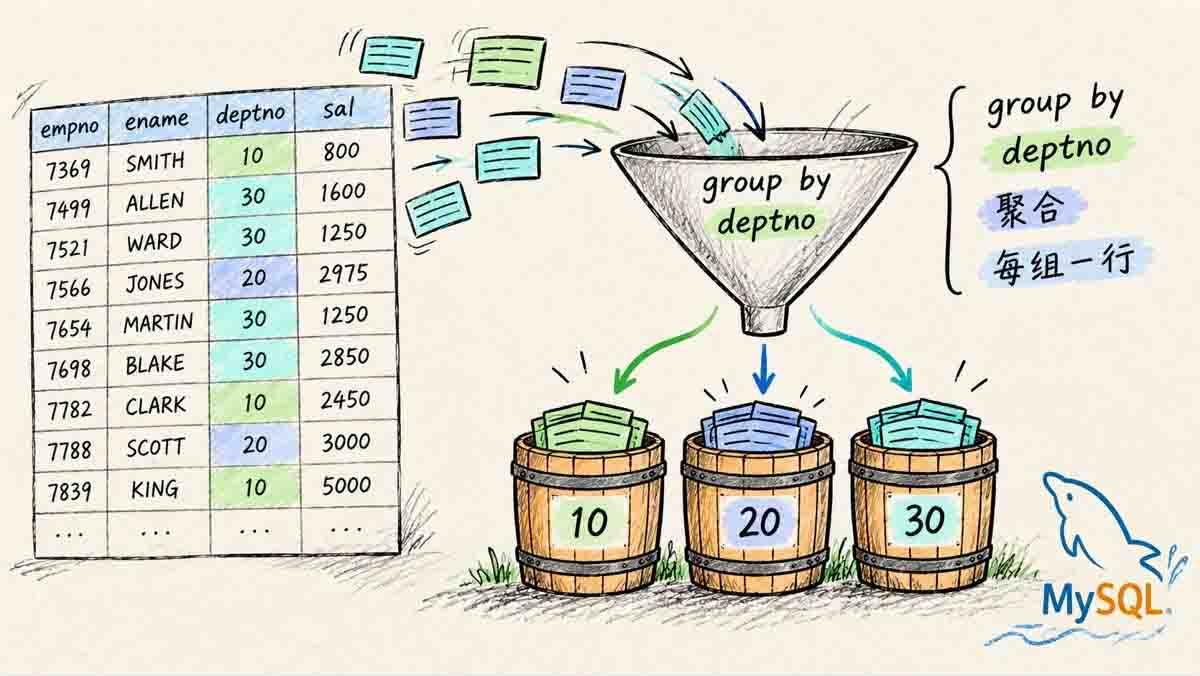
聚合函数是对整张表算一个值;如果想把表拆成几组,每组各算一个值,就要用 group by。它回答的是“每个部门/每个分类/每个状态分别怎样”这类问题。
3.6.1 group by 的基本用法
group by 把行按某列的值分组,每组算一个聚合值。
先建一张简化版的 emp 表:
create table emp (
    empno int primary key,
    ename varchar(20) not null,
    deptno int not null,
    job varchar(20) not null,
    sal decimal(7,2) not null
);

insert into emp values
(7369,'SMITH',20,'CLERK',800.00),
(7499,'ALLEN',30,'SALESMAN',1600.00),
(7521,'WARD',30,'SALESMAN',1250.00),
(7566,'JONES',20,'MANAGER',2975.00),
(7654,'MARTIN',30,'SALESMAN',1250.00),
(7698,'BLAKE',30,'MANAGER',2850.00),
(7782,'CLARK',10,'MANAGER',2450.00),
(7839,'KING',10,'PRESIDENT',5000.00),
(7844,'TURNER',30,'SALESMAN',1500.00),
(7900,'JAMES',30,'CLERK',950.00),
(7902,'FORD',20,'ANALYST',3000.00),
(7934,'MILLER',10,'CLERK',1300.00);
求每个部门的平均工资和最高工资,所以我们要先对部门进行分组,然后再计算每个部门的平均工资和最高工资:
select deptno, round(avg(sal), 2) as avg_sal, max(sal)
from emp
group by deptno;
按部门分组后,结果如下:
+--------+---------+----------+
| deptno | avg_sal | max(sal) |
+--------+---------+----------+
|     10 | 2916.67 |  5000.00 |
|     20 | 2258.33 |  3000.00 |
|     30 | 1566.67 |  2850.00 |
+--------+---------+----------+
round() 是 MySQL 的数值四舍五入函数,用于把数字按指定小数位数进行舍入。
求每个部门、每种岗位的平均工资和最低工资:
select deptno, job, round(avg(sal), 2) as avg_sal, min(sal)
from emp
group by deptno, job;
我们只需要将deptno和job一起分组即可:
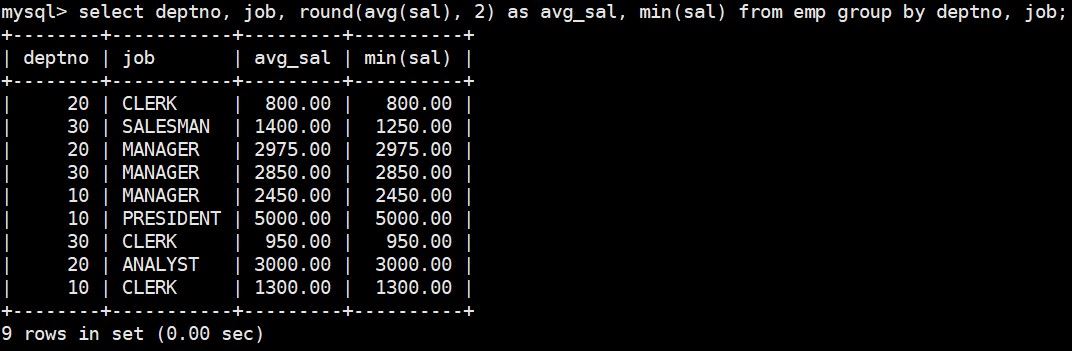
group by deptno, job 是“先按部门分,再按岗位分”;select 里的非聚合列要出现在 group by 里,像下面例子所示:
-- 正确:class_id 在 group by 里,count(*) 是聚合
select deptno, count(*) from emp group by deptno;

-- 错误:name 不在 group by 里,也不是聚合
select deptno, job, count(*) from emp group by deptno;
-- ERROR 1055 (42000): Expression #2 of SELECT list is not in GROUP BY clause and contains nonaggregated column 'test_crud.emp.job' which is not functionally dependent on columns in GROUP BY clause; this is incompatible with sql_mode=only_full_group_by
MySQL 8.0 默认开启 only_full_group_by:select 里的非聚合列如果不在 group by 里(且没有函数依赖),会报 1055。这不是 bug,是让结果可解释。
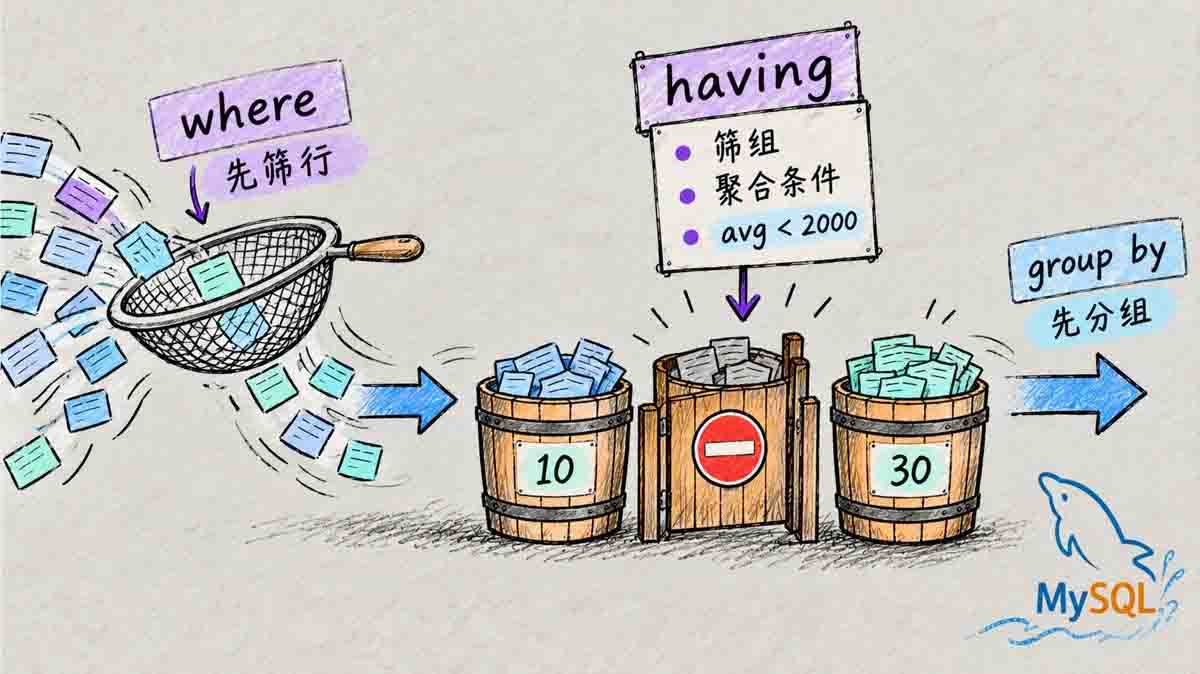
3.6.2 having:过滤分组
having 在 group by 之后执行,用来过滤“组”:
select deptno, round(avg(sal), 2) as avg_sal
from emp
group by deptno
having avg_sal < 2000;
过滤后只剩 30 号部门:
+--------+---------+
| deptno | avg_sal |
+--------+---------+
|     30 | 1566.67 |
+--------+---------+
结果只剩 30 号部门(平均工资 1566.67)。
where 和 having 的区别:
| 维度 | where | having |
|---|---|---|
| 执行时机 | group by 之前 | group by 之后 |
| 过滤对象 | 行 | 组 |
| 能否用聚合 | 不能 | 能 |
| 能否用别名 | 不能(select 还没执行) | 可以(MySQL 扩展) |
3.7 一条 SQL 的执行顺序
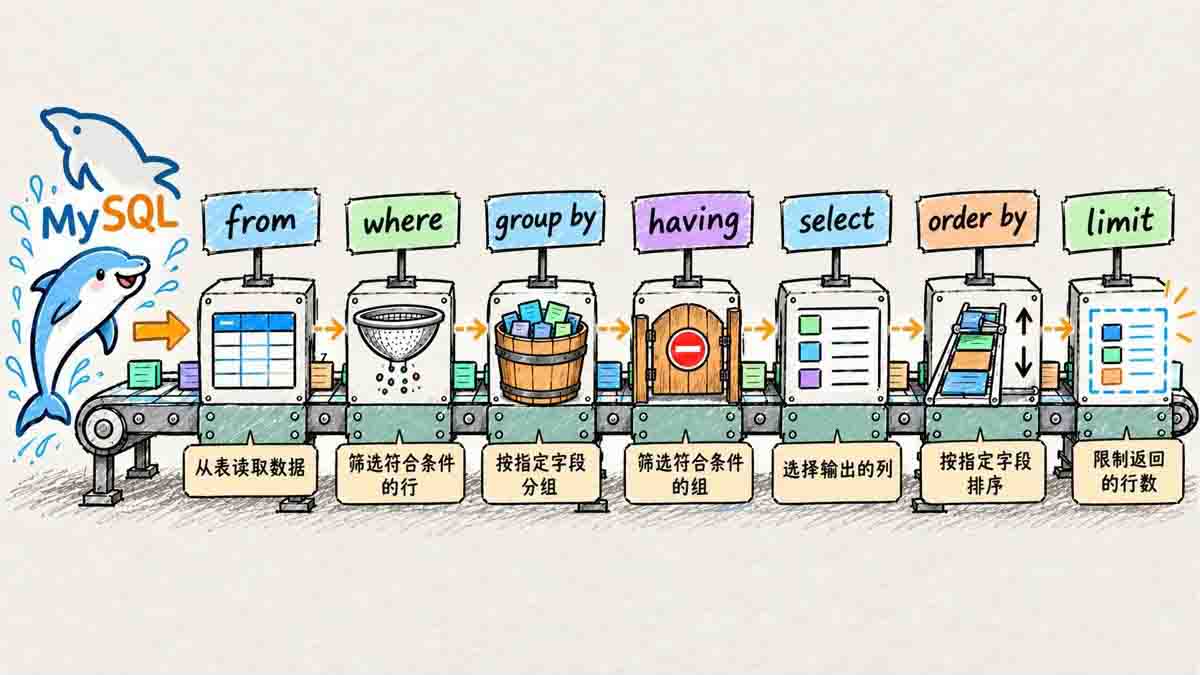
学了上面的知识后,我们认识了许多关键字,那么这些SQL关键字同时使用时的执行顺序就尤为重要了,下面我们把前面的例子拆开具体来看:
select deptno, round(avg(sal), 2) as avg_sal
from emp
where sal > 800
group by deptno
having avg_sal < 3000
order by avg_sal desc
limit 2;
逻辑执行顺序:
from emp
  → where sal > 800          -- 先筛行
  → group by deptno          -- 再分组
  → having avg_sal < 3000    -- 再筛组
  → select deptno, avg(sal)  -- 再算输出列
  → order by avg_sal desc    -- 再排序
  → limit 2                  -- 最后截断
这张“流水线”能解释很多问题:
where里不能用select的别名,因为select还没执行;having里可以用别名,因为select已经执行;having里可以用聚合,where里不行;order by可以用别名,也可以用表达式;limit最后执行,所以它截断的是排序后的结果。
四、Update:改数据
update 改的是已经存在的数据,和 insert 不同:它不新增行,只改列值。也正因为如此,它比 insert 更危险——where 写漏一个条件,整张表都会被改掉。
完整语法:
update table_name set column = expr [, column = expr ...]
    [where ...] [order by ...] [limit ...];
update 是对已经存在的行做列值更新;where 决定改哪些行,order by + limit 决定改多少行。
4.1 改一列
把孙悟空的数学成绩改成 80:
-- 更新前
select name, math from exam_result where name = '孙悟空';

update exam_result set math = 80 where name = '孙悟空';

-- 更新后
select name, math from exam_result where name = '孙悟空';
更新前后的对比如下:
-- 更新前
+-----------+------+
| name      | math |
+-----------+------+
| 孙悟空    |   78 |
+-----------+------+
-- 更新后
+-----------+------+
| name      | math |
+-----------+------+
| 孙悟空    |   80 |
+-----------+------+

Query OK, 1 row affected 表示改了 1 行;Rows matched: 1 Changed: 1 里,matched 是匹配到的行数,changed 是值真正发生变化的行数。如果新值和旧值一样,matched 是 1,changed 是 0。
4.2 改多列
把曹孟德的数学改成 60、语文改成 70:
update exam_result
set math = 60, chinese = 70
where name = '曹孟德';
改多列就直接用逗号隔开即可:

4.3 用表达式改
把总分倒数前三的同学,数学成绩加 30:
update exam_result
set math = math + 30
order by chinese + math + english
limit 3;
注意:
- 不支持
math += 30这种写法,必须写math = math + 30; order by+limit是 MySQL 的扩展,标准 SQL 不保证支持;order by里的表达式是更新前的值,所以“倒数前三”是按更新前的总分算的。update的limit只支持“限制行数”,不支持offset, n分页形式。
4.4 更新全表
没有 where,就会更新整张表:
update exam_result set chinese = chinese * 2;
来看下运行结果:

Query OK, 7 rows affected——7 行全改了。更新全表的语句慎用,执行前先 select 确认范围,最好在事务里做。
update 也可能撞上约束:改出重复的唯一键报 1062,改出非法外键报 1452,改出违反 check 的值报 3819(MySQL 8.0.16+ 才强制)。所以“改数据”不只是 SQL 写法问题,还要看表上有什么约束。
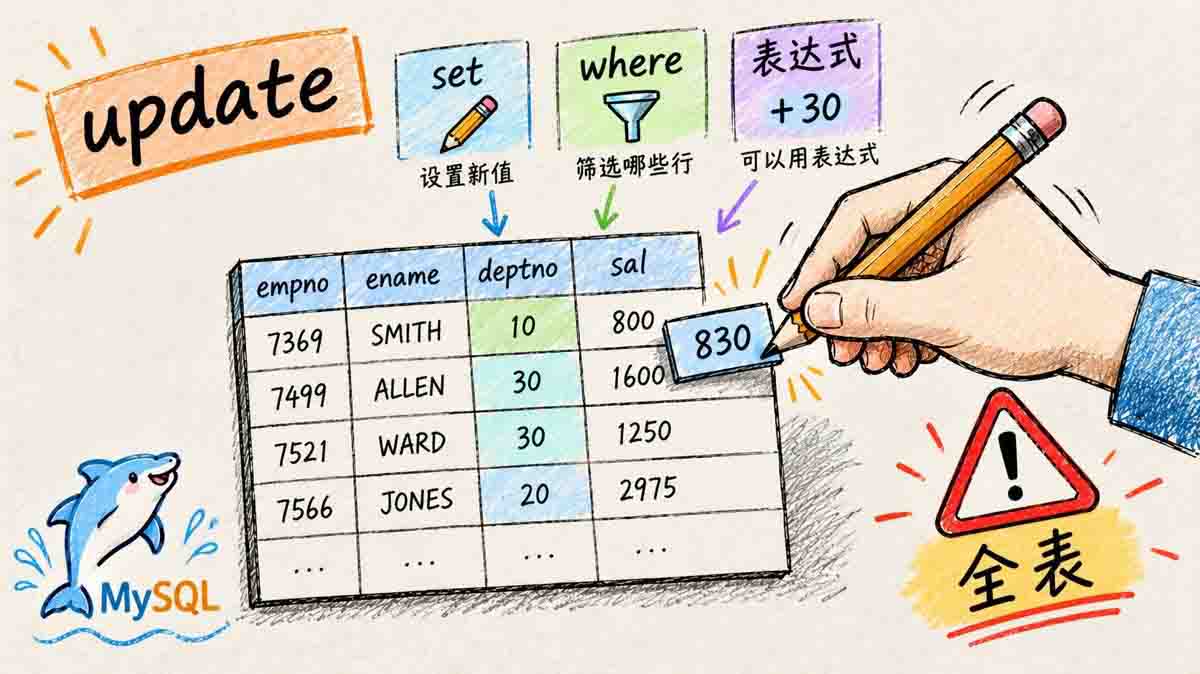
只要记住下面这句话,就能记住update:update 按 where 条件筛选行,用 set 修改指定列的值,不写 where 会更新全表,操作前务必确认条件。
五、Delete:删数据
delete 负责把不再需要的行拿掉。它和 update 一样,成败几乎全看 where:条件写对了只删一行,写漏了就删整表。我们主要区分“删一部分”和“清空整表”,并把 delete 与 truncate 的自增、回滚、速度差异放在一起对比。
完整语法:
delete from table_name [where ...] [order by ...] [limit ...];
5.1 删一部分
delete from exam_result where name = '孙悟空';
select * from exam_result where name = '孙悟空';
删除后再查,结果为空:
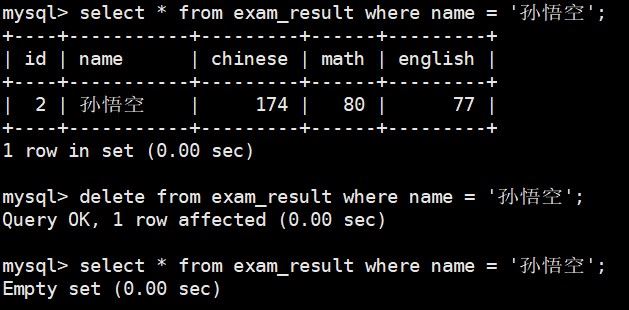
Empty set (0.00 sec)
Empty set 表示没有匹配的行,不是报错。
5.2 删整表:delete 与 truncate
delete from for_delete; 会删掉所有行,但不会重置自增:
create table for_delete (
    id int primary key auto_increment,
    name varchar(20)
);

insert into for_delete (name) values ('A'), ('B'), ('C');
delete from for_delete;
insert into for_delete (name) values ('D');
select * from for_delete;
查询结果里,新插入的 D 拿到 id = 4:
+-----+------+
| id  | name |
+-----+------+
|   4 | D    |
+-----+------+
删整表时,除了delete,我们还可以用truncate:truncate table for_truncate; 它会删掉所有行,并且重置自增:
create table for_truncate (
    id int primary key auto_increment,
    name varchar(20)
);

insert into for_truncate (name) values ('A'), ('B'), ('C');
truncate for_truncate;
insert into for_truncate (name) values ('D');
select * from for_truncate;
truncate 之后,D 的 id 回到 1:
+-----+------+
| id  | name |
+-----+------+
|   1 | D    |
+-----+------+
下面是delete和truncate的对比:
| 维度 | delete | truncate |
|---|---|---|
| 类型 | DML | DDL |
| 范围 | 可以按 where 删部分 | 只能整表 |
| 自增 | 不重置 | 重置 |
| 回滚 | 可以(事务内) | 不可以 |
| 速度 | 逐行删,慢 | 直接重建,快 |
| 触发器 | 会触发 | 不触发 |
| 外键 | 受外键约束 | 被外键引用时不能 truncate |
MySQL 8 会把自增计数器持久化:delete 后即使重启,也不会回到 1;truncate 才会重置。
truncate 不是“更快的 delete”,它更像“把表清空并重置”。
在生产环境:
- 执行
truncate前,必须确认:没有其他表通过外键引用该表(否则操作会直接失败);且业务逻辑不依赖自增 ID 的连续性(因为truncate会重置自增计数器)。 - 执行
delete前,则需注意外键约束在特定条件下(如无级联删除)可能导致删除失败,但delete本身不会重置自增计数器。
六、综合案例:从建表到统计
前面的示例都是按知识点拆开练的;这一节把建表、插入、查询、统计、更新、删除串成一条完整的链路。目标:管理一张图书表,能完成插入、查询、统计、更新、删除。
6.1 建表和插入
create table books (
    id int unsigned primary key auto_increment,
    title varchar(50) not null,
    author varchar(20) not null,
    category varchar(20) not null,
    price decimal(6,2) not null,
    stock int not null default 0
);

insert into books (title, author, category, price, stock) values
('MySQL 必知必会', 'Ben Forta', '数据库', 49.00, 30),
('高性能 MySQL', 'Baron Schwartz', '数据库', 99.00, 12),
('算法导论', 'Cormen', '算法', 128.00, 8),
('代码整洁之道', 'Robert Martin', '编程', 59.00, 25),
('深入理解计算机系统', 'Bryant', '系统', 139.00, 6),
('MySQL 技术内幕', '姜承尧', '数据库', 79.00, 15),
('图解 HTTP', '上野宣', '网络', 45.00, 20);
插入后共有 7 本书:
select * from books;
+-----+--------------------------+-----------------+----------+----------+-------+
| id  | title                    | author          | category | price    | stock |
+-----+--------------------------+-----------------+----------+----------+-------+
|   1 | MySQL 必知必会           | Ben Forta       | 数据库   |    49.00 |    30 |
|   2 | 高性能 MySQL             | Baron Schwartz  | 数据库   |    99.00 |    12 |
|   3 | 算法导论                 | Cormen          | 算法     |   128.00 |     8 |
|   4 | 代码整洁之道             | Robert Martin   | 编程     |    59.00 |    25 |
|   5 | 深入理解计算机系统       | Bryant          | 系统     |   139.00 |     6 |
|   6 | MySQL 技术内幕           | 姜承尧          | 数据库   |    79.00 |    15 |
|   7 | 图解 HTTP                | 上野宣          | 网络     |    45.00 |    20 |
+-----+--------------------------+-----------------+----------+----------+-------+
6.2 查询
价格低于 60 的书:
select title, price from books where price < 60;
+--------------------------+----------+
| title                    | price    |
+--------------------------+----------+
| MySQL 必知必会           |    49.00 |
| 代码整洁之道             |    59.00 |
| 图解 HTTP                |    45.00 |
+--------------------------+----------+
库存低于 10 的书:
select title, stock from books where stock < 10;
+--------------------------+-------+
| title                    | stock |
+--------------------------+-------+
| 算法导论                 |     8 |
| 深入理解计算机系统       |     6 |
+--------------------------+-------+
价格降序取前三:
select title, price from books order by price desc limit 3;
+--------------------------+----------+
| title                    | price    |
+--------------------------+----------+
| 深入理解计算机系统       |   139.00 |
| 算法导论                 |   128.00 |
| 高性能 MySQL             |    99.00 |
+--------------------------+----------+
6.3 统计
按原始 7 行统计:
select count(*) as cnt, sum(stock) as total_stock,
       round(avg(price), 2) as avg_price, max(price) as max_price, min(price) as min_price
from books;

+------+-------------+-----------+-----------+-----------+
| cnt  | total_stock | avg_price | max_price | min_price |
+------+-------------+-----------+-----------+-----------+
|    7 |         116 |     85.43 |    139.00 |     45.00 |
+------+-------------+-----------+-----------+-----------+
按分类统计,并用 having 筛掉平均价格不超过 60 的分类:
select category, count(*) as cnt,
       round(avg(price), 2) as avg_price, sum(stock) as total_stock
from books
group by category
having avg_price > 60
order by avg_price desc;

+----------+------+-----------+-------------+
| category | cnt  | avg_price | total_stock |
+----------+------+-----------+-------------+
| 系统     |    1 |    139.00 |           6 |
| 算法     |    1 |    128.00 |           8 |
| 数据库   |    3 |     75.67 |          57 |
+----------+------+-----------+-------------+
where 是筛行,having 是筛组;这里先按 category 分组,再用 having 过滤平均价格。
6.4 更新
数据库类图书涨价 10 元:
update books set price = price + 10 where category = '数据库';
再查数据库类图书:
select title, price from books where category = '数据库';
+--------------------------+----------+
| title                    | price    |
+--------------------------+----------+
| MySQL 必知必会           |    59.00 |
| 高性能 MySQL             |   109.00 |
| MySQL 技术内幕           |    89.00 |
+--------------------------+----------+
6.5 删除
删除《图解 HTTP》:
delete from books where title = '图解 HTTP';
再查剩余图书:
select id, title, category, price from books order by id;
+-----+--------------------------+----------+----------+
| id  | title                    | category | price    |
+-----+--------------------------+----------+----------+
|   1 | MySQL 必知必会           | 数据库   |    59.00 |
|   2 | 高性能 MySQL             | 数据库   |   109.00 |
|   3 | 算法导论                 | 算法     |   128.00 |
|   4 | 代码整洁之道             | 编程     |    59.00 |
|   5 | 深入理解计算机系统       | 系统     |   139.00 |
|   6 | MySQL 技术内幕           | 数据库   |    89.00 |
+-----+--------------------------+----------+----------+
建表、插入、查询、统计、更新、删除是一条连续链路;每一步都可能受约束影响。
七、总结
CRUD 的重点不是背结论,而是在正确的步骤用正确的子句。下面把决策表、执行顺序和三个最容易写错的点放在一起,方便你回查:
7.1 一张 CRUD 决策表
| 想做什么 | 用什么 | 关键提醒 |
|---|---|---|
| 插入一行/多行 | insert into ... values ... | 列数/顺序;省略列要有默认值 |
| 冲突时更新 | on duplicate key update | 更新列写全;8.0.20 后少用 values() |
| 冲突时替换 | replace into | 先删后插,未指定的列会被重置 |
| 查询 | select ... where ... order by ... limit ... | where 不能用别名;分页要配 order by |
| 更新 | update ... set ... where ... | 忘 where 会改全表;注意约束 |
| 删除 | delete ... where ... | 忘 where 会删全表;不重置自增 |
| 清空并重置 | truncate table ... | 不可回滚;重置自增;受外键限制 |
| 统计 | count/sum/avg/max/min | count(col) 跳过 NULL;sum 空集返回 NULL |
| 分组 | group by ... having ... | where 筛行,having 筛组 |
7.2 一条执行顺序
from → where → group by → having → select → distinct → order by → limit
记住它,你就能解释:
- 为什么
where不能用别名; - 为什么
having能用聚合; - 为什么
limit截断的是排序后的结果。
7.3 三个最容易写错的点
where不能用select的别名:select ... 总分 ... where 总分 > 200会报错;要么写表达式,要么用having。count(col)会跳过NULL:count(*)统计行数,count(qq)只统计qq非空的行。delete不重置自增,truncate重置:delete是 DML,事务内可以回滚;truncate是 DDL,不可回滚,还会把自增清零。
7.4 动手试试
- 建一张
students表,插入 4 行,其中qq两行为NULL;分别用count(*)和count(qq)统计,解释差异。 - 给
students.sn加唯一键,插入重复的sn,观察1062;再用on duplicate key update改成更新。 - 用
exam_result查出英语不及格、总分降序前三、第 2 页(每页 3 条)。 - 把总分倒数前三的同学数学加 30,观察
order by ... limit的效果;再select确认。 - 建
for_delete和for_truncate,分别delete/truncate后插入新行,观察自增 id。 - 用
emp按deptno分组,算平均工资和最高工资,再用having筛出平均工资低于 2000 的部门。
增删改查是“会用表”的开始,但 SQL 的能力不止于此。下一篇我们把查询往前推一步:内置函数、复合查询与内外连接——让一条 SQL 从“查一张表”变成“回答一个更复杂的问题”。
总结
以上为个人经验,希望能给大家一个参考,也希望大家多多支持脚本之家。
相关文章
 本文讲述了Mac系统中Workbench主题色的调整方法,从深色主题改为浅色主题只需在命令行中执行特定命令,反之亦然2026-04-04
 这篇文章主要介绍了zabbix--监控MySQL主从状态的方法,本文图文并茂给大家介绍的非常详细,具有一定的参考借鉴价值 ,需要的朋友可以参考下2019-06-06
 在数据库中我们一般都会对一些字段进行索引操作,这样可以提升数据的查询速度,下面这篇文章主要给大家介绍了关于MySQL8新特性:降序索引的相关资料,需要的朋友可以参考借鉴,下面随着小编来一起学习学习吧2018-07-07
 MySQL 管理...2006-12-12

CentOS6.7 mysql5.6.33修改数据文件位置的方法
mysql存放的数据文件,分区容量较小,目前已经满,导致mysql连接不上,怎么解决呢?下面小编给大家分享CentOS6.7 mysql5.6.33修改数据文件位置的方法,一起看看吧2017-06-06 本文详细介绍了数据库备份的重要性、分类、方法以及Mysql数据库的备份与恢复操作,包括完全备份、差异备份、增量备份等,同时,还涉及了日志数据库、备份策略和执行备份的定时任务(Crontab)等内容2025-01-01
 文章介绍了如何使用JMeter进行数据库压力测试的步骤,包括安装JMeter、下载并配置MySQL JDBC驱动、设置测试计划、添加JDBC连接配置元件、添加JDBC请求取样器以及可选的监听器配置,最后,文章指导如何运行测试并分析结果,以评估数据库在不同压力下的性能表现2024-11-11

实现MySQL与elasticsearch的数据同步的代码示例
MySQL 自身简单、高效、可靠,是又拍云内部使用最广泛的数据库,但是当数据量达到一定程度的时候,对整个 MySQL 的操作会变得非常迟缓,这个时候我们就需要MySQL与elasticsearch数据同步,接下来就给大家介绍如何实现数据同步2023-07-07 今天在MySql5.6操作时报错:You must SET PASSWORD before executing this statement解决方法,需要的朋友可以参考下2016-11-11
 这篇文章主要介绍了MySQL存储过程中sql语句条件的in无效问题及解决,具有很好的参考价值,希望对大家有所帮助,如有错误或未考虑完全的地方,望不吝赐教2023-12-12
最新评论