

HCIA认证学习笔记5:VRP的基本命令小结
发布时间:2020-04-28 14:23:57 作者:Tachyon.xue  我要评论
我要评论
我要评论这篇文章主要介绍了HCIA认证VRP的基本命令,总结分析了HCIA认证VRP基本文件、查询、目录、配置等相关使用技巧,需要的朋友可以参考下
本文讲述了HCIA认证VRP的基本命令。分享给大家供大家参考,具体如下:
VRP操作

[tachyonAR01]header login information "XXXXXXXX"    \\用户登录前标题信息
[tachyonAR01]header shell information "XXXXXXXX"     \\用户登录后的标题信息
命令权限等级
0-15


文件系统管理命令
基本查询命令

目录操作

文件操作


重点:保存命令
保存命令save(必须在用户模式下才可以使用)
正在运行的(在内存里的)键入save会保存在flash:下的vrpcfg.zip里面
系统启动文件查询
display startup查看下次系统启动的文件
<tachyonAR01>display startup         //查看下次系统启动的文件
MainBoard:
  Startup system software:                   null
  Next startup system software:              null
  Backup system software for next startup:   null
  Startup saved-configuration file:          flash:/vrpcfg.zip   //保存的文件
  Next startup saved-configuration file:     flash:/vrpcfg.zip    //下次启动的文件
  Startup license file:                      null
  Next startup license file:                 null
  Startup patch package:                     null
  Next startup patch package:                null
  Startup voice-files:                       null
  Next startup voice-files:                  null
配置系统下次启动时使用的文件
startup saved-configuration
<tachyonAR01>startup ?
  patch                Config patch file for system to startup   \\补丁,加载补丁
  saved-configuration  Config saved-configuration file for system to startup  \\加载下次的配置
  system-software      Config system software for system to startup \\加载下次启动的软件
<tachyonAR01>startup saved-configuration tachyon.zip  \\更改下次启动使用的文件为tachyon.zip
This operation will take several minutes, please wait....
Info: Succeeded in setting the file for booting system
<tachyonAR01>display startup            \\查看下
MainBoard:
  Startup system software:                   null
  Next startup system software:              null
  Backup system software for next startup:   null
  Startup saved-configuration file:          flash:/vrpcfg.zip
  Next startup saved-configuration file:     flash:/tachyon.zip   \\更改成功
  Startup license file:                      null
  Next startup license file:                 null
  Startup patch package:                     null
  Next startup patch package:                null
  Startup voice-files:                       null
  Next startup voice-files:                  null
比较当前配置和保存的配置
<tachyonAR01>compare configuration   \\比较当前配置和保存的配置命令
 The current configuration is not the same as the next startup configuration file.
 ====== Current configuration line 33 ======   \\当前配置情况
 ip address 20.1.1.1 255.255.255.0
#
interface GigabitEthernet0/0/2
#
interface NULL0
#
user-interface con 0
 authentication-mode password
 ====== Configuration file line 33 ======     \\保存配置的情况
#
interface GigabitEthernet0/0/2
#
interface NULL0
#
user-interface con 0
 authentication-mode password
user-interface vty 0 4
配置文件重置(可以用来恢复出厂默认)慎用!!!不知道会不会删除License

查看华为设备储存详细信息
display version
相关文章
 这篇文章主要介绍了HCIA认证VRP系统基本操作,总结分析了HCIA认证VRP系统基本原理、操作命令与注意事项,需要的朋友可以参考下2020-04-27
 这篇文章主要介绍了HCIA认证ipv4基础和分类原理,总结分析了HCIA认证ipv4基本概念、原理、分类与相关注意事项,需要的朋友可以参考下2020-04-27
- 这篇文章主要介绍了华为HCIA认证考试OSPF协议,总结分析了华为HCIA认证考试中OSPF协议相关概念、原理、配置与操作注意事项,需要的朋友可以参考下2020-04-23
 这篇文章主要介绍了华为HCIA认证考试NAT 实验,结合具体实验案例形式分析了华为 HCIA 认证考试中NAT地址转换协议相关配置方法、操作命令与注意事项,需要的朋友可以参考下2020-04-23
- 这篇文章主要介绍了华为HCIA认证考试NAT基本概念与配置方法,较为详细的分析了华为HCIA认证考试中NAT地址转换协议的基本概念、原理、配置方法及操作注意事项,需要的朋友可以2020-04-22
 这篇文章主要介绍了华为HCIA认证考试ACL 配置实验,结合具体实验案例形式详细分析了华为HCIA认证考试ACL 配置实验具体原理、配置命令及相关操作注意事项,需要的朋友可以参考2020-04-22
- 这篇文章主要介绍了华为HCIA认证考试ACL原理与基本配置方法,简单总结分析了华为HCIA认证考试中ACL访问控制列表的基本概念、原理及配置方法,需要的朋友可以参考下2020-04-20
 这篇文章主要介绍了华为HCIA认证考试VLAN 配置实验,结合具体实验案例形式分析了华为HCIA VLAN虚拟局域网划分原理及配置相关操作技巧,需要的朋友可以参考下2020-04-20
- 这篇文章主要介绍了华为HCIA认证考试VLAN概念、配置方法,总结分析了华为HCIA认证考试中VLAN虚拟局域网的基本概念、原理、配置方法及相关操作注意事项,需要的朋友可以参考下2020-04-17
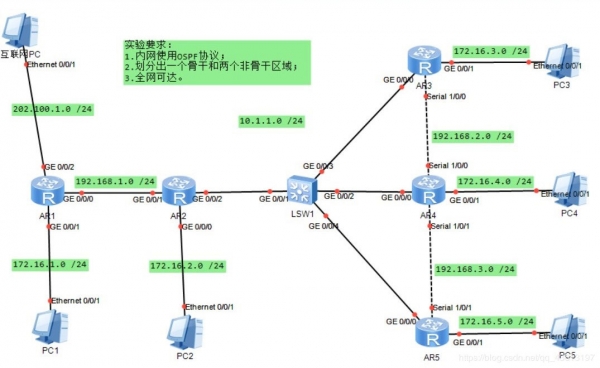 这篇文章主要介绍了华为HCIA认证考试OSPF 实验案例,结合实验案例形式分析了华为HCIA认证考试中OSPF配置实验具体步骤、原理、操作命令及注意事项,需要的朋友可以参考下2020-04-17

最新评论