

纯真ip数据库转换为(access)使用图文教程
发布时间:2010-04-20 09:42:25 作者:佚名  我要评论
我要评论
我要评论有时候默认的纯真ip数据库因为程序问题,需要转换格式等,这里就简单的给大家演示一下,转换方法。
第一步:其实制作查询IP工具的时候,已经有PHP可以完美直接读取QQWry.Dat文件了,演示地址:http://tools.jb51.net/ip/index.php
源码下载地址 PHP IP查询系统(纯真IP数据库) v2.1
第二步:IPLook 1.5.exe就是可以将 QQWry.Dat 文件,转出txt文件的软件。(如果是看了脚本之家的文章来的朋友,下面的输出格式,需要选择IP以无符号整数表示)
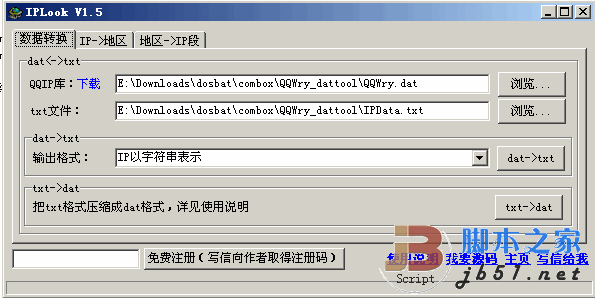
第三步:将刚导出的txt文件转成数据库的工具

其它的就很方便修改了
下面是asp读取access的代码,注意字段的名称需要简单的修改下
<%'IP
Public Function address(sip)
Dim aConnStr,aConn,adb
Dim str1,str2,str3,str4
Dim num
Dim country,city
Dim irs,SQL
If IsNumeric(Left(sip,2)) Then
If sip="127.0.0.1" Then sip="192.168.0.1"
str1=Left(sip,InStr(sip,".")-1)
sip=mid(sip,instr(sip,".")+1)
str2=Left(sip,instr(sip,".")-1)
sip=Mid(sip,InStr(sip,".")+1)
str3=Left(sip,instr(sip,".")-1)
str4=Mid(sip,instr(sip,".")+1)
If isNumeric(str1)=0 or isNumeric(str2)=0 or isNumeric(str3)=0 or isNumeric(str4)=0 Then
Else
num=CLng(str1)*16777216+CLng(str2)*65536+CLng(str3)*256+CLng(str4)-1
adb = "ip.mdb"
aConnStr = "Provider = Microsoft.Jet.OLEDB.4.0;Data Source = " & Server.MapPath(adb)
Set AConn = Server.CreateObject("ADODB.Connection")
aConn.Open aConnStr
sql="select * from ip where startip <="&num&" and endip >="&num&""
Set irs=aConn.execute(sql)
If irs.EOF And irs.bof Then
local="尚未收录"
Else
local=irs("country")&irs("local")
End If
Set irs=Nothing
Set aConn = Nothing
SqlQueryNum = SqlQueryNum+1
End If
address=local
Else
address="未知"
End If
End Function
linkip = Request.ServerVariables("HTTP_X_FORWARDED_FOR")
If linkip = "" Then linkip = Request.ServerVariables("REMOTE_ADDR")
ip=request.form("ip")
%>
<dd style="text-align:center"><span class="bot">+ + 您 的 IP : [ <%=linkip%> ] 来 自 : <%=address(linkip)%> + +
<%=Request.ServerVariables("HTTP_USER_AGENT")%></span>
<form method="post" target="_top" action="ip.asp" name="ipform" onsubmit="return checkIP();">
请输入要查询的IP:
<input type="text" name="ip" size="36" value="<%=ip%>" class=input> <input type="submit" value="点击查询" class=but></form>
<%
if request.ServerVariables("REQUEST_METHOD")="POST" then%>
<font color="#ff0000"><strong>查询结果 : <%=ip%> ==>> <%=ip%> ==>> <%=address(ip)%></strong></font>
上面四项依次显示的是 : 原始输入内容 <strong>==>></strong> 获取的IP地址 <strong>==>></strong> IP的物理位置
<%end if%>
文中所用工具打包下载 QQ IP数据库 纯真版 access(ip双精度)数据库制作工具
源码下载地址 PHP IP查询系统(纯真IP数据库) v2.1
第二步:IPLook 1.5.exe就是可以将 QQWry.Dat 文件,转出txt文件的软件。(如果是看了脚本之家的文章来的朋友,下面的输出格式,需要选择IP以无符号整数表示)
第三步:将刚导出的txt文件转成数据库的工具

其它的就很方便修改了
下面是asp读取access的代码,注意字段的名称需要简单的修改下
复制代码
代码如下:<%'IP
Public Function address(sip)
Dim aConnStr,aConn,adb
Dim str1,str2,str3,str4
Dim num
Dim country,city
Dim irs,SQL
If IsNumeric(Left(sip,2)) Then
If sip="127.0.0.1" Then sip="192.168.0.1"
str1=Left(sip,InStr(sip,".")-1)
sip=mid(sip,instr(sip,".")+1)
str2=Left(sip,instr(sip,".")-1)
sip=Mid(sip,InStr(sip,".")+1)
str3=Left(sip,instr(sip,".")-1)
str4=Mid(sip,instr(sip,".")+1)
If isNumeric(str1)=0 or isNumeric(str2)=0 or isNumeric(str3)=0 or isNumeric(str4)=0 Then
Else
num=CLng(str1)*16777216+CLng(str2)*65536+CLng(str3)*256+CLng(str4)-1
adb = "ip.mdb"
aConnStr = "Provider = Microsoft.Jet.OLEDB.4.0;Data Source = " & Server.MapPath(adb)
Set AConn = Server.CreateObject("ADODB.Connection")
aConn.Open aConnStr
sql="select * from ip where startip <="&num&" and endip >="&num&""
Set irs=aConn.execute(sql)
If irs.EOF And irs.bof Then
local="尚未收录"
Else
local=irs("country")&irs("local")
End If
Set irs=Nothing
Set aConn = Nothing
SqlQueryNum = SqlQueryNum+1
End If
address=local
Else
address="未知"
End If
End Function
linkip = Request.ServerVariables("HTTP_X_FORWARDED_FOR")
If linkip = "" Then linkip = Request.ServerVariables("REMOTE_ADDR")
ip=request.form("ip")
%>
<dd style="text-align:center"><span class="bot">+ + 您 的 IP : [ <%=linkip%> ] 来 自 : <%=address(linkip)%> + +
<%=Request.ServerVariables("HTTP_USER_AGENT")%></span>
<form method="post" target="_top" action="ip.asp" name="ipform" onsubmit="return checkIP();">
请输入要查询的IP:
<input type="text" name="ip" size="36" value="<%=ip%>" class=input> <input type="submit" value="点击查询" class=but></form>
<%
if request.ServerVariables("REQUEST_METHOD")="POST" then%>
<font color="#ff0000"><strong>查询结果 : <%=ip%> ==>> <%=ip%> ==>> <%=address(ip)%></strong></font>
上面四项依次显示的是 : 原始输入内容 <strong>==>></strong> 获取的IP地址 <strong>==>></strong> IP的物理位置
<%end if%>
文中所用工具打包下载 QQ IP数据库 纯真版 access(ip双精度)数据库制作工具
相关文章
 FC模拟器如何自定义按键布局?FC模拟器又称红白机模拟器,让玩家可以在电脑或其他设备上重温经典游戏,自定义按键布局是使用模拟器时一项重要的功能,下面就为大家带来FC模2025-10-20
 今天给大家介绍一下即梦ai生成图片的具体操作,生成图片分2种情形,一种是完全由文字生成图片,另一种是根据参考图生成图片,今天我们先介绍上传参考图生成新图的教程2025-10-02
复杂数据统计和分析不用烦! DeepSeek+豆包自动处理Excel数据真方便
AI时代来临,表格处理变得如此简单高效,简直太方便了,尤其是复杂的数据统计和分析,几分钟就搞定,强烈推荐给大家试试2025-08-07
困扰大家20年难题被破解了! DeepSeek一键生成农历函数附代码
之前利用PQ通过获取API来得到公历对用的农历,但是无奈效率太低了,现在利用DeepSeek一键生成农历函数,分分秒解决困扰大家20年难题2025-08-01
Copilot插件怎么用? 解锁AI助手的扩展功能的使用指南
Copilot是一款集成于操作系统和办公软件中的AI助手,该怎么使用Copilot插件呢?下面我们就来看看详细介绍2025-07-28- 之前都是用思维导图软件做的员工手册,现在想要提升工作效率,用DeepSeek制作,该如何操作呢?详细请看下文介绍2025-07-15
利用AI工具提高B站学习效率! DeepSeek一键生成B站视频笔记详解
在B站学习视频课程时,我们常常会遇到视频节奏缓慢或内容冗长的问题,导致注意力难以集中,我们可以利用ai解决这个问题,做好内容笔记,详细如下文所述2025-06-25
Windows系统本地自建蚂蚁(leanote)笔记图文教程
Leanote蚂蚁笔记是一款免费开源云笔记软件,允许用户在本地设备上建立私人服务器,实现数据安全和隐私性,但是还是有不少朋友不知道如何本地自建蚂蚁(leanote)笔记,今天小2025-06-24还能在Excel中直接编辑! DeepSeek配合Mermaid生成图表的技巧
今天跟大家分享下我们如何使用DeepSeek与Mermaid来实现快速的生成图表,操作也非常的简单,只需要准备好自己的数据源即可,还可以在excel中修改哦2025-06-24deepseek各版本有什么区别? DeepSeek各版本说明与优缺点分析
本文将详细介绍DeepSeek的各版本,从版本的发布时间、特点、优势以及不足之处,为广大AI技术爱好者和开发者提供一份参考指南2025-06-20
最新评论