

Dell System E-Support Tool (DSET)工具使用方法
 我要评论
我要评论前几天我们公司的一个服务器宕机了,ping不通ssh连不上。只好让IDC机房工作人员帮我们重启我们的服务器。重启完之后赶紧查看日志,但是自身服务日志并没有报错。接下来就是分析硬件问题了。我们服务器是DELL的,经理让我安装了一个DELL 的检测工具。
Dell System E-Support Tool (DSET)这个工具可以用来收集服务器硬件信息,存储信息(RAID卡,硬盘等)。及linux 驱动,服务,网络设置等等,同时又包括CPU,memory, ESM log, BIOS/firmware versions and system health (fan/voltage levels).
下载地址:
http://support.dell.com/support/topics/global.aspx/support/en/dell_system_tool

安装步骤
1 授予权限执行这个可执行文件
[root@www ~]# chmod +x delldset_v2.2.0.122_x64-A00.bin
[root@www ~]# ./delldset_v2.2.0.122_x64-A00.bin
。。。。。。。。。。。。
PARTICULAR PURPOSE, TITLE AND ANY WARRANTY OF NON-INFRINGEMENT. YOU WILL
USE THE SOFTWARE AT YOUR OWN RISK. DELL SHALL NOT BE LIABLE TO YOU FOR ANY
DIRECT OR INDIRECT DAMAGES INCURRED IN USING THE SOFTWARE. IN NO EVENT SHALL
DELL OR ITS SUPPLIERS BE RESPONSIBLE FOR ANY DIRECT OR INDIRECT DAMAGES
Dell License (42%): Press spacebar to view next page, 'q' to proceed
2,按q之后出现是否接受协议,直接按y
DELL OR ITS SUPPLIERS BE RESPONSIBLE FOR ANY DIRECT OR INDIRECT DAMAGES
Do you accept the terms of this license? (y/n):
3,按y之后出现如下提示
Dell System E-Support Tool (DSET) Options:
Choose an option:
1) Read DSET Release Notes First
Show latest information concerning features and known issues
2) Create DSET Report Only
Creates a DSET report and saves it to user's home directory
3) Clear ESM Hardware Log Only
Only clears the ESM Hardware Log contents
4) Install/Upgrade DSET Application
Permanently installs or upgrades the DSET application for repeat use
Enter option (1-4) or 'q' to quit:
4,选4安装
Install Location:
Where should DSET be installed?
Default location: /opt/dell/dset //默认程序安装位置
Press Return to accept the default location or
enter a new directory path:
Directory does not exist. Create? (y/n): y
Preparing... ########################################### [100%]
1:delldset ########################################### [100%]
Installation of Dell System E-Support Tool (DSET) complete.
Enter 'dellsysteminfo' from a terminal shell prompt to create a report file.
5,查看帮助
[root@www ~]# dellsysteminfo -h
Dell System E-Support Tool
@Copyright Dell Inc. 2004-2008 Version 1.6 build 135
The given option is invalid: ['-h']
Usage: dellsysteminfo [-options] [-f filepath/filename]
Options:
-f Specify a filename, a path using default filename, or both
--nohardware Skips collecting info for all hardware categories
--nostorage Skips collecting info for all storage categories
--nosoftware Skips collecting info for all software categories
--nologs Skips collecting any non-Linux log files
--time Append report filename with timestamp
--silent Accept defaults and prevent user prompting (for scripting)
--advanced Collect various advanced logs (may create large report size!)
6 获取系统报告,-f 指定报告位置在/home/report.zip,这里会等一段时间,这是他正在检测系统硬件系统,存储系统和操作系统信息,检测完,/home/目录下回产生一个report.zip 就是我们要的报告
[root@bogon ~]#dellsysteminfo -f /home/report
7 查看报告内容。
使用ssh工具把report.zip下载到我们本地计算机上,然后解压缩包,密码dell
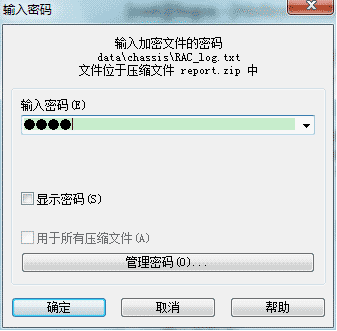
8 解压缩完了之后,双击dsetreport.hta打开报告内容

9 系统总体概览
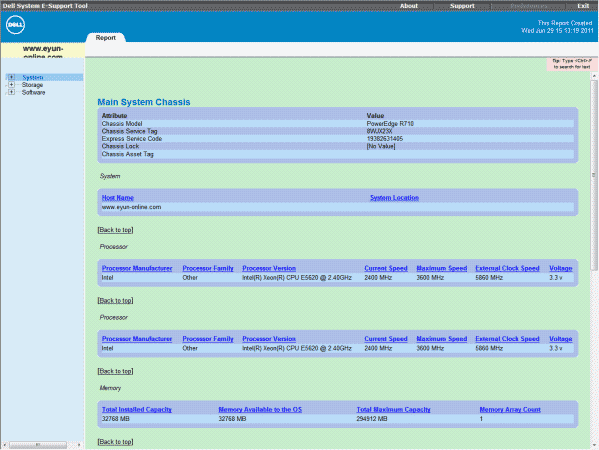
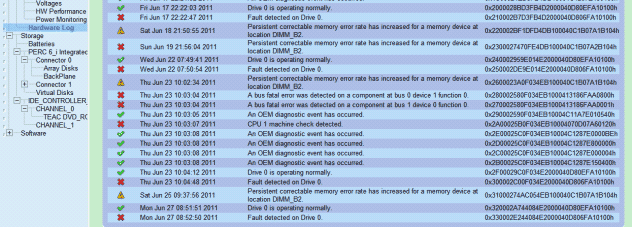
10 硬件日志。这里看到我们的cpu有一个出问题了。

11 下面这里我们硬件日志,这里我们看到,6月17日22:22:03首先在检测到设备0上有错误,接着就是6月18日21:50:55内存发生持久错误,中间重启过一次系统,正常了一段时间,有出错。最下面是从6月27号又开始出现错误,我们又重启了系统。
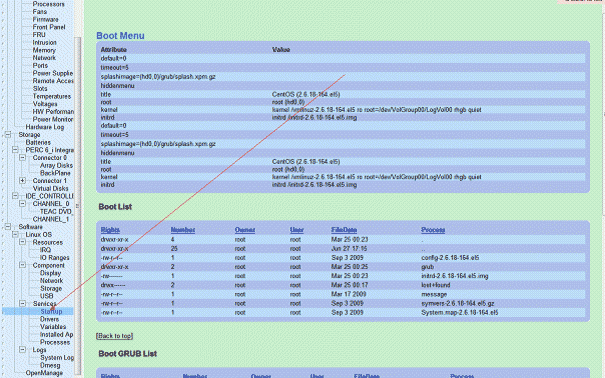
12 以下这些是软件信息没有什么错误,是有关操作系统。下面这个是启动项信息
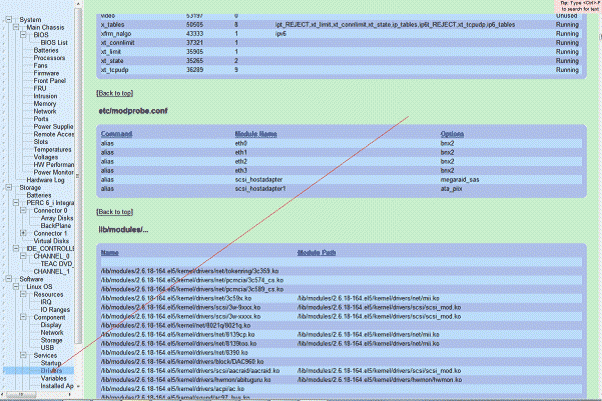
13 驱动及模块信息
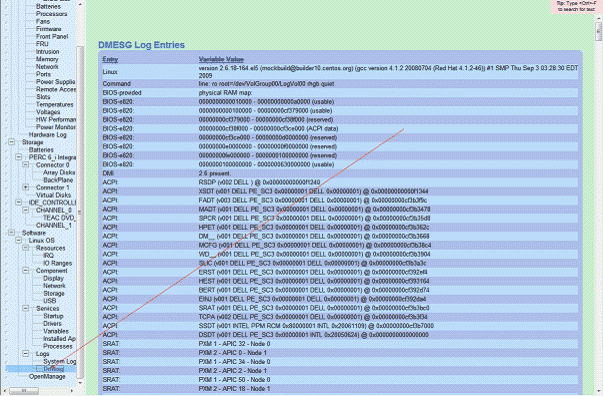
14 开机启动过程信息
相关文章

新增命令面板停靠栏! Win10/Win11优化工具PowerToys 0.98发布
微软发布 PowerToys 0.98 版本,面向 Windows 10/11 用户,本次更新核心是引入常驻屏幕边缘的‘命令面板停靠栏’,支持自定义固定命令、资源监控及第三方模块集成2026-03-18
微软系统直链下载工具怎么使用?Windows系统直链下载使用图文教程
今天为大家介绍一款可以用来下载原版 windows 10 和 widnows 11 系统,通过点击标题栏右键还可以切换至自定义直链下载,欢迎需要的朋友赶紧一起下载使用吧2025-10-31
ZyperWin++ 怎么使用? ZyperWin++使用详细图文教程
今天小编为大家介绍一款叫ZyperWin++的工具,它是一款Windows系统优化工具,只有5M左右大小的超精简工具,不需要安装,解压就能用,下文为大家带来了详细使用教程,一起看看2025-09-09
directx损坏怎么办? 6个常用的directx修复方法全解析
directx修复是很多电脑用户在玩游戏或者用某些软件时经常会碰到的烦心事,该怎么解决这个问题呢?详细请看下文介绍2025-07-24
怎么查看directx版本? 查看directx版本的常用方法汇总
么怎么查看directx版本呢?DirectX是Windows系统中负责多媒体和游戏图形处理的核心组件,不同软件或游戏可能依赖特定版本的DirectX,本文将介绍几种常用的查看方法2025-07-24 很多人都跟我一样的疑惑,就是DirectX怎么更新,随着技术的演进,DirectX 的版本也在不断更新,电脑安装的旧版本该怎么更新到新版本呢?下面我们就来看看详细教程2025-07-24
DirectX安装程序发生系统内部错误怎么办? DirectX安装错误的原因分析
今天安装DirectX,安装到最后的时候弹出“DirectX安装程序,发生内部错误”,下面我们就来看看这个问题的解决办法2025-07-24
DirectX在游戏和系统修复起到什么作用? DirectX的作用介绍
irectX能够解决应用程序无法正常启动的问题,错误代码为0xc000007b,究竟哪些问题是由DirectX引发的,以及它具体修复了哪些问题呢?让我们一起来揭秘2025-07-23
瞬间拾取想要的颜色代码! Color Picker颜色选择器使用指南
是无声的语言,代码是精准的表达,这时,Color Picker 颜色选择器就可以派上用场了,可以让您从 Windows 中的任何界面元素中拾取颜色,并以不同格式复制颜色代码,再根据需2025-05-26- 微软在PowerToys 工具集中推出了命令面板功能,有了它,让你只需简单几步,就能高效执行各种快捷操作,大幅提升日常工作效率2025-05-26
最新评论