

一款html5 canvas实现的图片玻璃碎片特效
发布时间:2014-09-11 15:09:28 作者:佚名  我要评论
我要评论
我要评论html5 canvas实现图片玻璃碎片特效,图片以玻璃碎片的形式出现到界面中,然后似玻璃被打碎的效果渐消息,效果很不错,喜欢的朋友可以参考下
今天要为大家带来一款html5 canvas实现的图片玻璃碎片特效。图片以玻璃碎片的形式出现到界面中,然后似玻璃被打碎的效果渐消息。效果图如下:
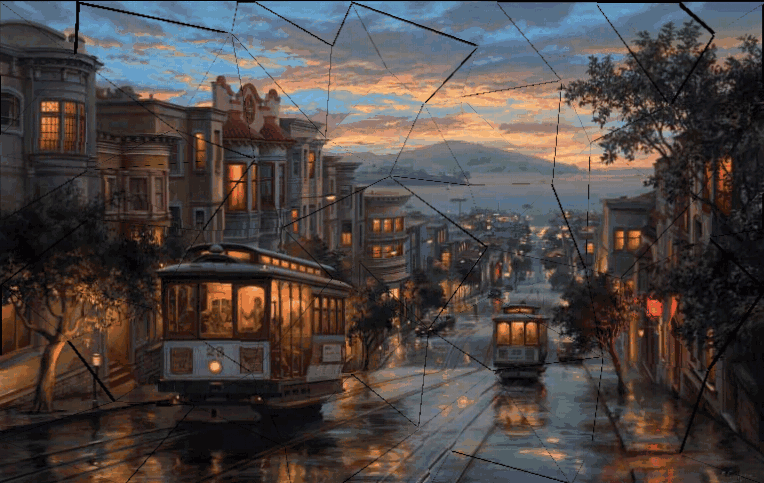
源码下载
html代码:
<img src="city_copy.jpg" id="src_img" class="hidden">
<div id="container" style="-webkit-perspective: 500px;">
<div>
<script src="delaunay.js"></script>
<script src="TweenMax.min.js"></script>
js代码:
// canvas settings
var imageWidth = 768,
imageHeight = 485;
var vertices = [],
indices,
boxes = [];
var image,
fragments = [],
container = document.getElementById('container');
window.onload = function () {
image = document.getElementById('src_img');
triangulate();
makeBoxes();
makeFragments();
};
function triangulate() {
var x,
y,
dx = imageWidth / 8,
dy = imageHeight / 8,
offset = 0.5;
for (var i = 0; i <= imageWidth; i += dx) {
for (var j = 0; j <= imageHeight; j += dy) {
if (i && (i !== imageWidth)) x = i + randomRange(-dx * offset, dx * offset);
else x = i;
if (j && (j !== imageHeight)) y = j + randomRange(-dy * offset, dy * offset);
else y = j;
vertices.push([x, y]);
}
}
indices = Delaunay.triangulate(vertices);
}
function makeBoxes() {
var p0, p1, p2,
xMin, xMax,
yMin, yMax;
for (var i = 0; i < indices.length; i += 3) {
p0 = vertices[indices[i + 0]];
p1 = vertices[indices[i + 1]];
p2 = vertices[indices[i + 2]];
xMin = Math.min(p0[0], p1[0], p2[0]);
xMax = Math.max(p0[0], p1[0], p2[0]);
yMin = Math.min(p0[1], p1[1], p2[1]);
yMax = Math.max(p0[1], p1[1], p2[1]);
boxes.push({
x: xMin,
y: yMin,
w: xMax - xMin,
h: yMax - yMin
});
}
}
function makeFragments() {
var p0, p1, p2,
box,
fragment;
TweenMax.set(container, { perspective: 500 });
var tl0 = new TimelineMax({ repeat: -1 });
for (var i = 0; i < indices.length; i += 3) {
p0 = vertices[indices[i + 0]];
p1 = vertices[indices[i + 1]];
p2 = vertices[indices[i + 2]];
box = boxes[i / 3];
fragment = new Fragment(p0, p1, p2, box);
var rx = randomRange(30, 60) * ((i % 2) ? 1 : -1);
var ry = randomRange(30, 60) * ((i % 2) ? -1 : 1);
var tl1 = new TimelineMax();
TweenMax.set(fragment.canvas, {
y: box.y - 1000
});
tl1.to(fragment.canvas, randomRange(0.9, 1.1), {
y: box.y,
ease: Back.easeOut
});
tl1.to(fragment.canvas, 0.5, {
z: -100,
ease: Cubic.easeIn,
delay: 0.4
});
tl1.to(fragment.canvas, randomRange(1, 1.2), {
rotationX: rx,
rotationY: ry,
z: 250,
alpha: 0,
ease: Cubic.easeOut
});
tl0.insert(tl1);
fragments.push(fragment);
container.appendChild(fragment.canvas);
}
}
function randomRange(min, max) {
return min + (max - min) * Math.random();
}
Fragment = function (v0, v1, v2, box) {
this.v0 = v0;
this.v1 = v1;
this.v2 = v2;
this.box = box;
this.canvas = document.createElement('canvas');
this.canvas.width = this.box.w;
this.canvas.height = this.box.h;
this.canvas.style.width = this.box.w + 'px';
this.canvas.style.height = this.box.h + 'px';
this.ctx = this.canvas.getContext('2d');
TweenMax.set(this.canvas, {
x: this.box.x,
y: this.box.y
});
this.ctx.translate(-this.box.x, -this.box.y);
this.ctx.beginPath();
this.ctx.moveTo(this.v0[0], this.v0[1]);
this.ctx.lineTo(this.v1[0], this.v1[1]);
this.ctx.lineTo(this.v2[0], this.v2[1]);
this.ctx.closePath();
this.ctx.clip();
this.ctx.drawImage(image, 0, 0);
}; //@ sourceURL=pen.js
源码下载
html代码:
复制代码
代码如下:<img src="city_copy.jpg" id="src_img" class="hidden">
<div id="container" style="-webkit-perspective: 500px;">
<div>
<script src="delaunay.js"></script>
<script src="TweenMax.min.js"></script>
js代码:
复制代码
代码如下:// canvas settings
var imageWidth = 768,
imageHeight = 485;
var vertices = [],
indices,
boxes = [];
var image,
fragments = [],
container = document.getElementById('container');
window.onload = function () {
image = document.getElementById('src_img');
triangulate();
makeBoxes();
makeFragments();
};
function triangulate() {
var x,
y,
dx = imageWidth / 8,
dy = imageHeight / 8,
offset = 0.5;
for (var i = 0; i <= imageWidth; i += dx) {
for (var j = 0; j <= imageHeight; j += dy) {
if (i && (i !== imageWidth)) x = i + randomRange(-dx * offset, dx * offset);
else x = i;
if (j && (j !== imageHeight)) y = j + randomRange(-dy * offset, dy * offset);
else y = j;
vertices.push([x, y]);
}
}
indices = Delaunay.triangulate(vertices);
}
function makeBoxes() {
var p0, p1, p2,
xMin, xMax,
yMin, yMax;
for (var i = 0; i < indices.length; i += 3) {
p0 = vertices[indices[i + 0]];
p1 = vertices[indices[i + 1]];
p2 = vertices[indices[i + 2]];
xMin = Math.min(p0[0], p1[0], p2[0]);
xMax = Math.max(p0[0], p1[0], p2[0]);
yMin = Math.min(p0[1], p1[1], p2[1]);
yMax = Math.max(p0[1], p1[1], p2[1]);
boxes.push({
x: xMin,
y: yMin,
w: xMax - xMin,
h: yMax - yMin
});
}
}
function makeFragments() {
var p0, p1, p2,
box,
fragment;
TweenMax.set(container, { perspective: 500 });
var tl0 = new TimelineMax({ repeat: -1 });
for (var i = 0; i < indices.length; i += 3) {
p0 = vertices[indices[i + 0]];
p1 = vertices[indices[i + 1]];
p2 = vertices[indices[i + 2]];
box = boxes[i / 3];
fragment = new Fragment(p0, p1, p2, box);
var rx = randomRange(30, 60) * ((i % 2) ? 1 : -1);
var ry = randomRange(30, 60) * ((i % 2) ? -1 : 1);
var tl1 = new TimelineMax();
TweenMax.set(fragment.canvas, {
y: box.y - 1000
});
tl1.to(fragment.canvas, randomRange(0.9, 1.1), {
y: box.y,
ease: Back.easeOut
});
tl1.to(fragment.canvas, 0.5, {
z: -100,
ease: Cubic.easeIn,
delay: 0.4
});
tl1.to(fragment.canvas, randomRange(1, 1.2), {
rotationX: rx,
rotationY: ry,
z: 250,
alpha: 0,
ease: Cubic.easeOut
});
tl0.insert(tl1);
fragments.push(fragment);
container.appendChild(fragment.canvas);
}
}
function randomRange(min, max) {
return min + (max - min) * Math.random();
}
Fragment = function (v0, v1, v2, box) {
this.v0 = v0;
this.v1 = v1;
this.v2 = v2;
this.box = box;
this.canvas = document.createElement('canvas');
this.canvas.width = this.box.w;
this.canvas.height = this.box.h;
this.canvas.style.width = this.box.w + 'px';
this.canvas.style.height = this.box.h + 'px';
this.ctx = this.canvas.getContext('2d');
TweenMax.set(this.canvas, {
x: this.box.x,
y: this.box.y
});
this.ctx.translate(-this.box.x, -this.box.y);
this.ctx.beginPath();
this.ctx.moveTo(this.v0[0], this.v0[1]);
this.ctx.lineTo(this.v1[0], this.v1[1]);
this.ctx.lineTo(this.v2[0], this.v2[1]);
this.ctx.closePath();
this.ctx.clip();
this.ctx.drawImage(image, 0, 0);
}; //@ sourceURL=pen.js
相关文章
 本文介绍HTML5实现移动端购物车自动结算,通过WebStorage、事件监听、DOM操作等技术,确保实时更新与数据同步,优化性能及无障碍性,提升用户体验,感兴趣的朋友一起看看吧2025-06-18
- 在HTML5中,<button>标签用于定义一个可点击的按钮,它是创建交互式网页的重要元素之一,本文将深入解析HTML5中的<button>标签,详细介绍其属性、样式以及实际2025-06-18
基于 HTML5 Canvas 实现图片旋转与下载功能(完整代码展示)
本文将深入剖析一段基于 HTML5 Canvas 的代码,该代码实现了图片的旋转(90 度和 180 度)以及旋转后图片的下载功能,通过对代码的解读,我们可以学习到如何利用 Canvas API2025-06-18
HTML5 getUserMedia API网页录音实现指南示例小结
本教程将指导你如何利用这一API,结合Web Audio API,实现网页录音功能,从获取音频流到处理和保存录音,整个过程将逐步详解,此外,还讨论了getUserMedia API的使用限制和最2025-06-16- HTML5的搜索框是一个强大的工具,能够有效提升用户体验,通过结合自动补全功能和适当的样式,可以创建出既美观又实用的搜索界面,这篇文章给大家介绍HTML5 搜索框Search Box2025-06-13
- Checkbox是HTML5中非常重要的表单元素之一,通过合理使用其属性和样式自定义方法,可以为用户提供丰富多样的交互体验,这篇文章给大家介绍HTML5中Checkbox标签的深入全面解2025-06-13
- 本实例展示了一种基于HTML5技术的图片上传功能,无需外部插件即可通过拖放图片实现上传,涉及到HTML5的拖放API和File API,以及使用CSS来增强用户界面的交互性和视觉反馈,2025-05-16
- 在HTML5和CSS中,定位(positioning)是控制元素在页面上位置的重要机制,主要有四种定位方式:静态定位(static)、相对定位(relative)、绝对定位(absolute)和固定定位(fixed),2025-05-13
- Microdata作为HTML5新增的一个特性,它允许开发者在HTML文档中添加更多的语义信息,以便于搜索引擎和浏览器更好地理解页面内容,本文将探讨HTML5中Microdata的使用方法以及2025-04-21
 在HTML语法中,表格主要通过< table >、< tr >和< td >3个标签构成,本文通过实例代码讲解HTML5表格语法格式,感兴趣的朋友一起看看吧2025-04-21
最新评论