

跨域修改iframe页面内容详解
发布时间:2019-10-31 16:02:35 作者:stephenliu1944  我要评论
我要评论
我要评论这篇文章主要介绍了跨域修改iframe页面内容详解,文中通过示例代码介绍的非常详细,对大家的学习或者工作具有一定的参考学习价值,需要的朋友们下面随着小编来一起学习学习吧
原理
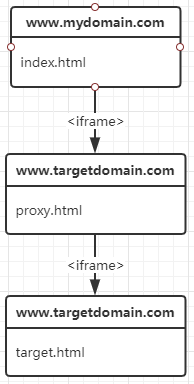
主站点内嵌代理页面, 并向代理页传递数据, 代理页根据主站点的数据对目标页的DOM进行操作.由于代理页与目标页同域, 所以代理页可以获取并操作目标页的document对象.
前提条件
需要将proxy.html放到与内嵌的iframe页同域的服务下, 并且可以被访问到.
使用
支持2种调用方式: 使用 postMessage 和 URL params.
postMessage
该方法需要使用 JSON.stringify 将对象转为字符串.
// React
function IframeProxy(props) {
    handleLoad = (e) => {
        e.target.contentWindow.postMessage(JSON.stringify({
            iframe: `<iframe name="target" title="target" className="target" src="http://www.targetdomain.com/target.html" frameBorder="0" scrolling="no" style="width: 100%;height:100%"></iframe>`,
            includeStyle: `
                body {
                    background-color: yellow;
                }
                header {
                    display: none;
                }
                footer {
                    display: none;
                }
            `,
            includeScript: `
                window.addEventListener('load', function() {
                    alert(document.querySelector('body').innerHTML);
                });
            `,
            importStyle: `http://www.mydomain.com/assets/css/import.css`,
            importScript: `http://www.mydomain.com/assets/js/import.js`
        }), 'https://www.target.com');
    }

    return <iframe name="proxy" title="proxy" className="proxy" width="100%" height="100%" onLoad={handleLoad} src={`http://www.targetdomain.com/proxy.html?origin=${window.location.protocol}//${window.location.host}`} frameBorder="0" scrolling="no"></iframe>;
}
URL params
该方法需要将传递的内容用 encodeURIComponent 编码.
// React
function IframeProxy(props) {
    var params = 'iframe=' + encodeURIComponent(`
        <iframe name="target" title="target" className="target" src="http://www.targetdomain.com/target.html" frameBorder="0" scrolling="no" style="width: 100%;height:100%"></iframe>
    `);

    params += '&includeStyle=' + encodeURIComponent(`
        body {
            background-color: red;
        }
        header {
            display: none;
        }
        footer {
            display: none;
        }
    `);

    params += '&includeScript=' + encodeURIComponent(`
        window.addEventListener('load', function(event) {
            alert(document.querySelector('body').innerHTML);
        });
    `);

    params += '&importStyle=' + encodeURIComponent(`
        http://www.mydomain.com/assets/css/import.css
    `);

    params += '&importScript=' + encodeURIComponent(`
        http://www.mydomain.com/assets/js/import.js
    `);

    return <iframe name="proxy" title="proxy" className="proxy" width="100%" height="100%" src={`http://www.targetdomain.com/proxy.html?${params}`} frameBorder="0" scrolling="no"></iframe>;
}
API
<iframe src="http://www.targetdomain.com/proxy.html?params"></iframe>;

params: {
    origin: 当前站点的域名, 使用postMessage方式时必填, proxy用来校验发出消息的源域名.
    iframe: 需要内嵌的iframe标签字符串,
    includeStyle: 希望添加到iframe页的css内容,
    includeScript: 希望添加到iframe页的js内容,
    importStyle: 希望引入到iframe页的css资源链接, 如果目标站点使用安全协议(https), 资源链接使用非安全协议(http), 该功能会被浏览器禁止.
    importScript: 希望引入到iframe页的js资源链接, 如果目标站点使用安全协议(https), 资源链接使用非安全协议(http), 该功能会被浏览器禁止.
}
注意: 处于安全问题, 默认禁用了 includeScript 和 importScript 功能, 如需启用在proxy.html中将变量 ENABLED_JS_INCLUDE 设置为 true 即可.
资源
https://github.com/stephenliu1944/cross-domain-iframe-proxy
以上就是本文的全部内容,希望对大家的学习有所帮助,也希望大家多多支持脚本之家。
相关文章
- 这篇文章主要介绍了关于iframe跨域使用postMessage的实现,文中通过示例代码介绍的非常详细,对大家的学习或者工作具有一定的参考学习价值,需要的朋友们下面随着小编来一2019-10-29
HTML5 window/iframe跨域传递消息 API介绍
window.postMessage允许多个 window/frame之间跨域传递数据和信息。下面为大家介绍下window.postMessage的工作原理,以及如何在FireFox,IE8+,Opera,Safari和Chrome中使用2013-08-26Iframe 高度自适应(兼容IE/Firefox、同域/跨域)
在实际的项目进行中,很多地方可能由于历史原因不得不去使用iframe,包括目前正火热的应用开发也是如此。2010-03-17
最新评论