

html5登录玻璃界面特效
发布时间:2023-12-12 16:20:06 作者:你的美,让我痴迷  我要评论
我要评论
我要评论本文主要介绍了html5登录玻璃界面特效,文中通过示例代码介绍的非常详细,对大家的学习或者工作具有一定的参考学习价值,需要的朋友们下面随着小编来一起学习学习吧
本文主要介绍了html5登录玻璃界面特效,废话不多说,具体如下:
<!DOCTYPE html>
<html lang="en">
<head>
    <meta charset="UTF-8">
    <meta name="viewport" content="width=device-width, initial-scale=1.0">
    <meta http-equiv="X-UA-Compatible" content="ie=edge"></meta>
    <title>Document</title>
    <style>
        html,
        body {
            margin: 0;
            padding: 0;
            font-family: "PingFang SC", "Microsoft Yahei", sans-serif;
        }
        .container {
            width: 100vw;
            height: 100vh;
            display: flex;
            align-items: center;
            justify-content: center;
            background: url("https://tse3-mm.cn.bing.net/th/id/OIP-C.8lHGYyoBPuSLsS6yFB5ACwHaEK?w=321&h=180&c=7&r=0&o=5&dpr=1.3&pid=1.7") fixed no-repeat;
            background-size: cover;
        }
        .login-form {
            width: 240px;
            height: 220px;
            display: flex;
            flex-direction: column;
            padding: 40px;
            text-align: center;
            position: relative;
            z-index: 100;
            background: inherit;
            border-radius: 18px;
            overflow: hidden;
        }
        .login-form::before {
            content: "";
            width: calc(100% + 20px);
            height: calc(100% + 20px);
            background: inherit;
            box-shadow: inset 0 0 0 200px rgba(255, 255, 255, 0.25);
            position: absolute;
            top: -10px;
            left: -10px;
            z-index: -1;
            filter: blur(6px);
            overflow: hidden;
        }
        .login-form h2 {
            font-size: 18px;
            font-weight: 400;
            color: #3d5245;
        }
        .login-form input,
        .login-form button {
            margin: 6px 0;
            height: 36px;
            border: none;
            background-color: rgba(255, 255, 255, 0.3);
            border-radius: 4px;
            padding: 0 14px;
            color: #3d5245;
        }
        .login-form input::placeholder {
            color: #3d5245;
        }
        .login-form button {
            margin-top: 24px;
            background-color: rgba(57, 88, 69, 0.4);
            color: white;
            position: relative;
            overflow: hidden;
            cursor: pointer;
            transition: 0.4s;
        }
        .login-form button:hover {
            background-color: rgba(12, 80, 38, 0.67);
        }
        .login-form button::before,
        .login-form button::after {
            content: "";
            display: block;
            width: 80px;
            height: 100%;
            background: rgba(179, 255, 210, 0.5);
            opacity: 0.5;
            position: absolute;
            left: 0;
            top: 0;
            transform: skewX(-15deg);
            filter: blur(30px);
            overflow: hidden;
            transform: translateX(-100px);
        }
        .login-form button::after {
            width: 40px;
            background: rgba(179, 255, 210, 0.3);
            left: 60px;
            filter: blur(5px);
            opacity: 0;
        }
        .login-form button:hover::before {
            transition: 1s;
            transform: translateX(320px);
            opacity: 0.7;
        }
        .login-form button:hover::after {
            transition: 1s;
            transform: translateX(320px);
            opacity: 1;
        }
    </style>
</head>
<body>
    <div>
        <div class="container">
            <form action="#" class="login-form">
                <h2>登录</h2>
                <input type="text" name="username" placeholder="用户名">
                <input type="password" name="password" placeholder="密码">
                <button type="submit">登录</button>
            </form>
        </div>
    </div>
</body>
</html>
到此这篇关于html5登录玻璃界面特效的文章就介绍到这了,更多相关html5登录玻璃内容请搜索脚本之家以前的文章或继续浏览下面的相关文章,希望大家以后多多支持脚本之家!
相关文章
 本文介绍HTML5实现移动端购物车自动结算,通过WebStorage、事件监听、DOM操作等技术,确保实时更新与数据同步,优化性能及无障碍性,提升用户体验,感兴趣的朋友一起看看吧2025-06-18
- 在HTML5中,<button>标签用于定义一个可点击的按钮,它是创建交互式网页的重要元素之一,本文将深入解析HTML5中的<button>标签,详细介绍其属性、样式以及实际2025-06-18
基于 HTML5 Canvas 实现图片旋转与下载功能(完整代码展示)
本文将深入剖析一段基于 HTML5 Canvas 的代码,该代码实现了图片的旋转(90 度和 180 度)以及旋转后图片的下载功能,通过对代码的解读,我们可以学习到如何利用 Canvas API2025-06-18
HTML5 getUserMedia API网页录音实现指南示例小结
本教程将指导你如何利用这一API,结合Web Audio API,实现网页录音功能,从获取音频流到处理和保存录音,整个过程将逐步详解,此外,还讨论了getUserMedia API的使用限制和最2025-06-16- HTML5的搜索框是一个强大的工具,能够有效提升用户体验,通过结合自动补全功能和适当的样式,可以创建出既美观又实用的搜索界面,这篇文章给大家介绍HTML5 搜索框Search Box2025-06-13
- Checkbox是HTML5中非常重要的表单元素之一,通过合理使用其属性和样式自定义方法,可以为用户提供丰富多样的交互体验,这篇文章给大家介绍HTML5中Checkbox标签的深入全面解2025-06-13
- 本实例展示了一种基于HTML5技术的图片上传功能,无需外部插件即可通过拖放图片实现上传,涉及到HTML5的拖放API和File API,以及使用CSS来增强用户界面的交互性和视觉反馈,2025-05-16
- 在HTML5和CSS中,定位(positioning)是控制元素在页面上位置的重要机制,主要有四种定位方式:静态定位(static)、相对定位(relative)、绝对定位(absolute)和固定定位(fixed),2025-05-13
- Microdata作为HTML5新增的一个特性,它允许开发者在HTML文档中添加更多的语义信息,以便于搜索引擎和浏览器更好地理解页面内容,本文将探讨HTML5中Microdata的使用方法以及2025-04-21
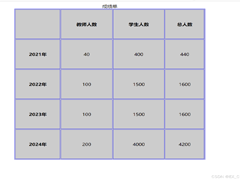 在HTML语法中,表格主要通过< table >、< tr >和< td >3个标签构成,本文通过实例代码讲解HTML5表格语法格式,感兴趣的朋友一起看看吧2025-04-21
最新评论