

在iOS App中实现地理位置定位的基本方法解析
iOS系统自带的定位服务可以实现很多需求。比如:获取当前经纬度,获取当前位置信息等等。
其定位有3种方式:
1,GPS,最精确的定位方式
2,蜂窝基站三角定位,这种定位在信号基站比较秘籍的城市比较准确。
3,Wifi,这种方式貌似是通过网络运营商的数据库得到的数据,在3种定位种最不精确
首先你要在你的Xcode中添加两个连接库,MapKit和CoreLocation,如图
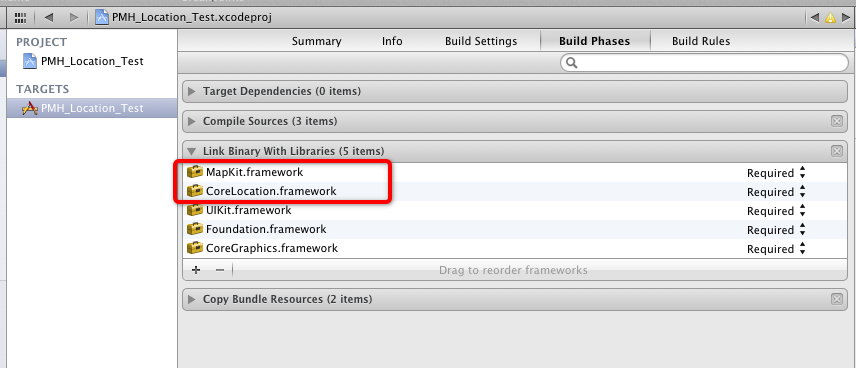
core location提供了定位功能,能定位装置的当前坐标,同时能得到装置移动信息,最重要的类是CLLocationManager,定位管理。
iOS8开始,Core Location framework的变化主要有以下几点:
1. 在定位状态中引入Always 和WhenInUse的概念。
2. 加入Visit monitoring的特性, 这类特性特别适合旅行类别的应用,当用户到达某个指定的区域内,monitor开始作用。
3.加入室内定位技术,增加CLFloor, 在室内可以得到楼层信息。
获取当前经纬度
首先导入#import <CoreLocation/CoreLocation.h>,定义CLLocationManager的实例,实现CLLocationManagerDelegate。
@interface ViewController ()<CLLocationManagerDelegate>
{
CLLocationManager *_locationManager;
}
@end
开始定位的方法:
- (void)startLocating
{
if([CLLocationManager locationServicesEnabled])
{
_locationManager = [[CLLocationManager alloc] init];
//设置定位的精度
[_locationManager setDesiredAccuracy:kCLLocationAccuracyBest];
_locationManager.distanceFilter = 100.0f;
_locationManager.delegate = self;
if ([[[UIDevice currentDevice] systemVersion] floatValue] > 8.0)
{
[_locationManager requestAlwaysAuthorization];
[_locationManager requestWhenInUseAuthorization];
}
//开始实时定位
[_locationManager startUpdatingLocation];
}
}
实现代理方法:
-(void)locationManager:(CLLocationManager *)manager didChangeAuthorizationStatus:(CLAuthorizationStatus)status
{
NSLog(@"Longitude = %f", manager.location.coordinate.longitude);
NSLog(@"Latitude = %f", manager.location.coordinate.latitude);
[_locationManager stopUpdatingLocation];
}
获取当前位置信息
在上面的代理方法中
-(void)locationManager:(CLLocationManager *)manager didChangeAuthorizationStatus:(CLAuthorizationStatus)status
{
NSLog(@"Longitude = %f", manager.location.coordinate.longitude);
NSLog(@"Latitude = %f", manager.location.coordinate.latitude);
[_locationManager stopUpdatingLocation];
CLGeocoder * geoCoder = [[CLGeocoder alloc] init];
[geoCoder reverseGeocodeLocation:manager.location completionHandler:^(NSArray *placemarks, NSError *error) {
for (CLPlacemark * placemark in placemarks) {
NSDictionary *test = [placemark addressDictionary];
// Country(国家) State(城市) SubLocality(区)
NSLog(@"%@", [test objectForKey:@"Country"]);
NSLog(@"%@", [test objectForKey:@"State"]);
NSLog(@"%@", [test objectForKey:@"SubLocality"]);
NSLog(@"%@", [test objectForKey:@"Street"]);
}
}];
}
这样就很简单获取了当前位置的详细信息。
获取某一个地点的经纬度
- (void)getLongitudeAndLatitudeWithCity:(NSString *)city
{
//city可以为中文
NSString *oreillyAddress = city;
CLGeocoder *myGeocoder = [[CLGeocoder alloc] init];
[myGeocoder geocodeAddressString:oreillyAddress completionHandler:^(NSArray *placemarks, NSError *error) {
if ([placemarks count] > 0 && error == nil)
{
NSLog(@"Found %lu placemark(s).", (unsigned long)[placemarks count]);
CLPlacemark *firstPlacemark = [placemarks objectAtIndex:0];
NSLog(@"Longitude = %f", firstPlacemark.location.coordinate.longitude);
NSLog(@"Latitude = %f", firstPlacemark.location.coordinate.latitude);
}
else if ([placemarks count] == 0 && error == nil)
{
NSLog(@"Found no placemarks.");
}
else if (error != nil)
{
NSLog(@"An error occurred = %@", error);
}
}];
}
计算两个地点之间的距离
- (double)distanceByLongitude:(double)longitude1 latitude:(double)latitude1 longitude:(double)longitude2 latitude:(double)latitude2{
CLLocation* curLocation = [[CLLocation alloc] initWithLatitude:latitude1 longitude:longitude1];
CLLocation* otherLocation = [[CLLocation alloc] initWithLatitude:latitude2 longitude:longitude2];
double distance = [curLocation distanceFromLocation:otherLocation];//单位是m
return distance;
}
首先我们可以用上面的getLongitudeAndLatitudeWithCity方法获取某一个地点的经纬度。比如我们获取北京和上海的经纬度分别为:北京Longitude = 116.405285,Latitude = 39.904989 上海Longitude = 121.472644, Latitude = 31.231706, 那么北京和上海之间的距离就是:
double distance = [self distanceByLongitude:116.405285 latitude:39.904989 longitude:121.472644 latitude:31.231706];
NSLog(@"Latitude = %f", distance);
计算的是大概的距离,可能没有那么精准。输入结果为:
distance = 1066449.749194
相关文章
 这篇文章主要介绍了如何在自己的电脑上配置APNS推送环境的相关资料,需要的朋友可以参考下2015-11-11
iOS应用开发中UITabBarController标签栏控制器使用进阶
这篇文章主要介绍了iOS应用开发中UITabBarController标签栏控制器的使用进阶,实例代码为传统的Objective-C,需要的朋友可以参考下2016-03-03 这篇文章主要为大家详细介绍了iOS实现简易的计算器,文中示例代码介绍的非常详细,具有一定的参考价值,感兴趣的小伙伴们可以参考一下2022-01-01
 本文主要介绍了IOS 贝塞尔曲线(UIBezierPath)的基础知识。具有很好的参考价值。下面跟着小编一起来看下吧2017-03-03
 这篇文章主要给大家介绍了关于iOS中颜色设置的相关资料,其中包括导航栏、状态栏、Tabbar、Button、TextField、AttributedString和通用部分的颜色设置方法示例,对大家具有一定的参考学习价值,需要的朋友们下面随着小编来一起看看吧。2017-09-09
 这篇文章主要介绍了IOS开发之判断两个数组中数据是否相同实例详解的相关资料,需要的朋友可以参考下2017-02-02
 iOS调用系统的发短信功能可以分为两种:1,程序外调用系统发短信。2,程序内调用系统发短信。第二种的好处是用户发短信之后还可以回到app。这对app来说非常重要。2016-07-07
 在iOS开发过程中,经常会设置状态栏的样式,所以下面这篇文章主要给大家介绍了关于iOS中状态栏的基本使用的相关资料,文中通过示例代码介绍的非常详细,需要的朋友可以参考下2018-07-07
 这篇文章主要为大家介绍了iOS13适配三指撤销和文案限长实例详解,有需要的朋友可以借鉴参考下,希望能够有所帮助,祝大家多多进步,早日升职加薪2023-01-01
 这篇文章主要给大家介绍了关于iOS字体大小适配的3种方法,文中通过示例代码介绍的非常详细,对各位iOS开发者们具有一定的参考学习价值,需要的朋友们下面随着小编来一起学习学习吧2018-11-11
最新评论