

css 背景固定样式background-attachment属性基础
发布时间:2017-03-08 19:24:49 作者:佚名  我要评论
我要评论
我要评论这篇文章主要为大家介绍了在CSS中,使用背景附件属性background-attachment可以设置背景图像是随对象滚动还是固定不动,需要的朋友可以参考下
一、background-attachment属性
在CSS中,使用背景附件属性background-attachment可以设置背景图像是随对象滚动还是固定不动。
语法:
background-attachment:scroll/fixed;
说明:
background-attachment 属性只有2个属性值。scroll表示背景图像随对象滚动而滚动,是默认选项;fixed表示背景图像固定在页面不动,只有其他的内容随滚动条滚动。
举例:
<!DOCTYPE html>
<html xmlns="http://www.w3.org/1999/xhtml">
<head>
    <title></title>
    <style type="text/css">
        #div1
        {
            width:160px;
            height:1200px;
            border:1px solid gray;
            background-image:url("cartoongirl.gif");
            background-repeat:no-repeat;
            background-attachment:fixed;
        }
    </style>
</head>
<body>
    <div id="div1"></div>
</body>
</html>
在浏览器预览效果如下:
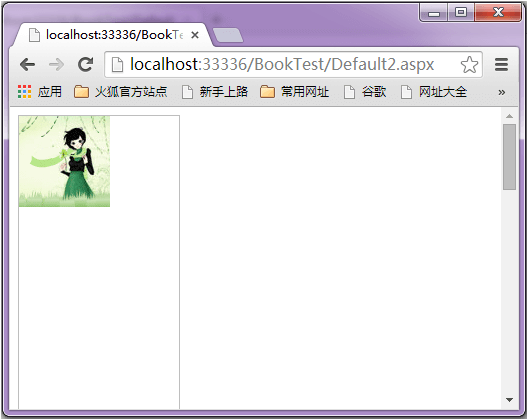
分析:
大家在浏览器中拖动右边的滚动条会发现,背景图片在页面固定不动。
在IE或者360中设置background-attachment之后不能设置background-position属性,不然图片没办法在浏览器显示。大家可以测试一下google浏览器、Firefox浏览器。
相关文章
- 前提是定义了background-image属性,然后用background-attachment来指明背景图的位置是固定于视口的,还是随着包含块移动的。可简单理解为定义背景图片随滚动轴的移动方式2017-03-08
关于css中的 background-attachment 属性详解
这篇文章主要介绍了关于css中的 background-attachment 属性详解,在日常的使用中,还是background-attachment:fixed 使用的最多,因为这个属性更多的时候是跟background-im2023-10-10
最新评论