

关于Fireworks 和Photoshop两者之间比较(图片优化的比较)
发布时间:2009-12-30 15:20:09 作者:佚名  我要评论
我要评论
我要评论Fireworks vs Photoshop Compression Fireworks 与photoshop的图片优化能力比较
具体不翻译细节,本人英文一般凑合着看,对于英文稍微鸟一点,技术鸟一点的同学们简单解释一下
,另外,应该说我不是在翻译这篇文章,而是共同探讨,加入了很多我自己的想法,有很多注解
Fireworks vs Photoshop Compression
Fireworks 与photoshop的图片优化能力比较
Surprisingly enough, based on the findings from my recent survey there are quite a bit of Fireworks users. Personally, I never used Fireworks. Photoshop is alway my first choice for designing—from image editing to designing mock-ups. But, did you know that Fireworks is way better than Photoshop in term of image compression? I’m not a software engineer, I can’t explain why Fireworks can compress better. But I can prove it to you by showing a series of experiments I did.
简单说作者是一直坚持用photoshop的,无论做网页设计还是图片优化都是如此,但作者经实验实际发现fireworks在图片优化上有很好的性能
PNG Compression
以PNG格式优化输出的比较
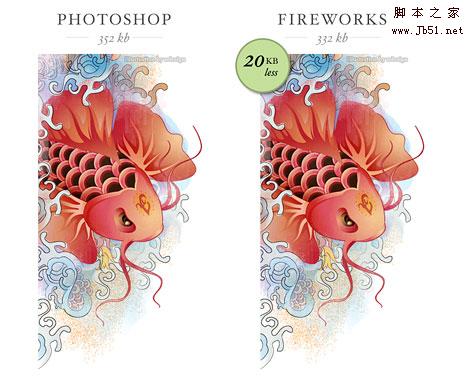
For testing purpose, I used an un-compressed image with transparency. I used Photoshop to export the image to PNG-24 with transparency and the resulting file size is about 352 kb. Then I used the same image and exported it to PNG-32 with Fireworks. The file size is about 332 kb. Visually, they both look the same (at least to me). In term of file size, the image exported with Fireworks is about 20 kb less.
如下图效果:photoshop以png24格式输出,fireworks以png32输出,(不羁虫:个人认为这2个格式在2个软件里输出格式名称不同,实际是相同的,我把ps导出的png24格式拖到fw里打开就是png32格式,而fw里还有一个png24格式输出,个人感觉fw里的png24就是优化质量100%的jpg)实际得出fireworks得到的图片尺寸比photoshop要小20kb(不羁虫:应该说图片的品质是一样的,我是没看出差别来)
GIF Compression
以GIF格式优化输出的比较
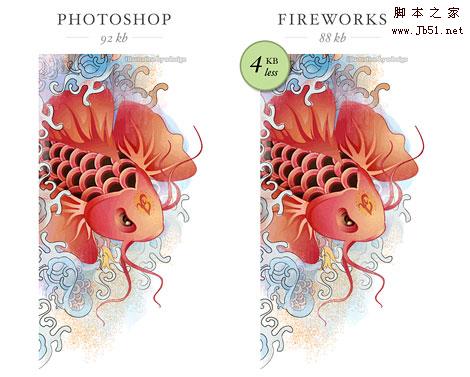
Next I exported the image to GIF 256 colors, adaptive, with no dither. The results are: Fireworks = 88kb, Photoshop = 92kb. That is 4 kb less. Also, they don’t look the same. I prefer the image exported with Fireworks because it has more image details.
如下面图所示,这次以gif256色导出图片,结果fireworks88kb,photoshop92kb,从尺寸上来看只相差4k而已,但是从导出的图片细节来看,fireworks导出的图片细节更多,看上去效果更好
JPG Compression
以JPG 格式优化输出的比较
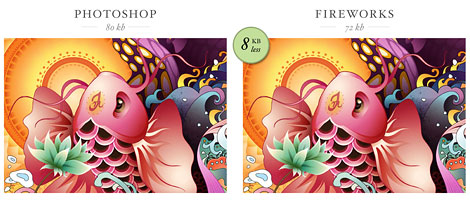
Now, I’m going to try the JPG compression with a different image. I exported the image with Photoshop to 60% quality JPG and the file size is 80 kb. Then I exported the same image with Fireworks to 80% quality JPG and the result is 72 kb. Both exported images look pretty much the same, but Fireworks beats Photoshop by 8 kb in this case.
如下图:最后是以jpg格式输出的比较,在photoshop以品质60%导出,fireworks下以品质80%导出,(不羁虫:作者的体会和我一样,这2个软件导出品质不同,ps里的60%效果相当于fw里的80%),图片看上去效果差不多,不过尺寸上还是fireworks胜出,fw72kb,ps80kb。
Please note: Fireworks and Photoshop have different compression technology. 80% compression rate in Fireworks is relevant to Photoshop 60% compression rate.
What Is The Big Deal?
有什么大问题?
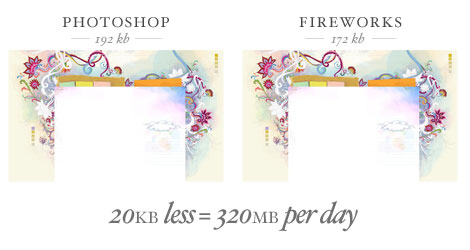
You’re probably thinking: what is the big deal? It is only a few kilobytes… Well, don’t under estimate the little difference in kilobytes, it can make a big difference on your bandwidth and load time. Lets use the background image on WebDesignerWall as an example. If I export the background with Fireworks, I can reduce its file size by 20 kb. I get about 16,000 visits per day on average. 20 kb x 16, 000 = 320, 000 kb. Yes, that is 320 megabytes per day! I’m only talking about the background image here. Could you imagine how much bandwidth I can save if I compress all the graphics on the site with Fireworks? Most importantly, I can make my site load faster and that is a big deal!
这段想法是比较深远滴,我就半参着自己的想法讲了:可能从优化上来讲,从上面的实验我们可以看到,一个图片优化下来想得到同样效果的图片,ps和fw虽然只差3,5k(视图片尺寸和格式,尺寸越大的图片,这个差距应该是越大),但如果整站下来,你会发现,fw优化后得出的图片尺寸整体要比ps要小很多,而从单个图片来看,如果一个图片能小20kb,而你的网站每天的访问量如果是1万6,那网站所要承担的流量差距是:20k*16000=320m,而从用户体验上来讲,更快的下载将给浏览者带来更好更快的加载效果,更好的用户体验,这是个很大的问题!
Conclusion
结论:
If you have Photoshop and Fireworks installed on your computer, try it yourself. You will be surpised with the results. From now on, I’m going to use Fireworks to export my web graphics, particularly the template graphics.
不用说了,如果你还在使用ps优化网页图片的话,赶紧换用fireworks吧,ps不是万能的,用fw优化图片的、将得到更好的效果,而且优化图片的方式你会发现fw的切片将会让你的优化操作更快更准确
最后,我觉得很讽刺也比较可笑的是:
我想作为大多数fw用户着来讲,很多还和我一样,停留在使用fireworks8的阶段,
对adobe这几年对fw的更新实在是很失望,
cs3,cs4里实在是没有太多有用的东西,
除了添加了不能兼容的ps图层效果和一些莫名其妙的多页面导出方式之外,
真没有看到什么有用的更新,
而且安装文件的大小是成倍的往上翻,真是很adobe,
可以说adobe对fw的态度基本是不改进也不丢弃,fw完全处于不死不活的状态,
可是当你真正熟悉fireworks时,你会发现在fw里做个web2.0的按钮是多么的方便快捷,
虽然只是8.0版,2005年上市的软件,但图片的优化能力,现在的ps根本没法比,这确实是个讽刺,
当然使用8.0版还有一个好处,估计adobe是不会来向你收版权费,
呵呵,毕竟fireworks8.0还是属于MacroMedia,没有什么adobe验证措施,
你就是全公司办公人员装了fw8.0,adobe也不会来向你要版权费
希望越来越多的网页前端工作者加入使用fireworks的行列,
当你熟悉他以后,你会发现fireworks才是真正为网页设计及优化而生的软件
,另外,应该说我不是在翻译这篇文章,而是共同探讨,加入了很多我自己的想法,有很多注解
Fireworks vs Photoshop Compression
Fireworks 与photoshop的图片优化能力比较
Surprisingly enough, based on the findings from my recent survey there are quite a bit of Fireworks users. Personally, I never used Fireworks. Photoshop is alway my first choice for designing—from image editing to designing mock-ups. But, did you know that Fireworks is way better than Photoshop in term of image compression? I’m not a software engineer, I can’t explain why Fireworks can compress better. But I can prove it to you by showing a series of experiments I did.
简单说作者是一直坚持用photoshop的,无论做网页设计还是图片优化都是如此,但作者经实验实际发现fireworks在图片优化上有很好的性能
PNG Compression
以PNG格式优化输出的比较
For testing purpose, I used an un-compressed image with transparency. I used Photoshop to export the image to PNG-24 with transparency and the resulting file size is about 352 kb. Then I used the same image and exported it to PNG-32 with Fireworks. The file size is about 332 kb. Visually, they both look the same (at least to me). In term of file size, the image exported with Fireworks is about 20 kb less.
如下图效果:photoshop以png24格式输出,fireworks以png32输出,(不羁虫:个人认为这2个格式在2个软件里输出格式名称不同,实际是相同的,我把ps导出的png24格式拖到fw里打开就是png32格式,而fw里还有一个png24格式输出,个人感觉fw里的png24就是优化质量100%的jpg)实际得出fireworks得到的图片尺寸比photoshop要小20kb(不羁虫:应该说图片的品质是一样的,我是没看出差别来)
GIF Compression
以GIF格式优化输出的比较
Next I exported the image to GIF 256 colors, adaptive, with no dither. The results are: Fireworks = 88kb, Photoshop = 92kb. That is 4 kb less. Also, they don’t look the same. I prefer the image exported with Fireworks because it has more image details.
如下面图所示,这次以gif256色导出图片,结果fireworks88kb,photoshop92kb,从尺寸上来看只相差4k而已,但是从导出的图片细节来看,fireworks导出的图片细节更多,看上去效果更好
JPG Compression
以JPG 格式优化输出的比较
Now, I’m going to try the JPG compression with a different image. I exported the image with Photoshop to 60% quality JPG and the file size is 80 kb. Then I exported the same image with Fireworks to 80% quality JPG and the result is 72 kb. Both exported images look pretty much the same, but Fireworks beats Photoshop by 8 kb in this case.
如下图:最后是以jpg格式输出的比较,在photoshop以品质60%导出,fireworks下以品质80%导出,(不羁虫:作者的体会和我一样,这2个软件导出品质不同,ps里的60%效果相当于fw里的80%),图片看上去效果差不多,不过尺寸上还是fireworks胜出,fw72kb,ps80kb。
Please note: Fireworks and Photoshop have different compression technology. 80% compression rate in Fireworks is relevant to Photoshop 60% compression rate.
What Is The Big Deal?
有什么大问题?
You’re probably thinking: what is the big deal? It is only a few kilobytes… Well, don’t under estimate the little difference in kilobytes, it can make a big difference on your bandwidth and load time. Lets use the background image on WebDesignerWall as an example. If I export the background with Fireworks, I can reduce its file size by 20 kb. I get about 16,000 visits per day on average. 20 kb x 16, 000 = 320, 000 kb. Yes, that is 320 megabytes per day! I’m only talking about the background image here. Could you imagine how much bandwidth I can save if I compress all the graphics on the site with Fireworks? Most importantly, I can make my site load faster and that is a big deal!
这段想法是比较深远滴,我就半参着自己的想法讲了:可能从优化上来讲,从上面的实验我们可以看到,一个图片优化下来想得到同样效果的图片,ps和fw虽然只差3,5k(视图片尺寸和格式,尺寸越大的图片,这个差距应该是越大),但如果整站下来,你会发现,fw优化后得出的图片尺寸整体要比ps要小很多,而从单个图片来看,如果一个图片能小20kb,而你的网站每天的访问量如果是1万6,那网站所要承担的流量差距是:20k*16000=320m,而从用户体验上来讲,更快的下载将给浏览者带来更好更快的加载效果,更好的用户体验,这是个很大的问题!
Conclusion
结论:
If you have Photoshop and Fireworks installed on your computer, try it yourself. You will be surpised with the results. From now on, I’m going to use Fireworks to export my web graphics, particularly the template graphics.
不用说了,如果你还在使用ps优化网页图片的话,赶紧换用fireworks吧,ps不是万能的,用fw优化图片的、将得到更好的效果,而且优化图片的方式你会发现fw的切片将会让你的优化操作更快更准确
最后,我觉得很讽刺也比较可笑的是:
我想作为大多数fw用户着来讲,很多还和我一样,停留在使用fireworks8的阶段,
对adobe这几年对fw的更新实在是很失望,
cs3,cs4里实在是没有太多有用的东西,
除了添加了不能兼容的ps图层效果和一些莫名其妙的多页面导出方式之外,
真没有看到什么有用的更新,
而且安装文件的大小是成倍的往上翻,真是很adobe,
可以说adobe对fw的态度基本是不改进也不丢弃,fw完全处于不死不活的状态,
可是当你真正熟悉fireworks时,你会发现在fw里做个web2.0的按钮是多么的方便快捷,
虽然只是8.0版,2005年上市的软件,但图片的优化能力,现在的ps根本没法比,这确实是个讽刺,
当然使用8.0版还有一个好处,估计adobe是不会来向你收版权费,
呵呵,毕竟fireworks8.0还是属于MacroMedia,没有什么adobe验证措施,
你就是全公司办公人员装了fw8.0,adobe也不会来向你要版权费
希望越来越多的网页前端工作者加入使用fireworks的行列,
当你熟悉他以后,你会发现fireworks才是真正为网页设计及优化而生的软件
相关文章
- photoshop无疑是一款非常好用的图像编辑软件,对于电脑小白来说操作非常困难,比如提示“不能完成命令,因为没有足够内存(RAM)”要怎么办呢?下面就来看看小编为大家提供2025-05-16
纵享丝滑的修图体验! 10个Photoshop性能优化小技巧
ps提供了丰富的自定义选项,只要根据你的硬件配置和项目需求,合理调整内存、缓存等核心参数,只要几个小步骤,小白用户也能让运行效率加倍2025-04-24
psd文件用什么打开? 没有Photoshop的情况下打开psd文件的四种方法
收到了psd文件,但是电脑没有安装ps,该怎么解决这个问题呢?下面我们就来看看这个问题的解决办法2025-05-07ps一直闪退是什么原因? Photoshop闪退原因及解决方案
在使用过程中,Photoshop总是会无缘无故地自动退出,这不仅打断了工作流程,还可能导致未保存的更改丢失,令人头疼不已,本文将深入剖析Photoshop自动退出的原因,并提供相2024-07-04
怎么优化PSD文件? 有效防止Photoshop崩溃卡死的技巧奥
明就几个图层,并没有引入什么大型图片,但是 PSD 文件却异常巨大,而且用起来经常卡顿?下面我们就来看看pds文件优化方法2024-05-25 将多个图层合并为一个图层,但作为设计师你需要了解一下合并图层是有破坏性的,下面我们就来详细介绍一下2024-05-25
- 通常是因为Photoshop使用的暂存盘空间不足,导致无法正常工作,那么,如何解决这一问题呢?本文将为您提供详细的解决方案2024-05-25
 ps导出文件的时候,可以直接存储,也可以另存存储为,这两个操作有区别吗?新手该怎么保存文件呢?详细请看下文介绍2024-03-28
ps beta ai显示高峰需求进不去怎么办? psai高峰期需求用不了解决办法
PSBetaAI2023加入了AI的功能,在使用过程中,有时会遇到一个令人烦恼的问题,那就是PhotoshopBetaAI提示我们正在面临高峰需求,请稍候再试,针对这个问题,本文为大家整理2024-03-28ps段落两端对齐不能用怎么办? ps文字排版不能对齐的修复技巧
PS进行设计时,段落两端对齐是一个常用的排版功能,它能让文本看起来更加整洁和专业,然而,许多用户在使用PS时可能会遇到一个令人头疼的问题:段落两端对齐功能似乎不起作2024-03-09

最新评论