

淘宝导航栏css代码分享
发布时间:2014-05-05 16:15:18 作者:佚名  我要评论
我要评论
我要评论这篇文章主要介绍了淘宝导航栏css代码示例,需要的朋友可以参考下
类似淘宝的导航栏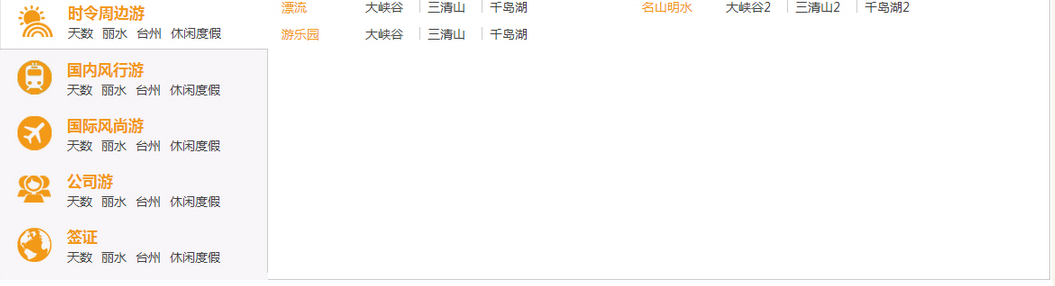
html代码
复制代码
代码如下:<div class="end_wrap">
<div class="end_box">
<ul>
<li class="shiling">
<dl>
<dt>
<h3>时令周边游</h3>
<p><a href="">天数</a><a href="">丽水</a><a href="">台州</a><a href="">休闲度假</a></p>
</dt>
<dd>
<div class="navcontent clear">
<div class="subitem">
<div class="li_dl">
<div class="li_dl_dt">漂流</div>
<div class="li_dl_dd"><em><a href="">大峡谷</a></em><em><a href="">三清山</a></em><em><a href="">千岛湖</a></em></div>
</div>
<div class="li_dl">
<div class="li_dl_dt">游乐园</div>
<div class="li_dl_dd"><em><a href="">大峡谷</a></em><em><a href="">三清山</a></em><em><a href="">千岛湖</a></em></div>
</div>
</div>
<div class="subitem">
<div class="li_dl">
<div class="li_dl_dt">名山明水</div>
<div class="li_dl_dd"><em><a href="">大峡谷2</a></em><em><a href="">三清山2</a></em><em><a href="">千岛湖2</a></em></div>
</div>
</div>
</div>
</dd>
</dl>
</li>
<li class="guonei">
<dl>
<dt>
<h3>国内风行游</h3>
<p><a href="">天数</a><a href="">丽水</a><a href="">台州</a><a href="">休闲度假</a></p>
</dt>
<dd>
2
</dd>
</dl>
</li>
<li class="guoji">
<dl>
<dt>
<h3>国际风尚游</h3>
<p><a href="">天数</a><a href="">丽水</a><a href="">台州</a><a href="">休闲度假</a></p>
</dt>
<dd>
3
</dd>
</dl>
</li>
<li class="gongsi">
<dl>
<dt>
<h3>公司游</h3>
<p><a href="">天数</a><a href="">丽水</a><a href="">台州</a><a href="">休闲度假</a></p>
</dt>
<dd>
3
</dd>
</dl>
</li>
<li class="visa">
<dl>
<dt>
<h3>签证</h3>
<p><a href="">天数</a><a href="">丽水</a><a href="">台州</a><a href="">休闲度假</a></p>
</dt>
<dd>
5
</dd>
</dl>
</li></p> <p> </ul>
</div>
</div>
js代码
复制代码
代码如下:$(function(){
$('.end_box ul li').each(function(){
$(this).hover(function() {
$(this).addClass('hover')
}, function() {
$(this).removeClass('hover')
});
})
})
css
复制代码
代码如下:*{ margin: 0px; padding: 0px;}
ul,li{ list-style:none;}
img{ border: 0;}
body{font-family: "Microsoft YaHei","微软雅黑",Arial,Helvetica,sans-serif;color: #404040; font-size: 14px;}
.clear { clear:both; zoom:1;}
.clear:after {visibility:hidden;display:block;font-size:0;content:" ";clear:both;height:0;}
.hide{ display: none;}
.show{ display: block;}
.fl{ float: left;}
.fr{ float: right;}
.pb10{ padding-bottom: 10px;}
.f12{ font-size: 12px; font-family: 微软雅黑;}
.f14{ font-size: 14px; font-family: 微软雅黑;}
.site_wrap{ width: 100%;}
.sitenav{ float: left; width: 10%; background: #fcfcfc; padding: 10px 0;}
.nav_top,.nav_con{ width: 95%; margin: 0px auto;}
.nav_top{ margin-bottom: -1px;}
.nav_top ul li{ float: left; display: inline; margin-right: 3px; padding: 0 15px; height: 25px; line-height: 25px; border-radius:2px; background: #cfcfcf; color: #333; border: 1px solid #ccc; margin-left: -1px; cursor: pointer;}
.nav_top ul li.on{ background: #fff; color: #000; border-bottom: 1px solid #fff;}
.nav_con{ border: 1px solid #ccc;}
.navcontent{}
.sitecontent{ float: left; width: 90%; padding: 10px 0;}
.width130{ float: left; width: 130px; text-align: right; padding-right: 40px; line-height: 25px;}
.con_style{}
.con_style input[type='text']{ width: 180px; border-radius: 2px; border: 1px solid #c5c5c5; border-top: 1px solid #c4c4c4; height: 23px; line-height: 23px; padding: 0 5px;-webkit-box-shadow: 1px 1px 1px 0px rgba(0,0,0,.0) inset; box-shadow: 1px 1px 1px 0px rgba(0,0,0,.1) inset;}
.con_style input[type='button'],.con_style button{ border-radius: 2px; border: 1px solid #afafaf; border-top: 1px solid #b0b0b0; height: 25px; line-height: 25px; padding: 0 15px; margin-left: 5px; cursor: pointer;*overflow:visible;}
.con_style input[type='checkbox'],.con_style input[type='radio']{ position: relative; margin-right: 2px; display: inline; cursor: pointer;}
.con_style input[type='file']{height: 25px; line-height: 25px; }
.con_style select{ height: 25px; line-height: 25px; padding: 0; width: 180px; border-radius: 2px; border: 1px solid #c5c5c5; border-top: 1px solid #c4c4c4;}
.con_style label{ padding-right: 25px;}
.con_style input.width80{ width: 80px; margin-left: 5px;}
.search_con{ border:1px solid #ccc; padding: 15px; margin: 10px 0;}
.con_title{ height: 30px; line-height: 30px; color: #000; font-weight: bold;}
.con_con label{ display: inline-block;}</p> <p>.end_wrap{ width: 80%;}
.end_box{ margin: 6px; height: 320px; background: #f8f6f8; margin-top: 0; position: relative; border-right: 1px solid #f8f6f8;}
.end_box li{ display: block; height: 62px; background-position: 20px center; background-repeat: no-repeat; border-right: 1px solid #ccc; width: 297px;}
.end_box li:hover {background-color: #fff;border: 1px solid #ccc;border-right: 1px solid #fff;}
.end_box h3{color: #f39b19; font-size: 13pt;}
.end_box a{margin-right: 10px; text-decoration: none; color: #404040;}
.end_box li dl{ padding-left: 75px; padding-top: 10px; padding-bottom: 3px; width: 223px;}
.end_box li dl dt{ display: block;position: relative;}
.end_box li dl dd{ width: 867px; border: 1px solid #ccc; height: 318px; position: absolute; z-index: 2; left: 298px; background: #fff; top: 0; display: none; border-left: 0 none; overflow-y: auto;}
.end_box li.hover dl dd{ display: block;}
.end_box .shiling{ background-image: url(../images/ico_shiling.png);}
.end_box .guonei{ background-image: url(../images/ico_train.png);}
.end_box .guoji{ background-image: url(../images/ico_plane.png);}
.end_box .gongsi{ background-image: url(../images/ico_men.png);}
.end_box .visa{ background-image: url(../images/ico_visa.png);}</p> <p>.subitem { float: left; width: 385px; min-height: 65px; padding-left: 15px; z-index: 100;}
.subitem .li_dl { overflow: hidden; zoom: 1; padding: 5px 0; }
.subitem .li_dl_dt { float: left; width: 85px; line-height: 20px; text-align: left; color: #f39b19;}
.subitem .li_dl_dd { float: left; width: 300px; }
.subitem em { float: left; font-style: normal; white-space: nowrap; height: 14px; line-height: 14px; border-right: 1px solid #ccc; margin: 3px 0; padding: 0 8px; }
.subitem em:last-child { border: 0 none; }
相关文章
 这篇文章主要介绍了html+css+js实现导航栏滚动渐变效果,本文通过实例代码给大家介绍的非常详细,对大家的学习或工作具有一定的参考借鉴价值,需要的朋友可以参考下2021-01-28
 这篇文章主要介绍了纯CSS实现导航栏下划线跟随效果,本文图文并茂实例代码详解,给大家介绍的非常详细,需要的朋友参考下吧2019-12-09
- 这篇文章主要介绍了基于html+css 实现简易导航栏功能,主要就是css(级联样式表)对html的内容做格式化。具体内容详情大家跟随小编一起通过本文学习吧2021-04-07
 这篇文章主要介绍了CSS中的导航栏和下拉菜单的实现的相关资料,小编觉得挺不错的,现在分享给大家,也给大家做个参考。一起跟随小编过来看看吧2018-07-18
 这篇文章主要介绍了纯CSS实现导航栏下划线跟随滑动效果,需要的朋友可以参考下2018-03-29
 这篇文章主要介绍了使用CSS制作立体导航栏的相关资料,需要的朋友可以参考下2017-10-16
- 本文主要介绍了制作漂亮美观的带箭头的面包屑导航栏的示例代码。具有很好的参考价值。下面跟着小编一起来看下吧2017-04-06
- 本篇文章主要介绍了CSS导航栏及弹窗示例代码,导航栏和弹窗是在web中应用很广泛的,非常具有实用价值,需要的朋友可以参考下。2017-01-10
- CSS 的强大之处有的时候超乎我们的想象,Tab 切换,常规而言确实需要用到一定的脚本才能实现。下面看看如何使用纯CSS实现导航栏Tab切换效果2016-10-13
- 这篇文章主要介绍了CSS利用伪元素实现导航栏斜线分隔的相关资料2016-03-14
最新评论